AI Carbon Fiber Wrap Designer - Add Carbon Fiber Elements
Add carbon fiber elements to your vehicle with AI precision. Design custom carbon fiber accents and panels.
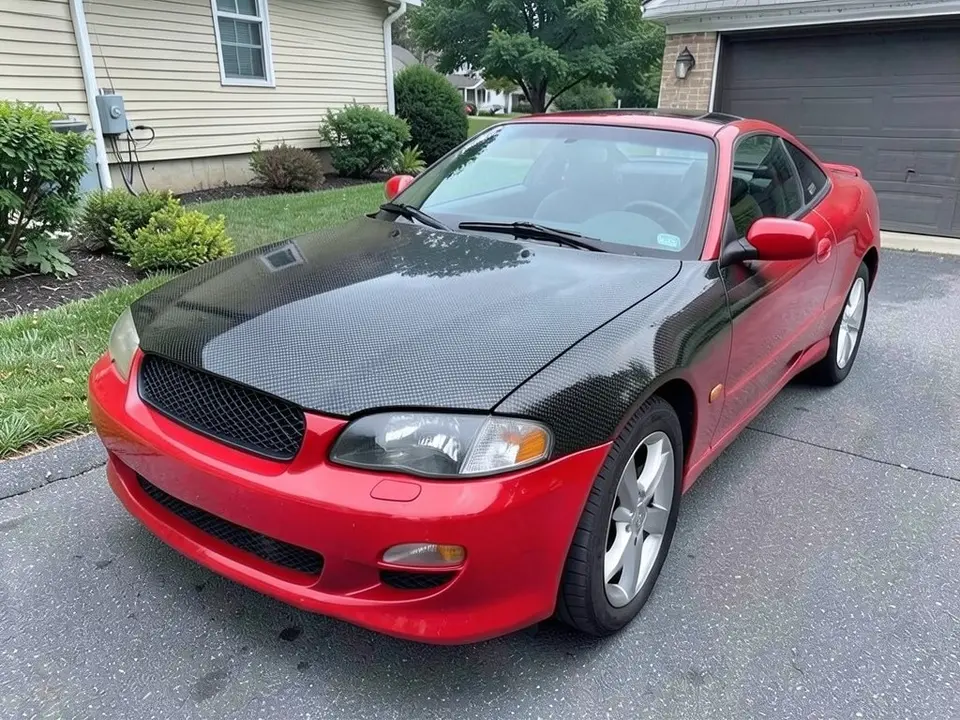
Carbon fiber hood example
These are AI-generated samples from our hood wrap visualizer. Upload a photo of your own car there to try the same kind of edit.
How to use the AI Carbon Fiber Wrap Designer
- Upload a clear photo of your vehicle, taken from the side or a three-quarter angle in daylight.
- Pick a wrap type (Hood Wrap, Roof Wrap, Mirror Caps, Spoiler Wrap and Interior Trim), a primary color and an optional accent color.
- Set the design complexity from 1 to 10 and render to see the wrap on your photo.
Wrap styles you can preview
- Hood Wrap
- Roof Wrap
- Mirror Caps
- Spoiler Wrap
- Interior Trim
Tips for a good AI Carbon Fiber Wrap Designer preview
Carbon fiber wrap is mostly used on details, such as the hood, roof, mirror caps and spoiler, not the whole car. Pick one area at a time in the preview and see how it works with your paint color. Carbon fiber film looks best on dark or neutral paint; on a bright color, try it on the roof and mirrors first.
Related tools: car wrap visualizer, racing stripes visualizer, hood wrap visualizer.
Questions
What does the AI Carbon Fiber Wrap Designer do?
It draws the wrap style and colors you choose onto a photo of your car, so you can compare ideas before you visit a wrap shop.
Can a wrap shop use the result?
You can show it to a wrap installer as a reference for the look. It is not a print-ready design file.
Is the AI Carbon Fiber Wrap Designer free to try?
Sign in with email or Google to render. Most new accounts get 5 free credits (valid 30 days). Free renders carry a WheelAI watermark.