See a New Brake Caliper Color on a Photo of Your Car
Upload a close photo of your wheel, ask for red, yellow, blue or black calipers, and see the colour against your own paint and wheels. Pick the one you like before you buy paint, book a powder coater or order covers.
Try a caliper color on my carSign in with email or Google to render. Most new accounts get 5 free credits (valid 30 days); a standard render uses 1 credit. Free renders carry a WheelAI watermark.
Before and after examples
Each pair shows a wheel photo and the same photo after asking for a new caliper colour and nothing else. We reran renders that also repainted the wheel or added lettering, and kept the cleanest one.
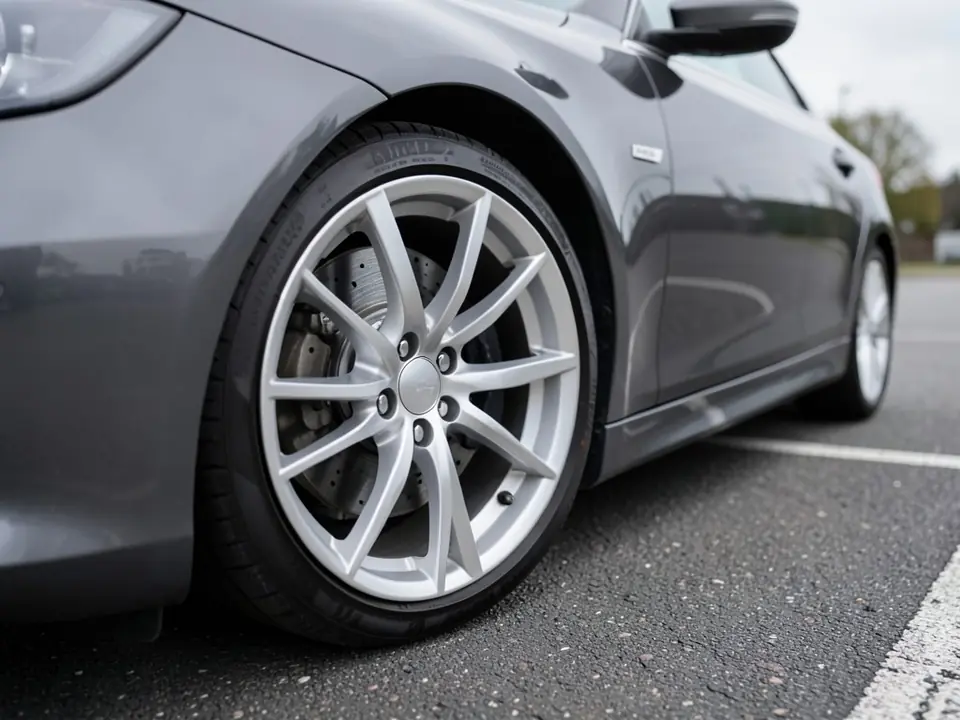
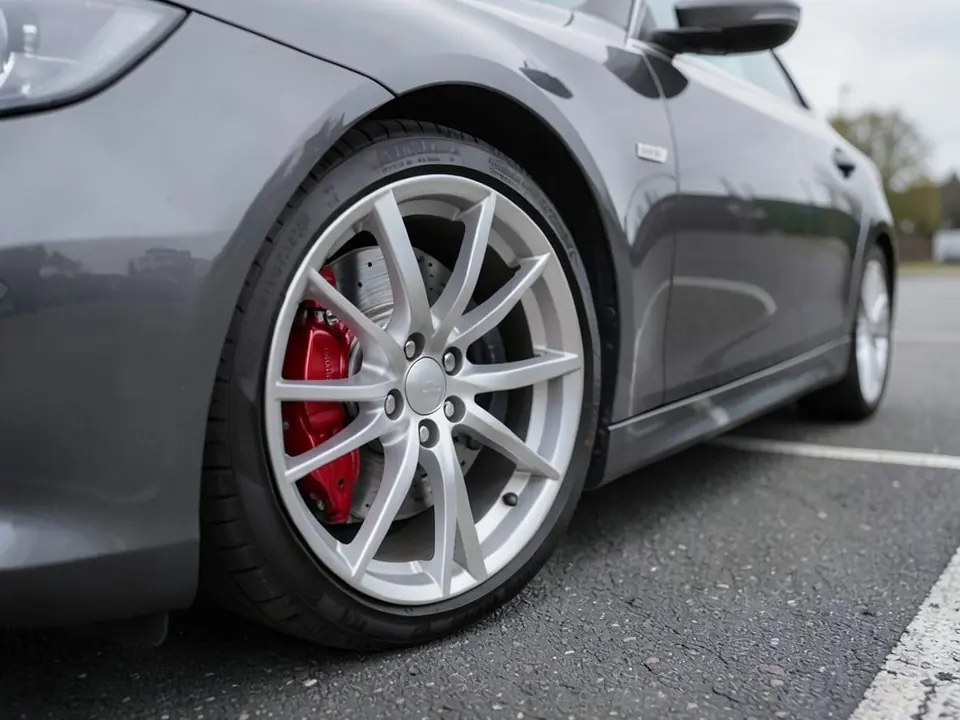
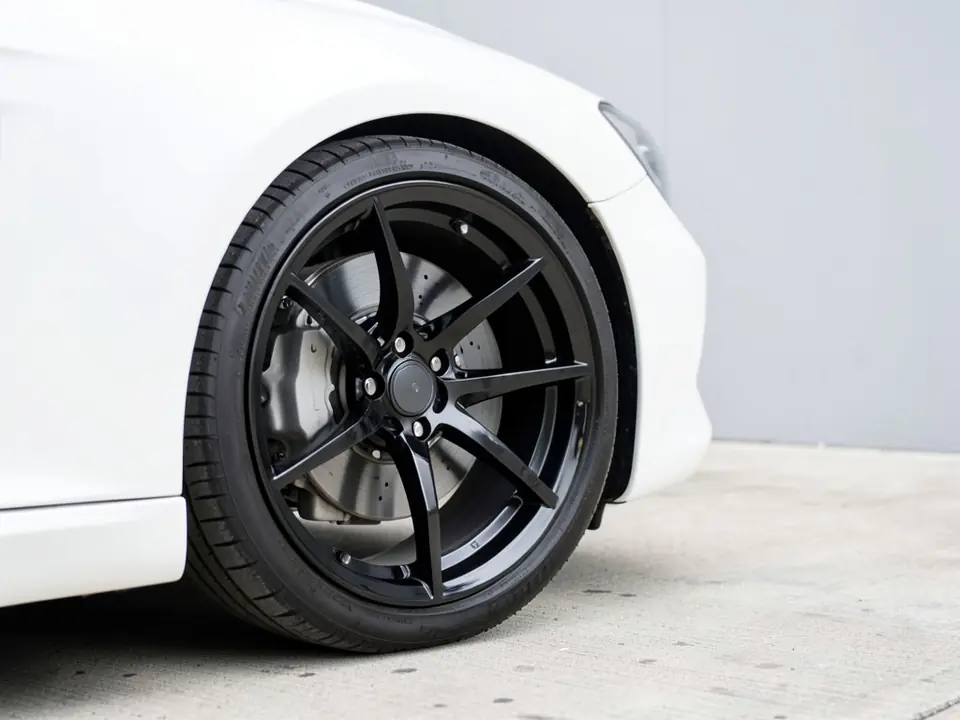
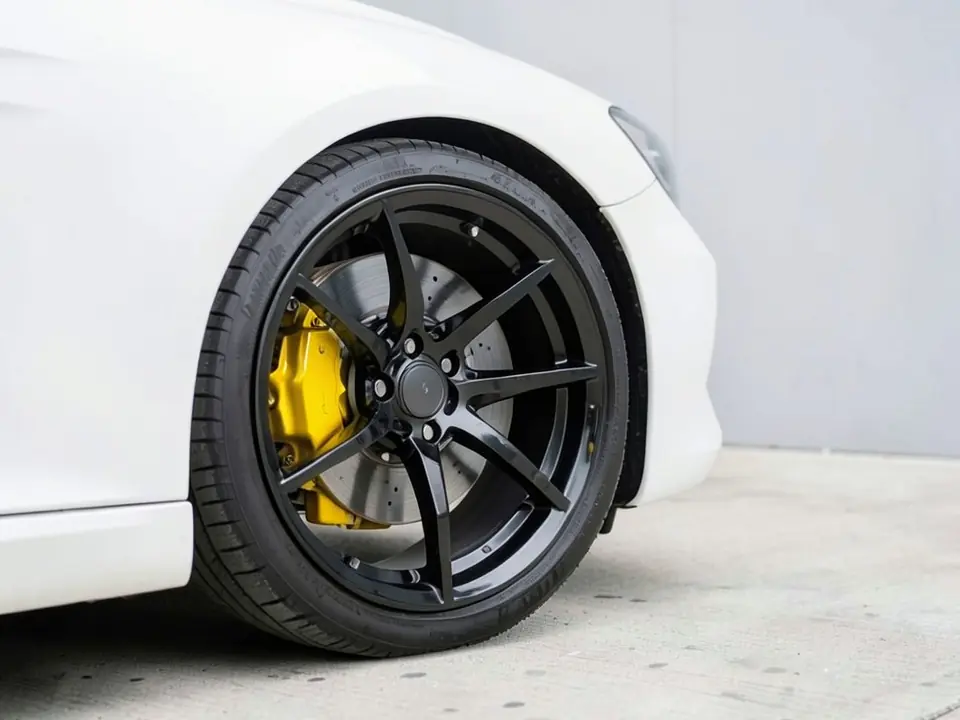
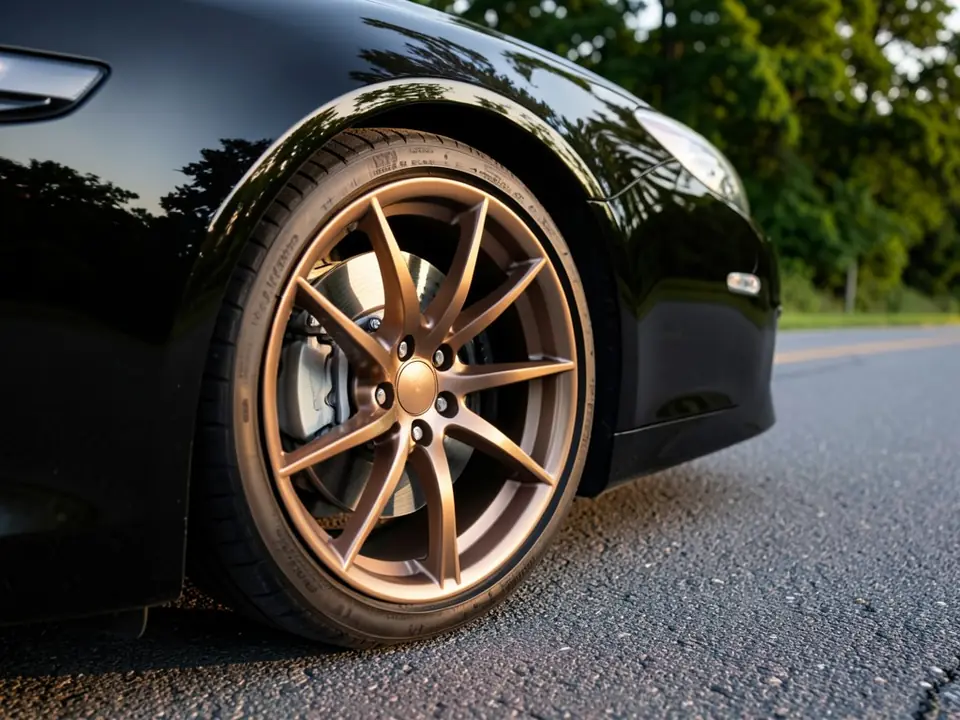
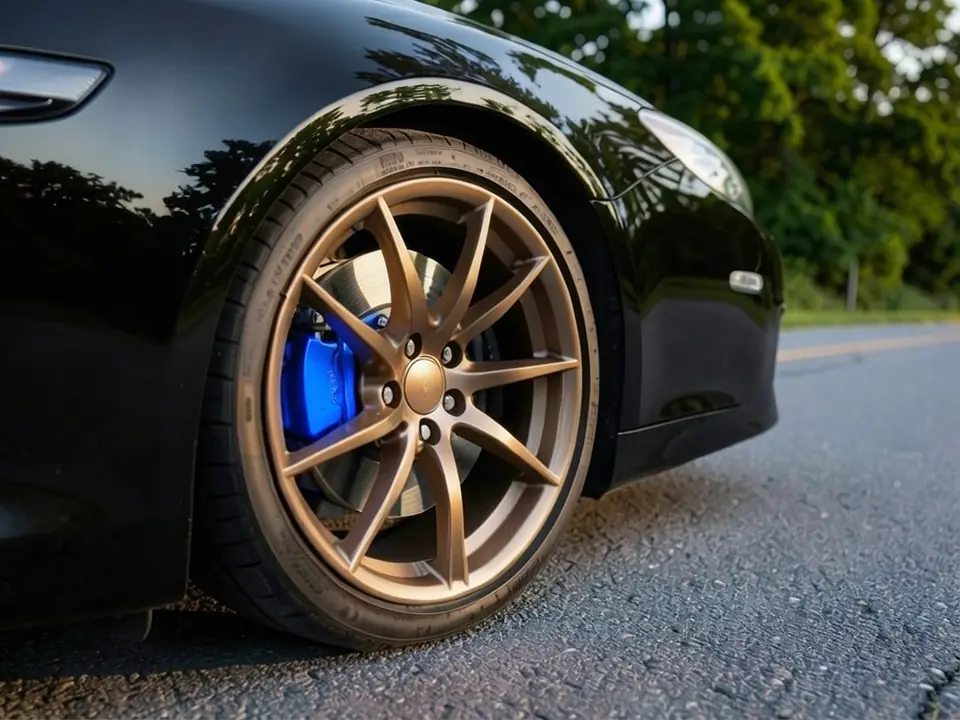
Both the before and the after images on this page are AI-generated samples made with our own image model, not photos of real customer cars. Look closely and you will see the AI changed a few small things besides the caliper colour; each caption says what.
How to try a caliper color on your car
There is no separate caliper button in WheelAI yet. You get a caliper preview from the Custom Vision mode of the Modifications tool, where you type the change you want in plain words.
- 1
Take a close photo of one wheel
Shoot the front wheel from the side or a low three-quarter angle, close enough that the caliper is easy to see between the spokes.
- 2
Open the Modifications tool and pick Custom Vision
Upload your photo in the Modifications tool and switch to the "Custom Vision" mode.
- 3
Describe only the caliper change
In the Modification Goals box, type something like "paint only the brake calipers glossy red; leave the wheels, tires, brake discs and paint exactly as they are". Naming what must stay the same helps the AI leave it alone.
- 4
Render, compare and try another colour
Generate the image and compare it with your photo. Then repeat with a second and third colour, for example yellow and black, so you can judge them together instead of from memory.
Choosing a caliper color for your paint
The body colour sets the backdrop. Calipers sit low and in shadow, so a colour that contrasts with the paint is what makes them noticeable from a few steps away.
Grey, silver and white cars
Neutral paint lets nearly any colour work. Red gives the sporty look most people picture; yellow and orange feel more motorsport; blue looks cooler and a little more unusual.
Black cars
Dark paint makes a bright caliper stand out strongly. Red, yellow and orange are the most visible. Black or dark grey calipers on a black car are a stealth look that most people will not notice.
Red, blue and other strong colours
If the paint is already loud, a second loud colour can clash. Black, graphite or silver calipers let the paint lead, or you can match the caliper to the body for a planned, single-colour look.
Your wheels decide how much of the color shows
The wheel colour is the frame around the caliper, so it changes the result as much as the paint does. Black wheels give the strongest contrast, and almost any bright caliper colour reads clearly behind them. Silver wheels soften the effect, and a silver or grey caliper behind silver spokes can blend in completely.
Bronze and gold wheels are warm colours, so a warm caliper like red or orange can fight with them. Cooler colours such as blue, black or dark grey often sit better behind bronze. The third example above shows blue behind bronze spokes; try a red version on your own car and compare.
Stand out or blend in?
It helps to decide the goal before you pick a colour. A focal-point caliper is meant to be seen: a bright colour, often glossy, that contrasts with both the wheels and the paint. A blend-in caliper is meant to look neat: black, grey, silver or body colour, so the brakes stop looking like bare cast metal without drawing the eye.
Brake dust is the practical side of this. Pale and bright colours show grey dust quickly, while dark colours hide it. If you do not want to clean your wheels often, a darker caliper will stay looking fresh for longer.
Paint, powder coat or covers
Once you have chosen a colour, there are a few ways to get it on the car. The visualizer shows only the look; ask a brake or detailing shop which method suits your car.
Brush-on or spray caliper paint
Kits made for calipers (G2 is one well-known brand) are the do-it-yourself route. The caliper must be cleaned and degreased well, and the paint must be one made for brake heat, not ordinary spray paint.
Powder coating
The calipers come off the car and are coated and baked in a shop. It is a harder-wearing finish, but it means taking the brakes apart, so it is a job for a professional.
Caliper covers
Shells that clip or bolt over the existing caliper. Fit varies by model and quality varies by maker, so check that a cover is made for your exact car and leaves enough clearance inside the wheel.
Factory or aftermarket calipers
Some cars offer coloured calipers from the factory, and brake upgrades usually come in a choice of finishes. This is the most expensive route but gives the original look.
Photo tips for a clear caliper preview
- Hold the phone low, around the height of the hub; shots taken while standing tend to hide the caliper behind the spokes.
- Roll the car a little until a gap between two spokes sits right over the caliper.
- Use soft, even daylight. Deep shade inside the wheel makes the caliper hard for the AI to find.
- Get close: the wheel should fill a large part of the frame, not just a small corner of a whole-car photo.
- Clean the wheel first if it is covered in dust, so the AI can tell the wheel, disc and caliper apart.
An honest note about AI renders
Our image model edits the whole photo, not just one part, so small side effects happen. In our tests it sometimes made the caliper look larger or a different shape, added faint marks on the caliper, shifted the framing, or changed the tire lettering. When the wheel and caliper were the same colour, it occasionally painted the spokes too. If that happens, render again and say more clearly what must stay unchanged. Use the render to choose a colour, then match it to a real paint chip or product sample before you buy.
Frequently asked questions
What color should I paint my brake calipers?
Start with the effect you want. If the calipers should be the first thing people notice, pick a strong colour that stands apart from both the paint and the wheels, such as red, yellow or bright blue. If you only want the brakes to look tidy, go for black, dark grey or silver. Then render two or three options on a photo of your own car, because a colour that looks great on a sample swatch can look very different behind your particular wheels.
What caliper color suits a grey, white or black car?
Grey, white and silver cars are the easiest, since almost any caliper colour stands out against a neutral body; red and yellow are the classic picks there. A black car makes bright calipers pop even more, so red, yellow, orange or blue all read clearly, while black calipers on a black car mostly disappear. Your wheel colour matters just as much, so test the colour with the wheels you actually run.
Red, yellow or black calipers: which one?
Red is the familiar sporty choice and works on most paint colours. Yellow is louder and is very easy to see through the spokes, but it also shows brake dust sooner. Black is the quiet option: it hides dust and looks clean, but on dark wheels it adds almost nothing. If you cannot decide, render all three on the same photo and look at them side by side.
Why do some cars come with colored calipers from the factory?
Carmakers often use caliper colour to mark a sport trim or an upgraded brake package, and some list painted calipers as a paid option. Aftermarket brake companies also sell their calipers in several finishes; Wilwood, for example, lists 28 caliper colours on its own website. Painting the stock calipers copies that look, but it does not change how the brakes perform.
Will anyone see the calipers through my wheels?
That depends on the wheel design. Wheels with a few thin spokes show most of the caliper, while mesh, multi-spoke or solid-face wheels hide much of it. This is also why the visualizer needs a photo where the caliper is clearly visible between the spokes: if you cannot see it in your photo, the AI has nothing to recolour and the preview will not help.
Will the AI change my wheels or tires too?
It tries not to, but it can. In our own tests the AI sometimes redrew the caliper a little bigger or in a slightly different shape, nudged the framing, changed the tire lettering, or tinted the wheel when the wheel and caliper were a similar colour. Ask it to keep the wheels, tires and paint exactly the same, and if anything else changed, render again or reword the request.
Should the calipers match my wheels or my paint?
Neither is a rule. Many people pull the caliper colour from an accent that is already on the car, such as a stripe, mirror caps, seat stitching or the badge background, so the colour looks planned rather than random. Matching the body colour gives a subtle, factory look. A contrasting colour that matches nothing is the bolder route. Rendering one of each is the fastest way to decide.
Is the brake caliper color visualizer free?
You need to sign in with your email or a Google account. Most new accounts get 5 free credits that last 30 days, and a standard render uses 1 credit, so you can try up to 5 caliper colours before deciding whether to buy more. Free renders carry a WheelAI watermark; an active paid plan removes it.
Ready to pick your caliper color?
Upload one close wheel photo and compare red, yellow and black side by side before you paint, powder coat or order covers.
Try a caliper color on my carAlso try: Rim Visualizer · Car Wrap Visualizer · Camaro Visualizer · Corvette Visualizer · Civic Visualizer