Ram 1500 Wheel Visualizer for a Photo of Your Own Truck
Upload a photo of your own Ram 1500, describe the wheels, tires, lift or side steps you are thinking about, and see them on your truck before you spend money on parts.
Preview mods on my RamSign in with email or Google to render. Most new accounts get 5 free credits (valid 30 days); a standard render uses 1 credit. Free renders carry a WheelAI watermark.
Before and after examples
Each pair is one truck photo and the same photo after one Modification Goals request, sent to the image model that Custom Vision uses but with more processing steps than the live tool default, so your own render may be rougher. We ran some requests more than once and show the best result; the goal shown under each pair is the wording that made the image shown. The full request text sits under each pair.
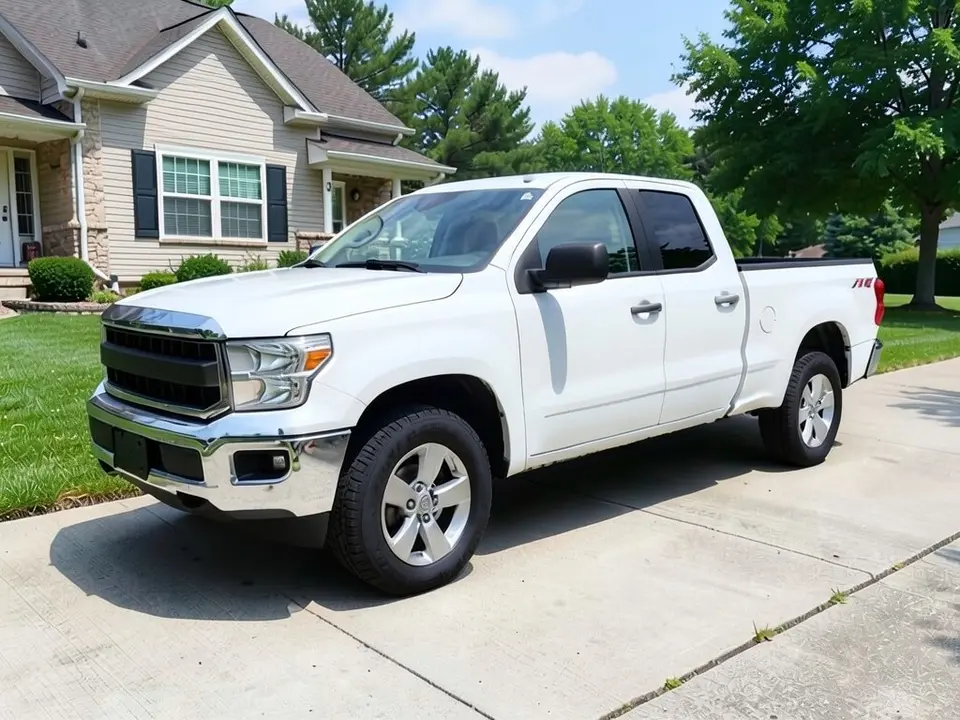
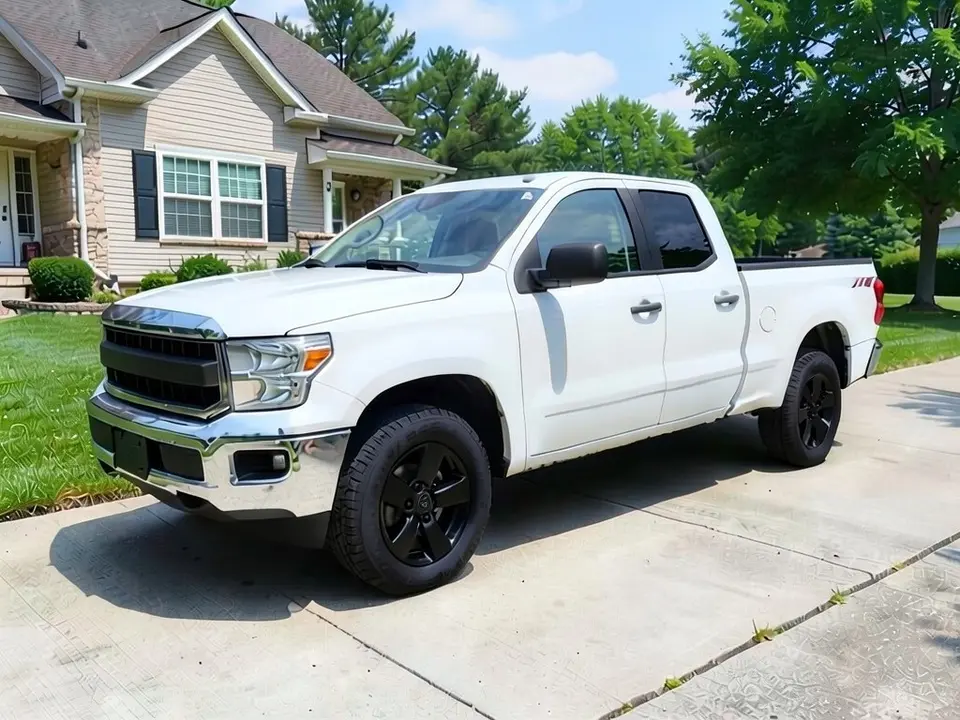
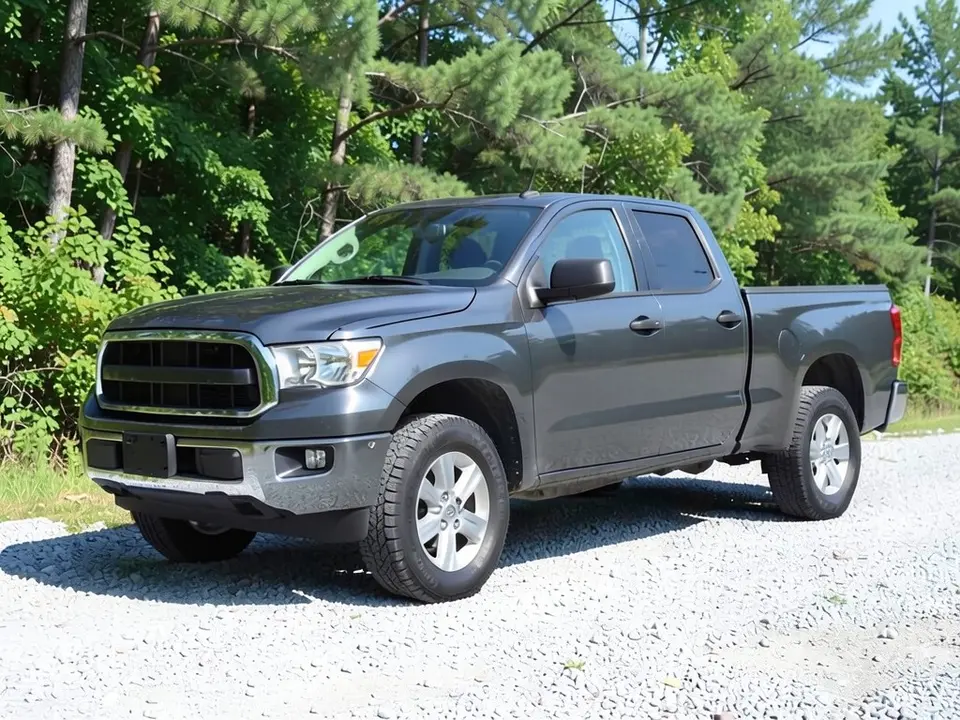
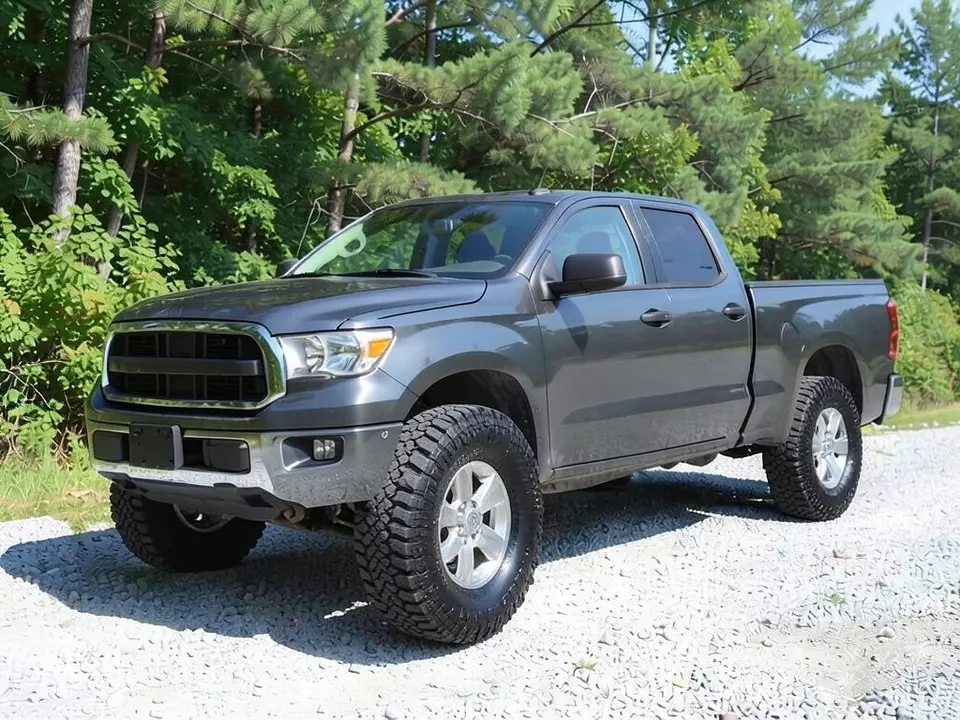
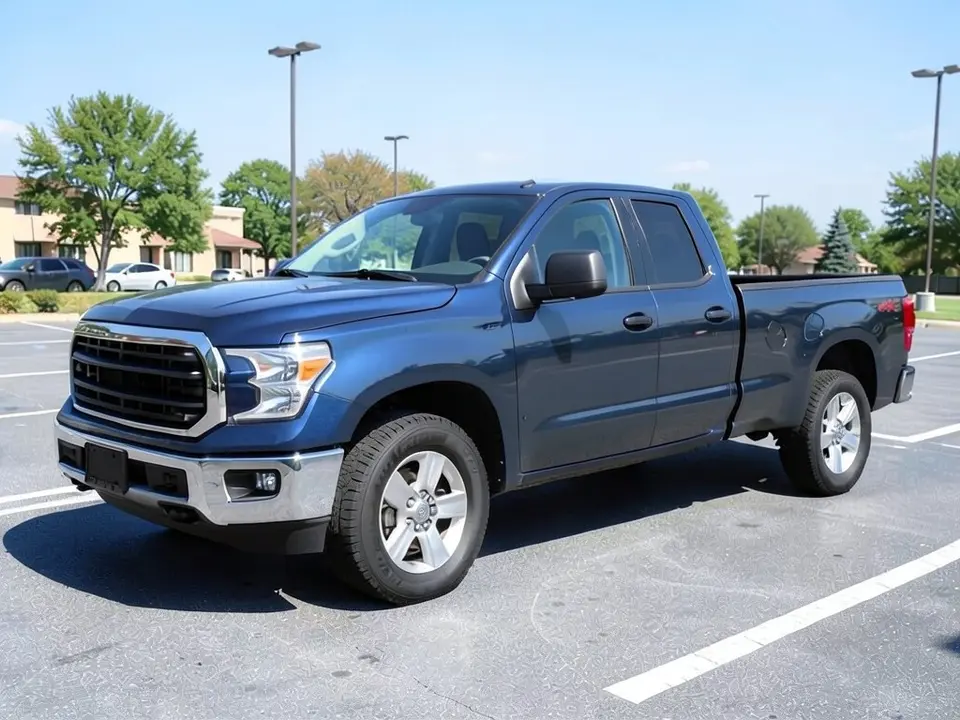
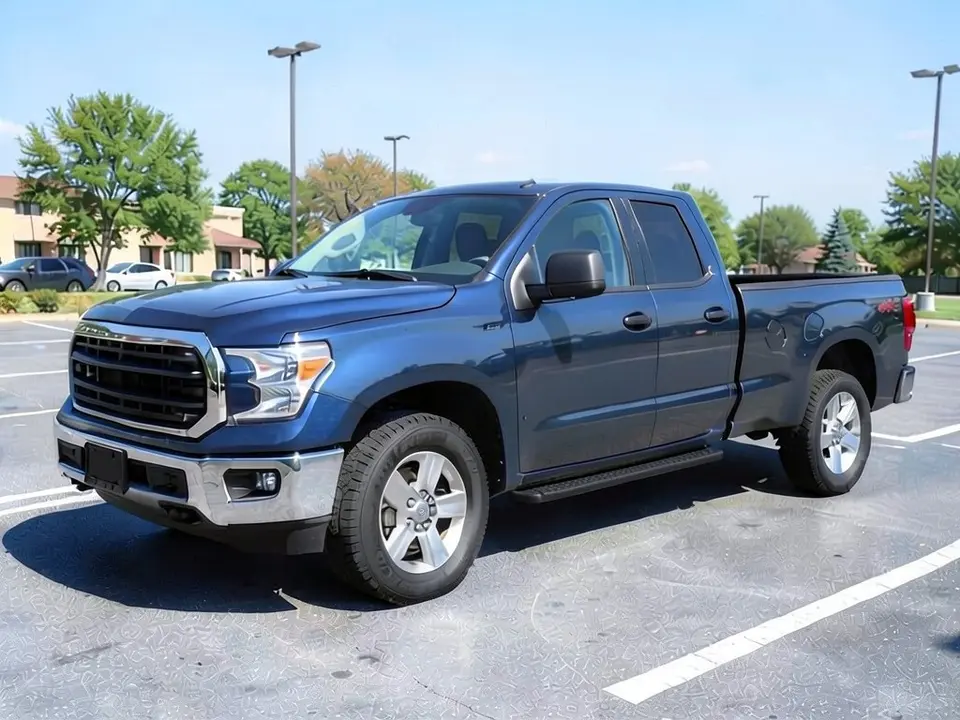
All before and after images are AI-drawn samples from our own image model, not photos of real Rams or customer trucks. The trucks are generic full-size pickup stand-ins; the first drafts of the before images had oval badge shapes on the grille, which extra edit requests removed. Small unreadable marks remain on some bed sides and wheel centers; they are AI artifacts (one reads like a generic 4X4 decal), not brand logos. Under each pair we list which parts of the request worked, which did not, and any change we never asked for.
See the build on your own Ram, not a stock truck
Most Ram wheel tools we looked at ask you to pick a year and trim and then show a catalog render of a truck that is not yours, or swap the wheels and nothing else. WheelAI redraws your own photo, so one picture can show new wheels, taller tires, a lifted stance or side steps against your real paint and the parts already on the truck.
Ram is a trademark of its owner. WheelAI is not affiliated with or endorsed by Ram, no Ram logos are used on this page, and the example trucks below are AI-drawn generic pickups, not real Rams.
How to preview a build on your Ram 1500
The Modifications tool works on any truck, so there is no special Ram option: pick from its lists or write the change yourself.
- 1
Photograph the truck
Stand at a front corner in daylight so the grille, one full side, the bed and both visible wheels fit in the frame.
- 2
Upload it to the Modifications tool
Open the Modifications tool and add your photo.
- 3
Choose a mode
Off-Road Modifications gives lists for Off-Road Style, Lift Height, Tire & Wheel Setup and Off-Road Accessories. For a specific idea, use Custom Vision and write in the Modification Goals box what should change and what must stay. The Wheel Upgrade list under Exterior Modifications also asks the AI for body kit changes, so Custom Vision is safer for a wheels-only test.
- 4
Render and refine
Compare the result with your photo. If a part is missing or drawn wrong, run it again with plainer words, or ask for that one part by itself.
Choosing wheels and tires for a Ram
Finish against paint
Black wheels sit quietly on white, gray and silver trucks; bronze stands out on blue and gray; chrome suits a dressier build. Try two finishes on the same photo before you decide.
Spoke style
Few, thick spokes look rugged from across a parking lot. Many thin spokes look busier and show more brake. Deep-dish designs look wider but change how the tire sits.
Tire size and tread
Taller tires change the stance more than any wheel design. All-terrain tires have tighter blocks than mud-terrains, and the AI tends to draw chunkier tread than you ask for, so name the tread and check it. A taller tire can rub, so a shop should confirm the size.
Check your generation first
Wheels that fit one Ram 1500 generation may not fit another, and heavy-duty trucks differ again. Read the placard in the door jamb before you shop from any picture.
Leveled or lifted: what to expect
The Lift Height list runs from Level Kit through Moderate and Aggressive to Extreme Lift. The labels only hint at a style: the picture shows a taller or more level stance, never a measured height, and it is not a fitment check, so ask a shop what your truck can run.
We asked for a leveling kit twice on a dark gray stand-in truck and the body barely moved. A request for a 6-inch lift with 35-inch tires did raise the truck and opened a big gap above the tires, and that is the example below. If your own render does not change the stance, rerun it with the lift and the tire size written out.
Side steps, bed covers and bumpers
Side steps
Black tubular or flat steps under the doors change the side profile and are easy to see in a photo. Say where they start and end.
Bed cover
A hard or soft cover over the bed makes the truck look cleaner from the side. In our test the cover did not appear at all, so ask for it as its own request.
Steel bumper
A steel front bumper is one of the biggest visual changes to the front of the truck. Say whether you want it low or with a bar over the grille.
More accessories
The Off-Road Accessories list also offers a light bar, front winch, roof rack, rock sliders, skid plates and snorkel.
A look, not a fitment check
The render tells you whether you like a look on your truck. It knows nothing about offset, bolt pattern, hub bore, load rating or tire clearance, cannot say whether a part is made for your generation and cab, and shows no real brand products or prices.
Ask a shop to confirm fitment before ordering, and ask about tire pressure sensors, speedometer change and towing needs if you plan to change the tire size. Lift height and extra lighting are regulated differently from place to place, so check those locally too.
Photo tips
- Park on level ground so the photo shows the real stance.
- Point the front wheels straight ahead; turned wheels are harder to redraw.
- Hold the camera at about headlight height rather than above the truck.
- Leave space around the truck so a taller stance or bigger tires fit inside the frame.
- Reuse one photo for every idea so the comparisons are fair.
Three Modification Goals to paste
We used these requests for the three examples. Copy one into the Modification Goals box, change the colors and background words to match your photo, and remove any part you do not want.
- Change only the wheels: replace the silver wheels with satin black multi-spoke wheels of the same size; keep the white paint, grille, headlights, bumper, tires, ride height, driveway, house, lawn and the camera angle exactly the same
- Add a 6-inch suspension lift and much taller 35-inch all-terrain tires so the whole truck sits clearly higher with a big gap between the tires and the wheel arches; keep the dark gray paint, silver wheels, grille, headlights, bumper, gravel, trees and the camera angle exactly the same
- Add black tubular side steps under the doors and a flat black hard cover over the open truck bed; keep the dark blue paint, wheels, tires, grille, headlights, bumper, parking lot and the camera angle exactly the same
What the AI does well and where it slips
Our image model redraws the whole picture, not only the parts you name, so expect side effects. Paint, cab shape, background and camera angle usually stay put. In our Ram-style tests it also drew tires that look more like mud-terrains than all-terrains, ignored a requested bed cover, skipped the body rise on two leveling-kit requests and left small unreadable marks on the bed sides. When a render misses, try again with clearer words about what has to change and what has to stay, or request the missed part alone.
Frequently asked questions
Can I see new wheels on my Ram 1500 before I buy them?
Photograph the truck from the side or a front corner in daylight, upload it in the Modifications tool and describe the wheel, for example satin black multi-spoke or bronze six-spoke. The render draws that style onto your own Ram, so you judge it against your real paint, trim and stance instead of a catalog picture.
Will the wheels in the picture fit my Ram 1500?
The picture cannot tell you. A photo edit knows nothing about bolt pattern, offset, hub bore, load rating or brake clearance. Wheels that fit one Ram generation or cab may not fit another, so the look alone can mislead. Check the placard in the driver door jamb and ask a wheel or tire shop before you order.
What would a lift or leveling kit look like on my Ram?
In Off-Road Modifications pick a Lift Height, or in Custom Vision ask for a visible lift and bigger tires. A leveling kit mainly raises the front so the truck sits level, and it needs to be asked for in those words. The render is a look, not a fitment check or a measured height, so ask a shop which lift suits your trim and whether your wheels and tires clear. In our test, two leveling-kit requests barely moved the body, while a 6-inch lift with 35-inch tires did make the truck sit higher.
Can I try a Rebel or Power Wagon look?
You can describe the parts you link with those trims, such as a taller stance, chunky tires, black wheels and a steel bumper, and see them on your photo. The tool draws generic parts, not factory Ram parts, and a render never changes the trim of your truck. Ram, Rebel and Power Wagon are trademarks of their owner.
Does it work on a Ram 2500 or an older 1500?
It should. The tool edits the truck in your picture and never asks for a model year, cab or trim. Our examples are AI-drawn stand-ins for a generic full-size pickup, not real Ram photos, so we have not tested a specific model year. A sharp daylight photo showing the whole truck matters more than the badge.
Which wheel finishes and styles can I try?
Anything you can put into words: black, bronze, gunmetal, chrome or silver, in split-spoke, six-spoke, multi-spoke or deep-dish designs. The Wheel Upgrade list under Exterior Modifications offers Off-Road/Rugged as a preset. What you get is a generic wheel design, never a brand name or part number.
Can I add side steps, a bed cover or a new bumper?
Describe them in Custom Vision, since the Off-Road Accessories list covers items such as a light bar, winch, roof rack, rock sliders and bull bar. Say the shape, color and where each part mounts. In our test, side steps appeared but a requested bed cover did not, so check the result and ask for the missing part on its own.
Is WheelAI affiliated with Ram or Stellantis?
No. Ram and Ram 1500 are trademarks of their owner. WheelAI is an independent tool and is not affiliated with, endorsed by or sponsored by Ram or its parent company. The names appear here only to say which truck this page is about, and no logos are used.
Is the Ram 1500 visualizer free?
You need to sign in with your email or a Google account. Most new accounts get 5 free credits that last 30 days, and a standard render uses 1 credit, so you can try up to 5 builds before deciding whether to buy more. Free renders carry a WheelAI watermark; an active paid plan removes it.
Ready to plan your Ram build?
Try a few wheel, lift and accessory ideas on one photo of your truck, then bring your favorite to a shop to confirm it fits.
Preview mods on my RamAlso try: F-150 Visualizer · Tacoma Visualizer · Lift Kit Visualizer · Rim Visualizer · Tundra Visualizer · Tahoe Visualizer · Pickup Truck Wrap Visualizer