Pickup Truck Wrap Visualizer: See a New Color on Your Own Truck
Upload a photo of your own pickup, describe the wrap color and finish you are considering, and see how it looks on your truck before you pay a shop.
Preview a wrap on my truckSign in with email or Google to render. Most new accounts get 5 free credits (valid 30 days); a standard render uses 1 credit. Free renders carry a WheelAI watermark.
Before and after examples
Each pair is one vehicle photo and the same photo after one Modification Goals request, sent to the image model that Custom Vision uses but with more processing steps than the live tool default, so your own render may be rougher. We picked the best of a few tries for each. The full request text sits under each pair.
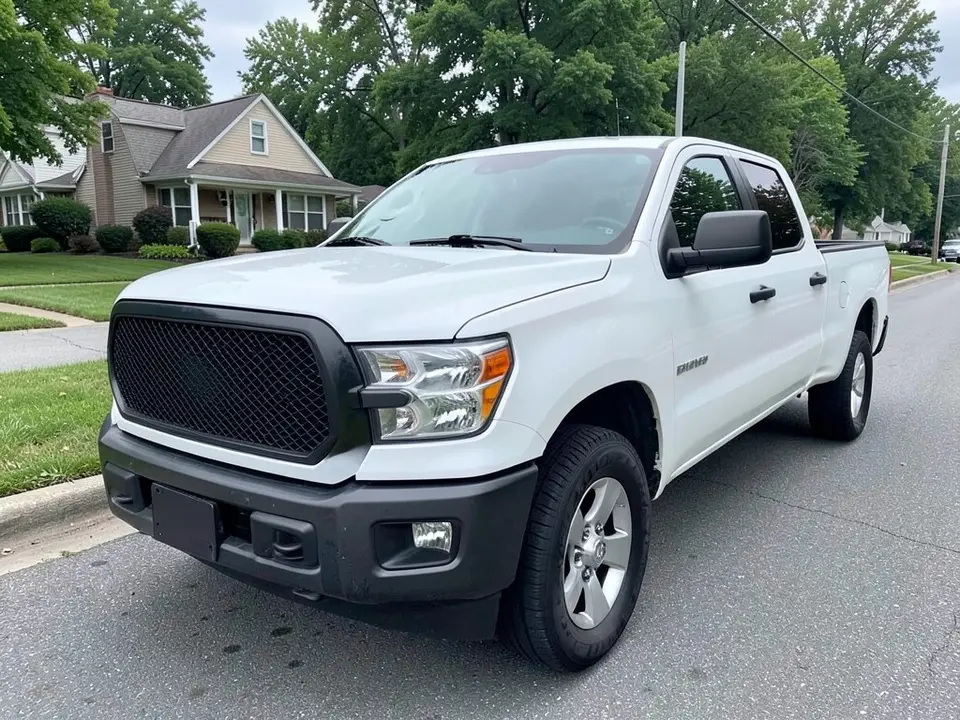
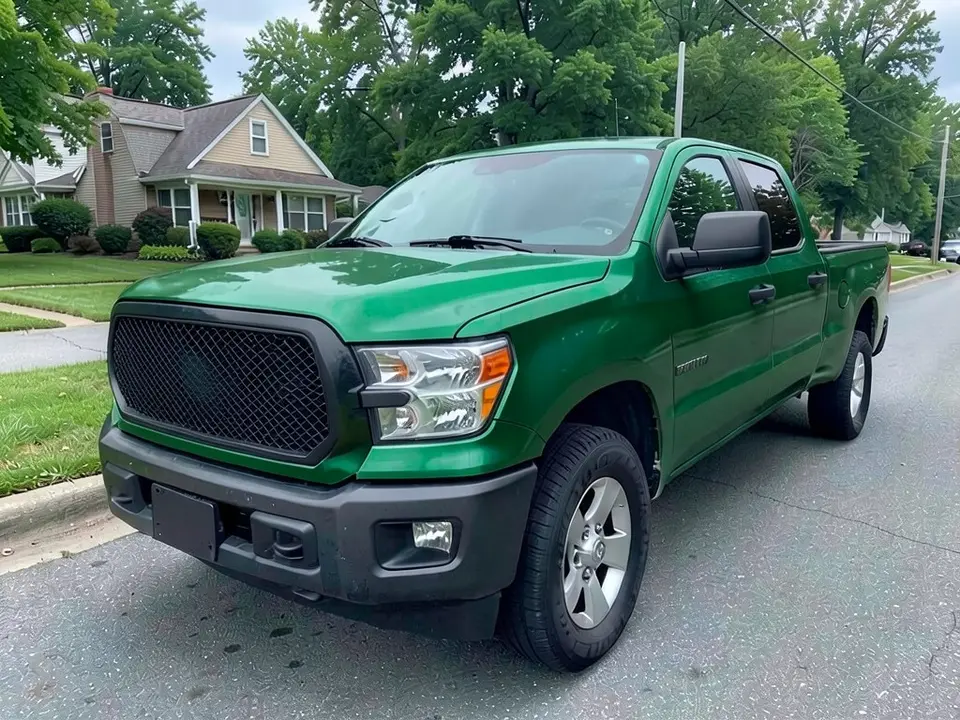
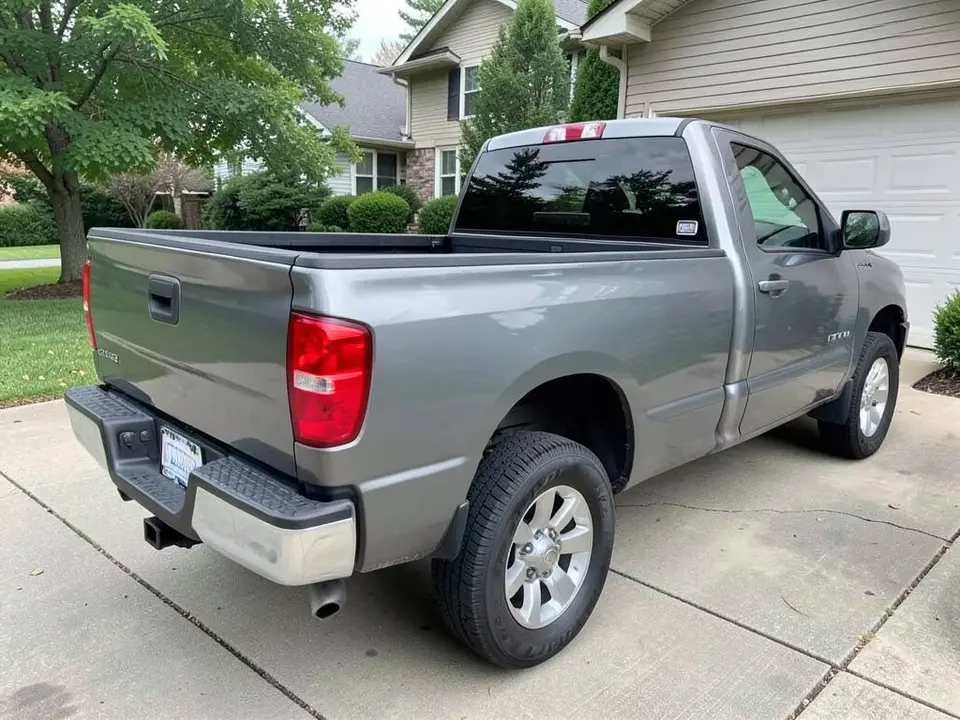
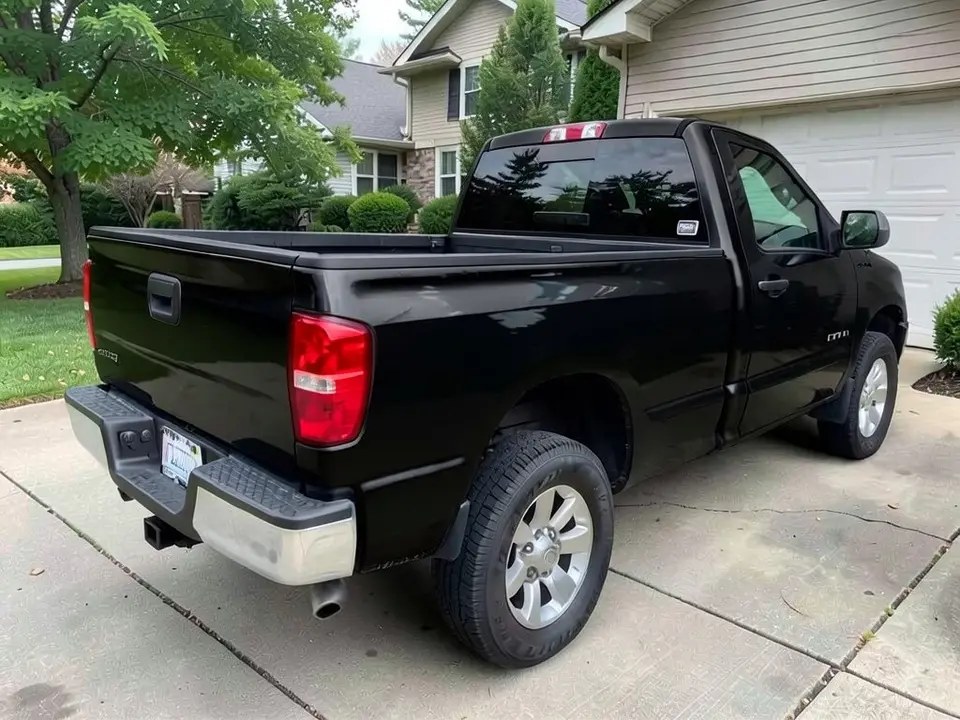
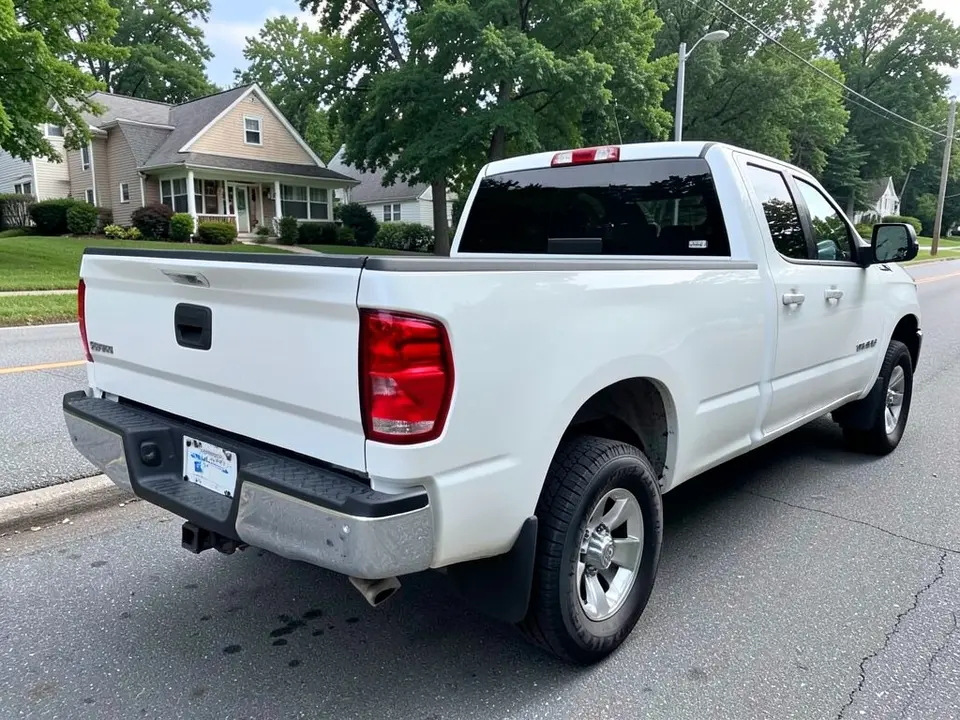
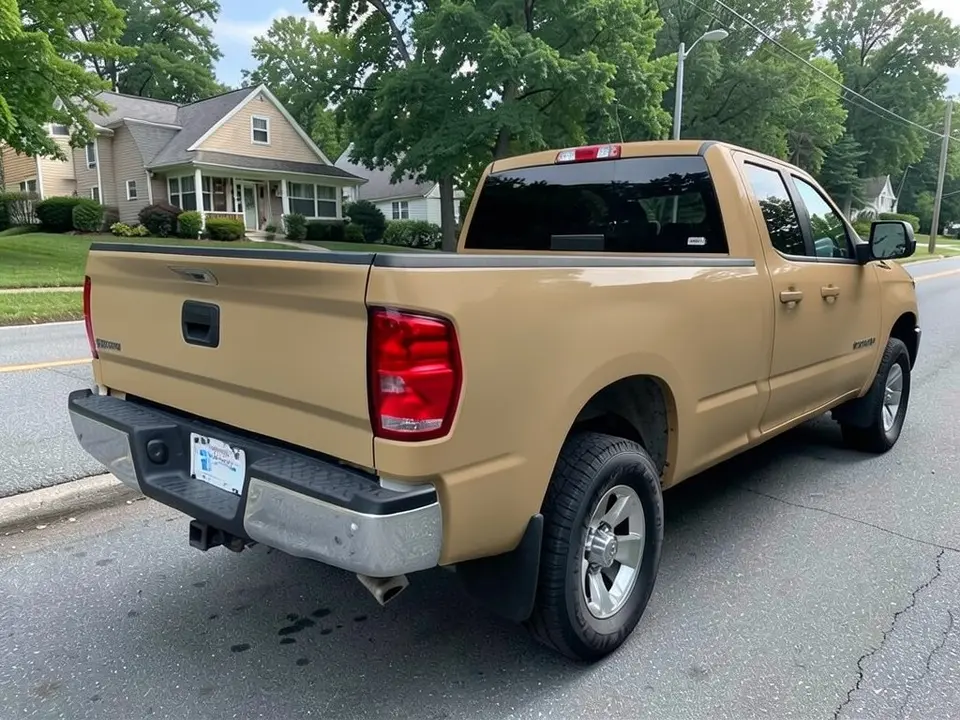
All before and after images are AI-drawn samples from our own image model, not photos of real customer trucks. The trucks are generic. We asked for blank grilles and tailgates, though a tiny unreadable mark can appear on a door or tailgate as an AI artifact. Under each pair we list which parts of the request worked, which did not, and any change we never asked for.
See a wrap color on your own pickup first
A color-change wrap changes how a whole truck looks, and a pickup has a lot of flat panel to fill. Wrap shops and film makers show colors on swatches or sample trucks. Your truck has its own cab, bed, wheels and light, so WheelAI redraws your photo with the body in the color and finish you describe.
The example trucks below are AI-drawn generic pickups, not photos of real customer trucks, and no truck maker is affiliated with this page.
How to preview a pickup truck wrap
There is no special truck wrap mode. The Modifications tool edits any vehicle photo, and its Custom Vision mode takes your own wording.
- 1
Take a photo of the whole truck
Stand at a front or rear corner in daylight so the cab, doors and bed are all in the frame.
- 2
Open the Modifications tool
Upload your photo and switch to Custom Vision.
- 3
Name the color, the finish and what stays
In the Modification Goals box, say the color and finish (for example matte sand tan) and list what must stay: windows, wheels, tires, bumpers, mirrors, bed and background.
- 4
Compare and refine
Look at the result next to your original. If the finish looks glossier than you asked for, try another word such as flat or satin and run it again.
Colors and finishes to try
Dark green
A deep green on a white truck. The result looked glossy even though we asked for satin, so judge the shade, not the sheen.
Black
A solid black body. Our black example looked glossy although we asked for matte, with visible reflections on the tailgate and bed side.
Sand tan
A flat tan on a white truck. This was the example closest to the finish we asked for: it looked matte, and it left the chrome bumper untouched.
Two renders for two ideas
Try one color per render on the same photo so you can compare them side by side.
What a picture cannot tell you
A render shows whether you like the color. It cannot show the film brand, the price, how the edges at the bed and door gaps are finished, or how the film wears. The TeckWrap guide credited to E. Adnan (January 24, 2026) lists truck size, full or partial coverage and finish among the things that move the price. It is a film seller, so use it as a list of questions for your shop, not as a quote.
- Ask a shop for a real film sample and hold it against your truck in daylight.
- Ask what is wrapped and what is not: door jambs, bed rails, the tailgate and the bumpers.
- Ask how long the job takes and what the warranty covers.
- Get a quote for your own truck; a render does not give a price.
Photo tips
- Use daylight and avoid parking where trees or buildings reflect strongly in the paint.
- Stand at a corner and keep the whole truck, wheels included, in the frame.
- Wash the truck first; dirt reads as texture and confuses the edit.
- Use the same photo for every color so the comparisons are fair.
Three Modification Goals to paste
We used these requests for the examples. Copy one into Modification Goals, swap the colors and background words for your own, and delete anything that does not apply.
- Change ONLY the paint color: wrap the pickup truck body in satin dark green vinyl instead of white; keep the windows, wheels, tires, bumpers, mirrors, truck bed, ground, background and the camera angle exactly the same
- Change ONLY the paint color: wrap the pickup truck body in matte black vinyl instead of gray; keep the windows, wheels, tires, bumpers, mirrors, truck bed, ground, background and the camera angle exactly the same
- Change ONLY the paint color: wrap the pickup truck body in matte sand tan vinyl instead of white; keep the windows, wheels, tires, bumpers, mirrors, truck bed, street, houses, trees and the camera angle exactly the same
What the AI does well and where it slips
The new body color usually covers the cab, doors, fenders and bed, and the wheels, glass and chrome mostly stay put. Two things slip: the finish (our satin and matte requests looked glossier in two of three examples) and the ground, which looked slightly different after each edit. Logos and lettering are not reliable, so treat this page as a color test. If a render misses, rerun it with shorter, plainer wording.
Frequently asked questions
Is there a free pickup truck wrap visualizer that uses a photo of my own truck?
Yes. Sign in with email or Google, upload a photo of your pickup, and describe the wrap color and finish in the Modification Goals box. Most new accounts get 5 free credits that last 30 days, and a standard render uses 1 credit. Free renders carry a WheelAI watermark. Wrap shops and film makers show colors on swatches or sample trucks; this edits your own picture.
Can I preview a logo, lettering or a business wrap?
Not reliably. This page is for color and finish: the whole body in one color. The image model does not draw logos, lettering or phone numbers dependably, and our examples show small unreadable marks on doors and tailgates both before and after. For a printed or business design, use a wrap designer and use this page only to try the base color.
Which colors and finishes can I try?
Any color you can name, in matte, satin or gloss. Our examples use satin dark green, matte black and matte sand tan. Name the finish, and expect the model to be loose with it: our green and black requests asked for satin and matte and came out looking glossier, while the tan came out flat.
Will the AI recolor only the body?
Mostly. In our three examples the body panels and doors changed and the windows, wheels, tires and bumpers stayed. The window frames, the black grille and the mirror housings on the green truck also stayed as they were. Check every part you want to keep: the road or driveway looked slightly different in our edits.
Does the render show the real cost, the install time or how long a wrap lasts?
No. A picture says nothing about price, film quality, install quality or wear. A guide by the vinyl maker TeckWrap, credited to E. Adnan and dated January 24, 2026, says size matters (extended-cab, crew-cab and long-bed trucks need more vinyl and more install time), that a full wrap costs more than a partial wrap, and that specialty finishes such as matte or chrome raise the price. It is a film seller, so get a quote for your own truck.
Can I preview a partial wrap such as a hood, roof or stripes?
Yes, with the same tool. Name the one part to change and say that the rest stays the original color. We have separate pages for the hood, the roof and racing stripes, and one for chrome delete, which turns chrome trim black.
Are the example trucks real customer trucks?
No. They are AI-drawn generic pickups, made with our own image model. We asked for blank grilles and tailgates, but a tiny unreadable mark can appear on a door or tailgate as an AI artifact. No truck maker is affiliated with or endorses this page.
How is this different from the F-150, Silverado or Ram pages?
Those pages are about wheels, tires and lift on a named truck model. This page is about a body color change on any pickup. The tool is the same; only the Modification Goals wording differs.
Ready to try a wrap color?
Compare a dark green, a black and a tan on one photo, then take your favorite to a wrap shop for a real film sample and a quote.
Preview a wrap on my truckAlso try: Chrome Delete Visualizer · Car Wrap Visualizer · Van Wrap Visualizer · Hood Wrap Visualizer · Roof Wrap Visualizer · F-150 Visualizer