Camaro Visualizer: See Rims and Wrap Colors on Your Own Photo
Upload a photo of your own Chevy Camaro, describe the rims or wrap color you are considering, and see the look on your car before you spend money.
Preview mods on my CamaroSign in with email or Google to render. Most new accounts get 5 free credits (valid 30 days); a standard render uses 1 credit. Free renders carry a WheelAI watermark.
Before and after examples
Each pair is one vehicle photo and the same photo after one Modification Goals request, sent to the image model that Custom Vision uses but with more processing steps than the live tool default, so your own render may be rougher. The full request text sits under each pair.
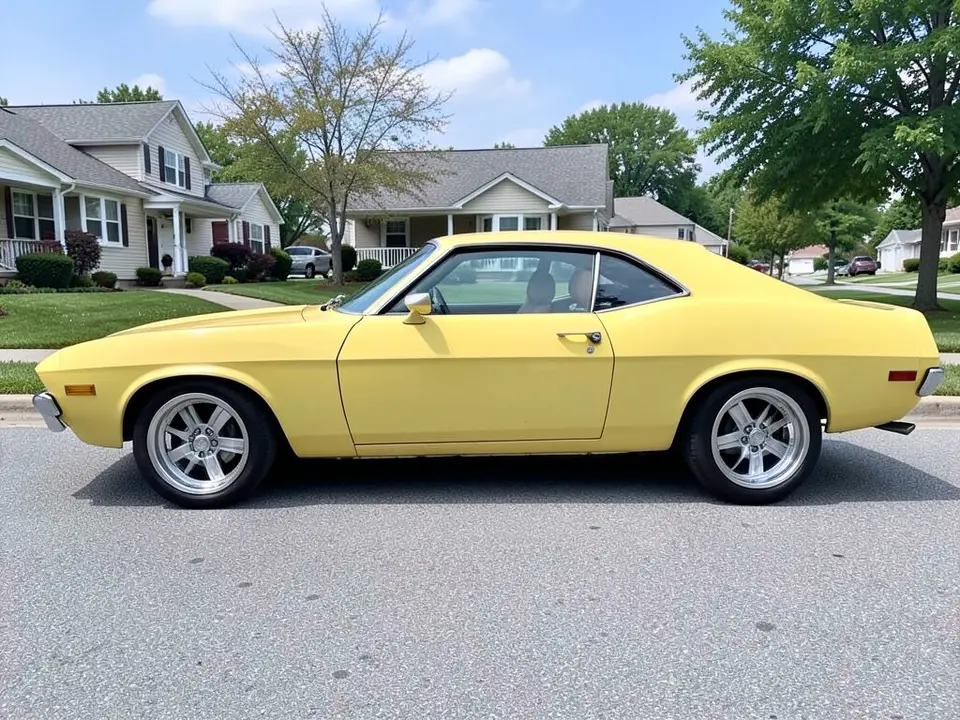
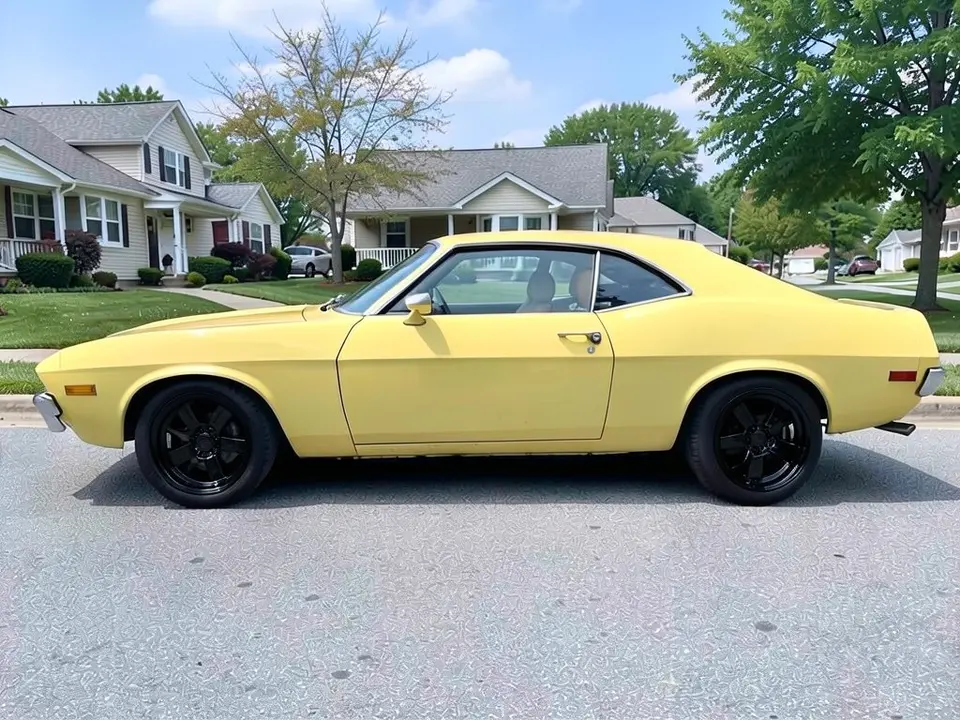
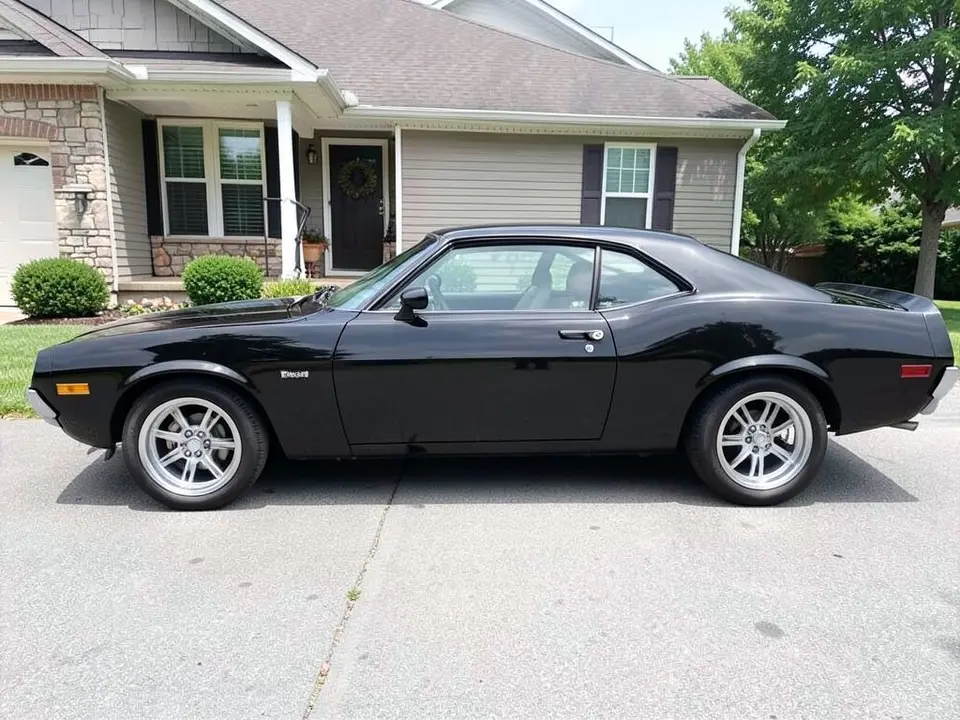
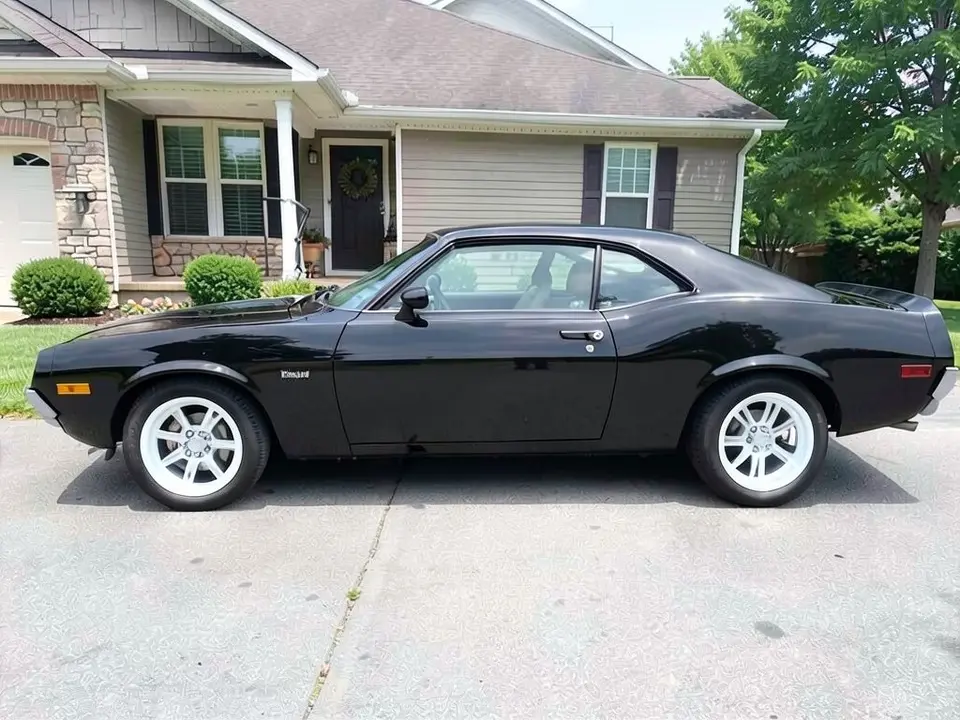
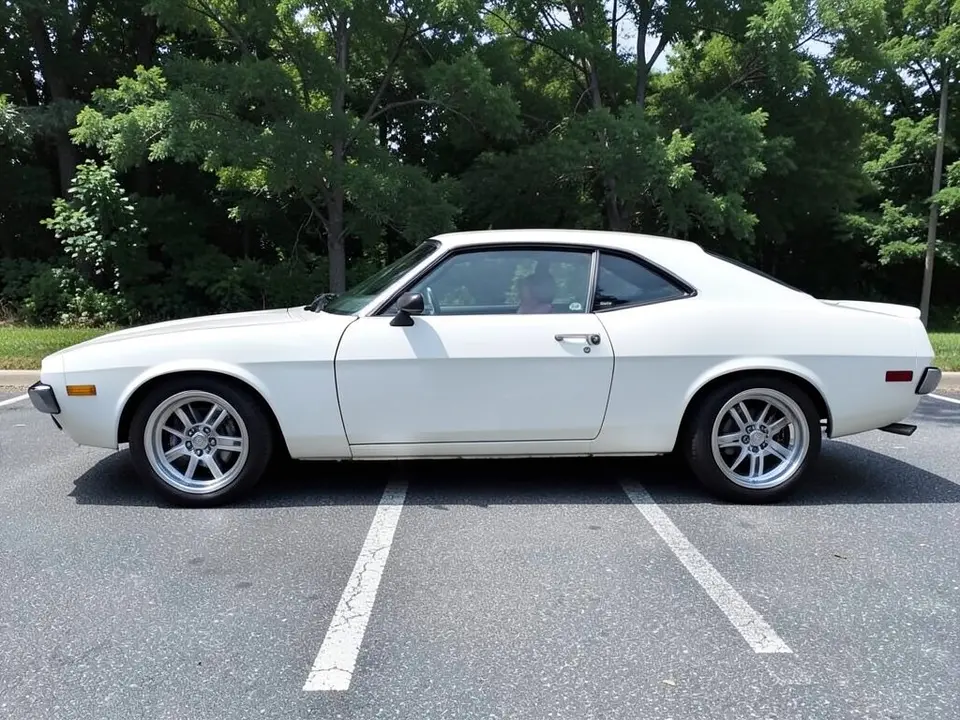
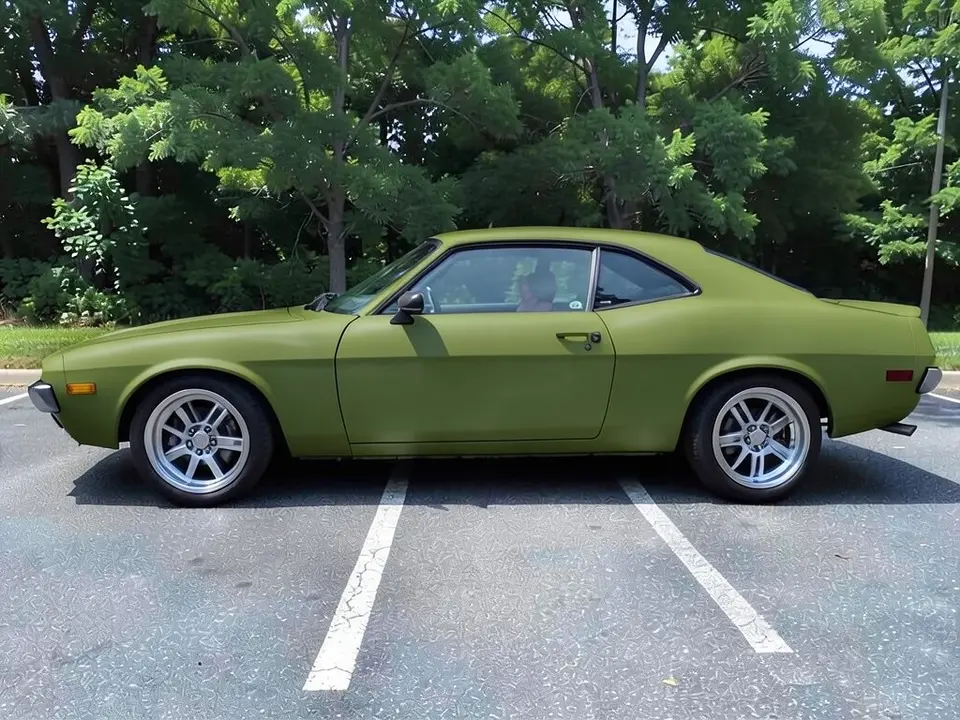
All before and after images are AI-drawn samples from our own image model, not photos of real Camaros or customer cars. The cars are generic two-door coupe stand-ins with a retro, long-hood shape; they are not shaped like a current Camaro, so do not judge proportions from them. They are drawn side-on to avoid emblem-like marks. No brand logos are used, though the black coupe has a tiny unreadable chrome mark on the front fender that is an AI artifact. Under each pair we list which parts of the request worked, which did not, and any change we never asked for.
Try the look on your own Camaro
Catalog pages show a wheel on a studio car. Your Camaro has its own paint, its own stance and its own tires. WheelAI redraws your photo with the change you describe, so you can compare black rims with white or bronze on the same car, or see a different wrap color before you talk to a shop.
Chevrolet and Camaro are trademarks of their owner. WheelAI is not affiliated with or endorsed by Chevrolet, no Chevrolet logos are used here, and the example cars below are AI-drawn generic coupes, not real Camaros.
How to preview rims or a wrap on a Camaro
There is no special Camaro mode. The Modifications tool edits any vehicle photo, and its Custom Vision mode takes your own wording.
- 1
Take the photo
Stand square to the side of the Camaro in daylight so both wheels and the whole car are in the frame.
- 2
Open the Modifications tool
Upload your photo and switch to Custom Vision.
- 3
Write the change and what stays
In the Modification Goals box, say what changes (for example the wheel finish) and list what must stay the same: paint, tires, brake calipers, background and camera angle.
- 4
Compare and refine
Look at the result next to your original. If one part is wrong, ask for that part alone in the next run.
Rim finishes that suit a muscle car
Gloss or matte black
Black rims are an easy finish to judge in a photo. They gave strong contrast on our yellow example.
White
White rims are a bold look that stands out against a dark car. In our black example the white was clear, but the spoke pattern shifted a little.
Bronze, gunmetal or machined
Darker neutral finishes sit between silver and black. Ask for the exact look, such as satin gunmetal with a polished lip.
Size and width matter as much
Rim diameter, width and tire sidewall change the stance more than the color. Ask for a size change only if you mean it, and check fitment with a shop.
Wrap color and finish
A color-change wrap is a big decision, and a photo is a cheap way to rule colors in or out. Ask for one change at a time and name the finish: gloss, satin or matte.
- Name the color and the finish, and say that the wheels, glass and trim stay the same.
- Expect the shade to be approximate; check it against a physical sample.
- Look at the same car in more than one lighting condition before you commit, because reflections change the perceived color.
- Ask a wrap shop for real samples; the render shows no actual vinyl product or price.
A look, not a fitment check
The render shows whether you like a look. It knows nothing about offset, load rating, tire clearance, brake package or whether a part is made for your trim and year, and it shows no real brand products or prices. Ask a shop to confirm anything you plan to buy.
Photo tips
- Use daylight and avoid harsh shadows across the wheels.
- Stand square to the side and hold the camera at about door-handle height.
- Keep the front wheels pointing straight ahead.
- Leave space around the car in the frame.
- Use the same photo for every idea so the comparisons are fair.
Three Modification Goals to paste
We used these requests for the examples. Copy one into Modification Goals, swap the colors and background words for your own, and delete anything that does not apply.
- Change ONLY the wheels: replace the silver wheels with gloss black wheels; keep the yellow paint, windows, tires, ride height, street, houses and the camera angle exactly the same
- Change ONLY the wheels: replace the silver wheels with gloss white wheels; keep the black paint, windows, tires, ride height, driveway, house and the camera angle exactly the same
- Change ONLY the paint color: wrap the car in matte olive green vinyl instead of white; keep the wheels, windows, tires, ride height, parking lot, trees and the camera angle exactly the same
What the AI does well and where it slips
Rim finishes usually come out well and the rest of the photo mostly stays put. Spoke shapes shifted a little on both wheel edits, and plain areas such as pavement looked more textured after all three. If a render misses, rerun it with shorter, plainer wording.
Frequently asked questions
Is there a free Camaro rim visualizer that uses my own photo?
Yes. Sign in with email or Google, upload a photo of your Camaro, and describe the rims or wrap color you want in the Modification Goals box. Most new accounts get 5 free credits that last 30 days, and a standard render uses 1 credit. Free renders carry a WheelAI watermark. Catalog visualizers from wheel brands show their wheels on a stock car; this one edits your own picture.
Which rim finishes can I try on a Camaro?
Any finish you can describe: gloss or matte black, white, bronze, gunmetal, chrome or machined. Our examples use gloss black and gloss white on stand-in coupes. Name the finish and the style, because a bare "new rims" request leaves the AI free to choose.
Can it show a Camaro in a different wrap color?
You can ask for a new color and finish in the Modification Goals box. Our example turned a white stand-in into matte olive green. Name the finish and shade, then compare with a sample swatch from a wrap shop. The render shows no real vinyl product, price or install cost.
Will the rims in the render fit my Camaro?
The render cannot say. A picture knows nothing about bolt pattern, offset, hub bore, load rating or brake clearance, and a rim that looks right can still be wrong for your trim, model year or brake package. Check your owner manual and the tire placard in the driver door jamb, and ask a wheel or tire shop before you order.
Does it work on every Camaro generation?
It edits the car in your photo and never asks for a model or year, so it should work on any car. Our examples are AI-drawn generic retro-style coupes, not real Camaro photos, so we have not tested a specific generation. A sharp daylight side photo of the whole car matters more than the badge.
What if the AI changes something I did not ask for?
It can. The image model redraws the whole photo. In our examples the paint, body and background stayed as asked, but the spoke patterns of the new wheels shifted a little and the pavement looked more textured after all three edits. Write what must stay the same, compare the result with your original, and rerun if a part changed.
Is WheelAI affiliated with Chevrolet?
No. Chevrolet and Camaro are trademarks of their owner. WheelAI is an independent tool and is not affiliated with, endorsed by or sponsored by Chevrolet or General Motors. The names appear here only to say which car this page is about, and no logos are used.
How is this different from a wheel brand visualizer?
Wheel brands let you pick their real wheels from a catalog and put them on a listed car, and they tell you to check fitment. WheelAI has no catalog and no fitment data: you describe a look in words and see it on your own photo. Use it to decide on a style, then use a brand tool or a shop to choose parts that fit.
Ready to plan your Camaro?
Compare a few rim finishes and a wrap color on one photo, then bring your favorite to a shop to confirm it fits and what it costs.
Preview mods on my CamaroAlso try: Rim Visualizer · Car Wrap Visualizer · Wheel Color Visualizer · Mustang Wrap Visualizer · Car Spoiler Visualizer