Jeep Wrangler Wrap Visualizer: See a New Color on Your Own Wrangler
Upload a photo of your own Jeep Wrangler, describe the wrap color and finish you are considering, and see how it looks on your vehicle before you pay a shop.
Preview a wrap on my WranglerSign in with email or Google to render. Most new accounts get 5 free credits (valid 30 days); a standard render uses 1 credit. Free renders carry a WheelAI watermark.
Before and after examples
Each pair is one vehicle photo and the same photo after one Modification Goals request, sent to the image model that Custom Vision uses but with more processing steps than the live tool default, so your own render may be rougher. We picked the best of a few tries for each. The full request text sits under each pair.
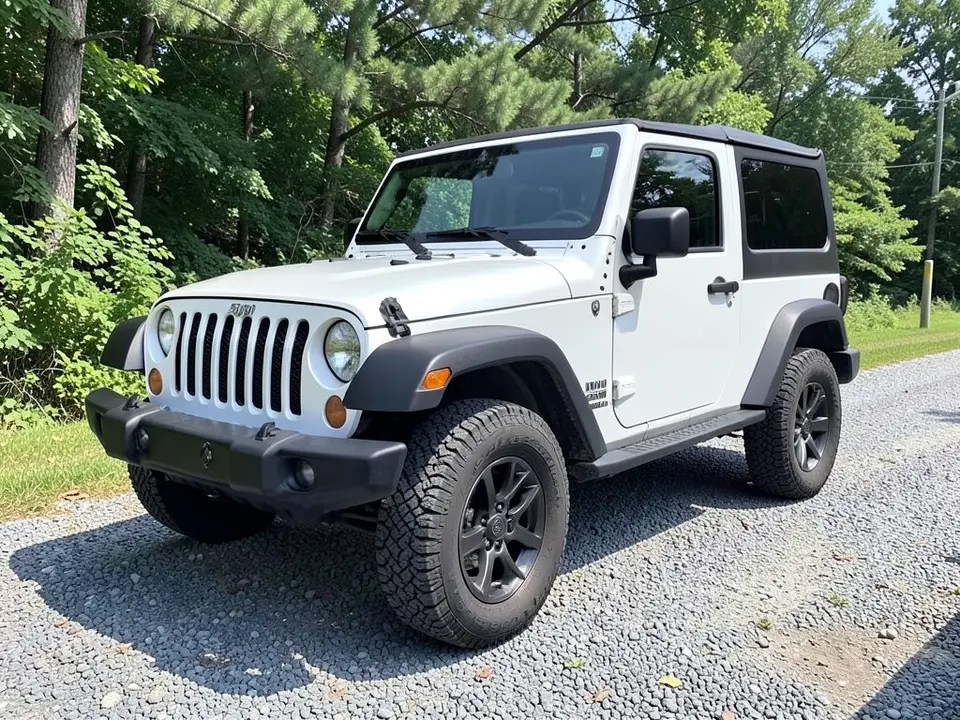
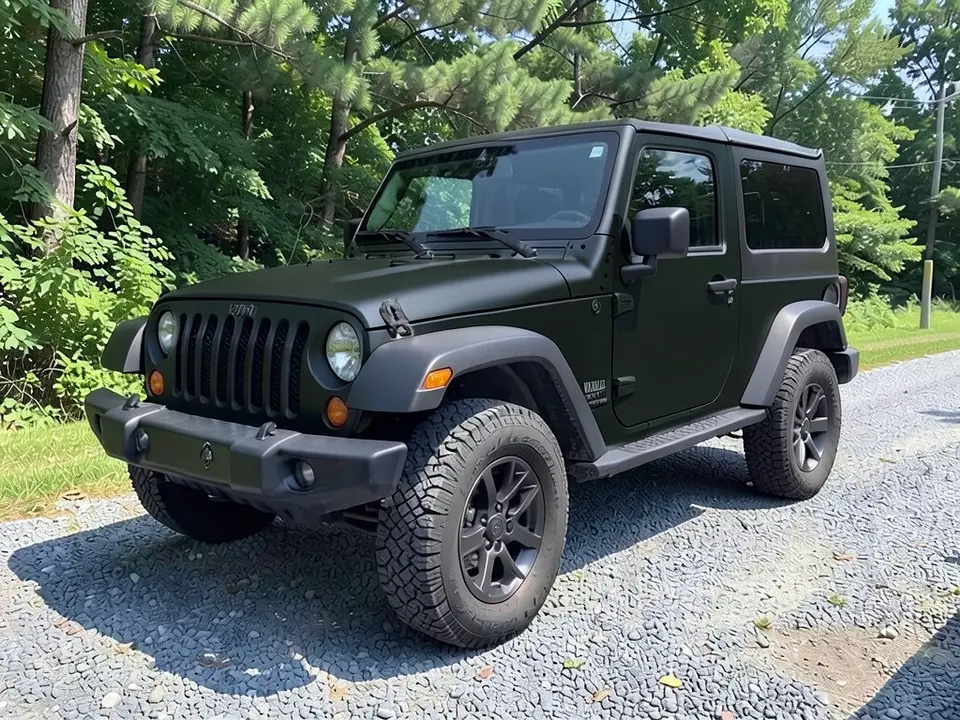
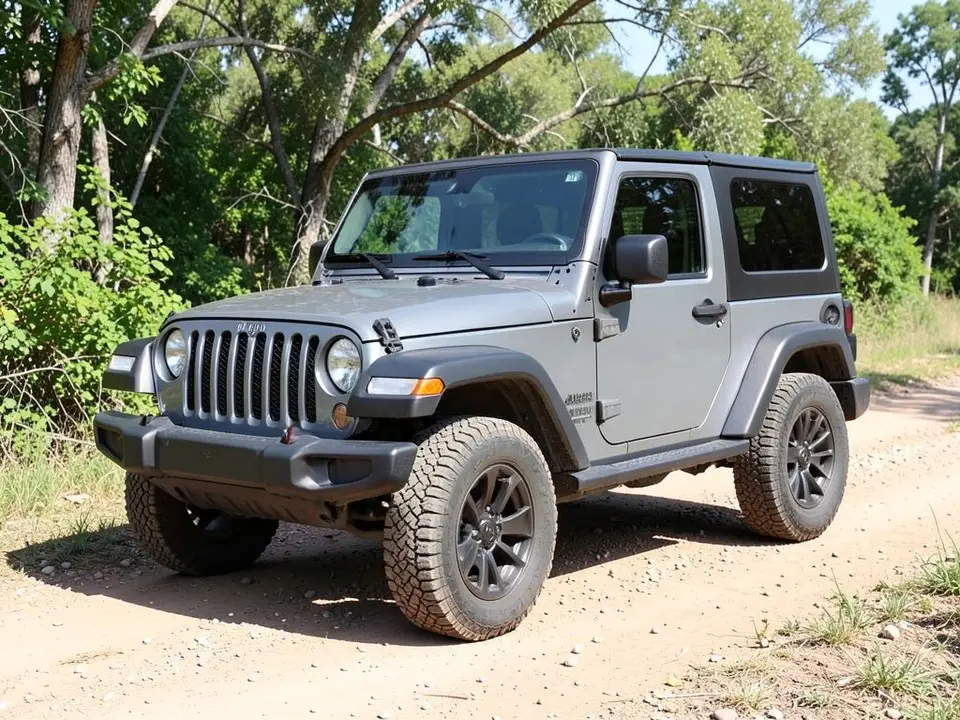
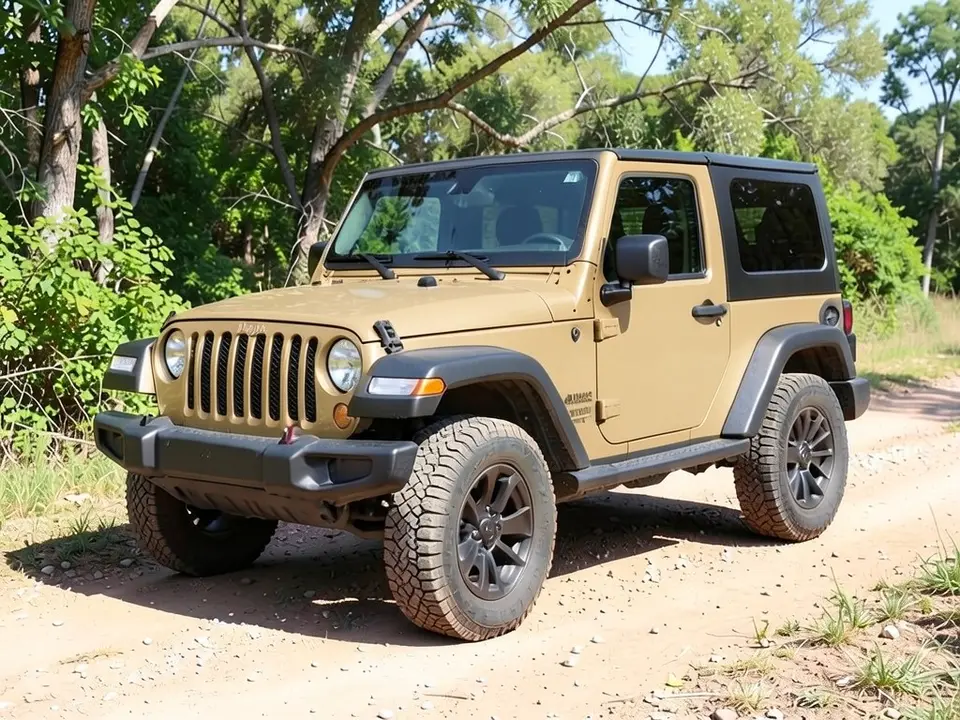
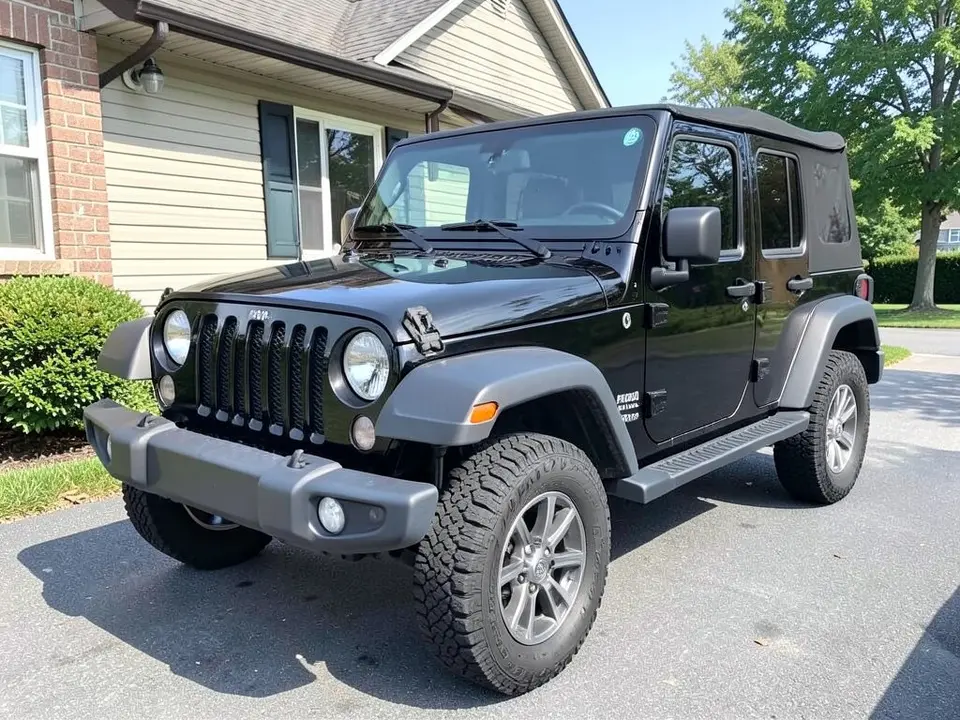
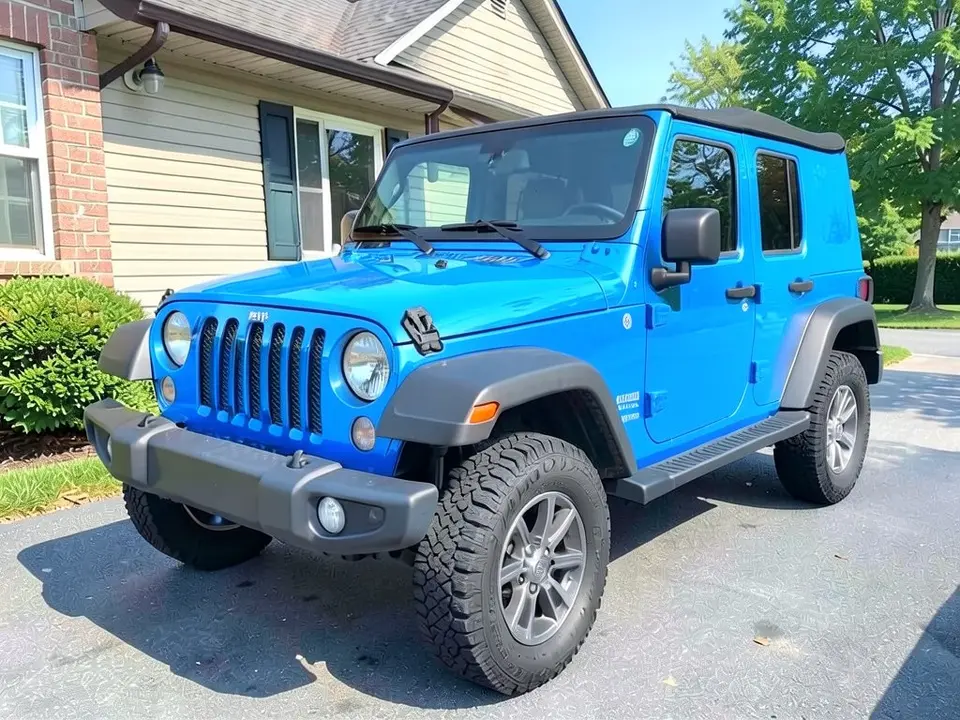
All before and after images are AI-drawn samples from our own image model, not photos of real customer vehicles. The vehicles are generic Wrangler-style SUVs. A tiny unreadable mark can appear on the grille and a small decal-like mark on a door as AI artifacts, in both the before and the after picture. Under each pair we list which parts of the request worked, which did not, and any change we never asked for.
See a wrap color on your own Wrangler first
A color-change wrap changes how a Wrangler looks, and a Wrangler has a flat, boxy body that shows color well. Wrap shops and film makers show colors on swatches or sample vehicles. Your Wrangler has its own flares, top, wheels and light, so WheelAI redraws your photo with the body panels in the color and finish you describe.
The example vehicles below are AI-drawn Wrangler-style SUVs, not photos of real customer vehicles. WheelAI is independent and is not affiliated with Jeep or any vehicle maker; the names are used only to say which vehicles this page is about.
How to preview a Jeep Wrangler wrap
There is no special Wrangler wrap mode. The Modifications tool edits any vehicle photo, and its Custom Vision mode takes your own wording.
- 1
Take a photo of the whole Wrangler
Stand at a front or rear corner in daylight so the hood, doors, flares and top are all in the frame.
- 2
Open the Modifications tool
Upload your photo and switch to Custom Vision.
- 3
Name the color, the finish and what stays
In the Modification Goals box, say the color and finish (for example matte desert sand tan) and list what must stay: top, flares, bumpers, wheels, tires and background.
- 4
Compare and refine
Look at the result next to your original. If the finish looks glossier than you asked for, or the color spills onto the top, try shorter wording and run it again.
Colors and finishes to try
Matte black
A flat black on a white Wrangler. It looked matte, though the shade reads very dark green-black, and the white grille surround turned black too.
Desert sand tan
A khaki-tan on a gray Wrangler. It looked mostly flat, with a slight sheen, and the grille surround turned tan.
Electric blue
A bright blue on a black Wrangler. It looked glossy, as asked, but the blue spilled onto the rear side panel of the soft top.
Two renders for two ideas
Try one color per render on the same photo so you can compare them side by side.
What a picture cannot tell you
A render shows whether you like the color. It cannot show the film brand, the price, how the door edges and the top are finished, or how the film wears. The TunedRides Wrangler page says matte and satin films hide the brush marks trails leave better than gloss, and that owners who actually wheel treat the wrap as sacrificial armour. It is a vendor page with no author or date, so use it as a list of questions for your shop, not as a quote.
- Ask a shop for a real film sample and hold it against your Wrangler in daylight.
- Ask how the removable doors and the roof are handled, and whether the door jambs are wrapped.
- Ask whether the flares, bumpers and grille are wrapped or left as they are.
- Get a quote for your own Wrangler; a render does not give a price.
Photo tips
- Use daylight and avoid parking where trees or buildings reflect strongly in the paint.
- Stand at a front or rear corner and keep the whole vehicle, wheels and top included, in the frame.
- Wash the Wrangler first; dirt reads as texture and confuses the edit.
- Use the same photo for every color so the comparisons are fair.
Three Modification Goals to paste
We used these requests for the examples. Copy one into Modification Goals, swap the colors and background words for your own, and delete anything that does not apply.
- Change ONLY the paint color: wrap the Jeep body panels in matte black vinyl instead of white; keep the black hardtop, black fender flares, grille slots, round headlights, windows, wheels, tires, bumpers, gravel, trees and the camera angle exactly the same
- Change ONLY the paint color: wrap the Jeep body panels in matte desert sand tan vinyl instead of gray; keep the black hardtop, black fender flares, tail lights, spare tire, windows, wheels, tires, bumpers, trail, trees and the camera angle exactly the same
- Change ONLY the paint color: wrap the Jeep body panels in gloss electric blue vinyl instead of black; keep the black hardtop, gray fender flares, grille slots, round headlights, windows, wheels, tires, bumpers, driveway, house and the camera angle exactly the same
What the AI does well and where it slips
The new body color usually covers the hood, doors and grille surround, and the flares, bumpers, wheels, tires and glass mostly stay put. Three things slip: the top (the blue example spilled onto the soft top), the grille (a white or gray grille surround takes the new color, although we asked to keep the grille slots), and the ground, which looked slightly different after each edit. Badges and lettering are not reliable, so treat this page as a color test. If a render misses, rerun it with shorter, plainer wording.
Frequently asked questions
Is there a free Jeep Wrangler wrap visualizer that uses a photo of my own Wrangler?
Yes. Sign in with email or Google, upload a photo of your Wrangler, and describe the wrap color and finish in the Modification Goals box. Most new accounts get 5 free credits that last 30 days, and a standard render uses 1 credit. Free renders carry a WheelAI watermark. Wrap shops and film makers show colors on swatches or sample vehicles; this edits your own picture.
Which colors do Wrangler owners try?
The 10KWRAPS article "Top 10 Unique Jeep Wrangler Color Ideas for Personalization", credited to Ben, Gail and dated 14 May 2025 on the page, lists ten ideas that include matte black, desert sand beige, electric blue and olive green. Our examples use matte black, matte desert sand tan and gloss electric blue. 10KWRAPS is a wrap shop, so treat the list as ideas, not a ranking.
What about the removable doors, roof and top?
This is the hard part of wrapping a Wrangler. A vendor page from TunedRides (no author or date shown) says the detachable body complicates a wrap: installers wrap the door shuts and panel edges so that removed doors do not show unwrapped paint, and the removable roof panels either join the wrap design or are set in a contrasting color. A render cannot show how those edges are finished. Our examples left the top black on purpose, and one of them still shifted color there (see the blue example), so check the top in your own render and ask a shop how it handles the doors and roof.
Will the AI recolor only the body panels?
Mostly. In our three examples the hood, doors and the painted grille surround changed. The fender flares, bumpers, wheels, tires, windows and headlights stayed, though the black bumper and flares looked a little lighter in the matte black example. The top is a risk: on the blue example the blue spilled onto the rear side panel of the soft top even though we asked to keep it black.
Does the render show the real cost, the install time or how long a wrap lasts?
No. A picture says nothing about price, film quality, install quality or wear. Ask a shop for a quote on your own Wrangler, ask to see a real film sample outdoors, and ask how the doors, hardtop or soft top and the flares are handled.
Can I preview a partial wrap such as a hood or stripes?
Yes, with the same tool. Name the one part to change and say that the rest stays the original color. We have separate pages for the hood, the roof and racing stripes, and one for chrome delete, which turns chrome trim black.
Are the example Wranglers real customer vehicles?
No. They are AI-drawn Wrangler-style SUVs, made with our own image model, and the model drew them with round headlights and a slotted grille. A tiny unreadable mark sits on top of the grille and a small decal-like mark on the front door in both the before and the after pictures. These are AI artifacts, not real badges.
Is WheelAI affiliated with Jeep or Stellantis?
No. WheelAI is an independent tool and is not affiliated with, endorsed by or sponsored by Jeep, Stellantis or any other vehicle maker. We use the Jeep and Wrangler names only to say which vehicles this page is about.
How is this different from the Jeep Visualizer page?
The Jeep Visualizer page is about wheels, lift and other mods on a Jeep. This page is about a body color change. The tool is the same; only the Modification Goals wording differs.
Ready to try a wrap color?
Compare a matte black, a sand tan and a blue on one photo, then take your favorite to a wrap shop for a real film sample and a quote.
Preview a wrap on my WranglerAlso try: Jeep Visualizer · Bronco Wrap Visualizer · Car Wrap Visualizer · Hood Wrap Visualizer · Chrome Delete Visualizer · Lift Kit Visualizer