Chrome Delete Visualizer: See Black Trim on Your Own Car or Truck
Upload a photo of your own vehicle, name the chrome part you want to turn black, and see how it looks before you pay a shop.
Preview a chrome delete on my vehicleSign in with email or Google to render. Most new accounts get 5 free credits (valid 30 days); a standard render uses 1 credit. Free renders carry a WheelAI watermark.
Before and after examples
Each pair is one vehicle photo and the same photo after one Modification Goals request, sent to the image model that Custom Vision uses but with more processing steps than the live tool default, so your own render may be rougher. We picked the best of a few tries for each. The full request text sits under each pair.
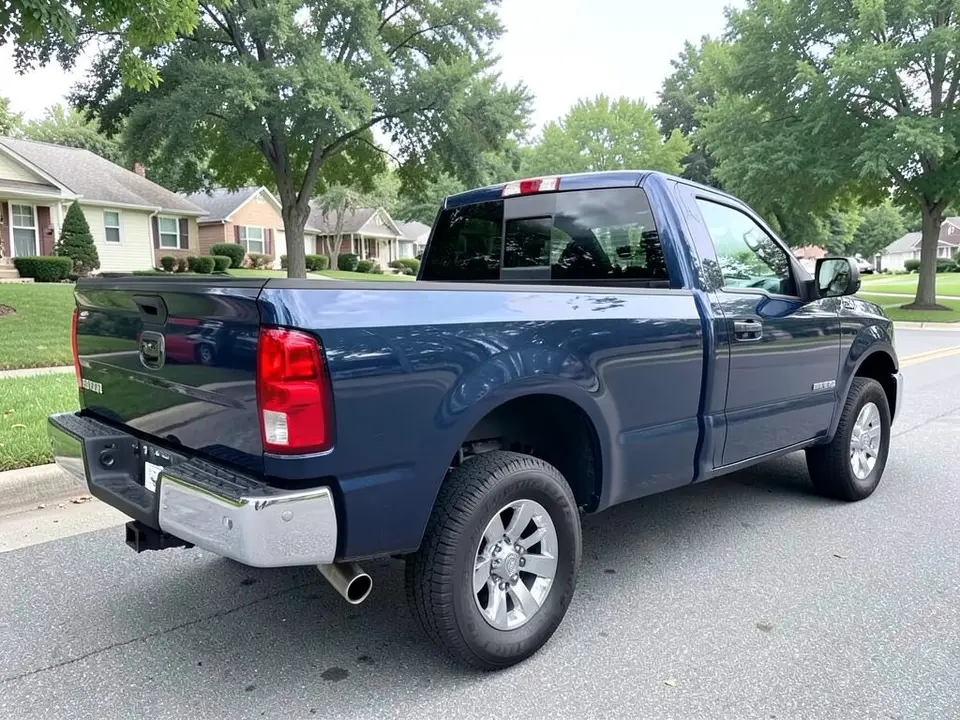
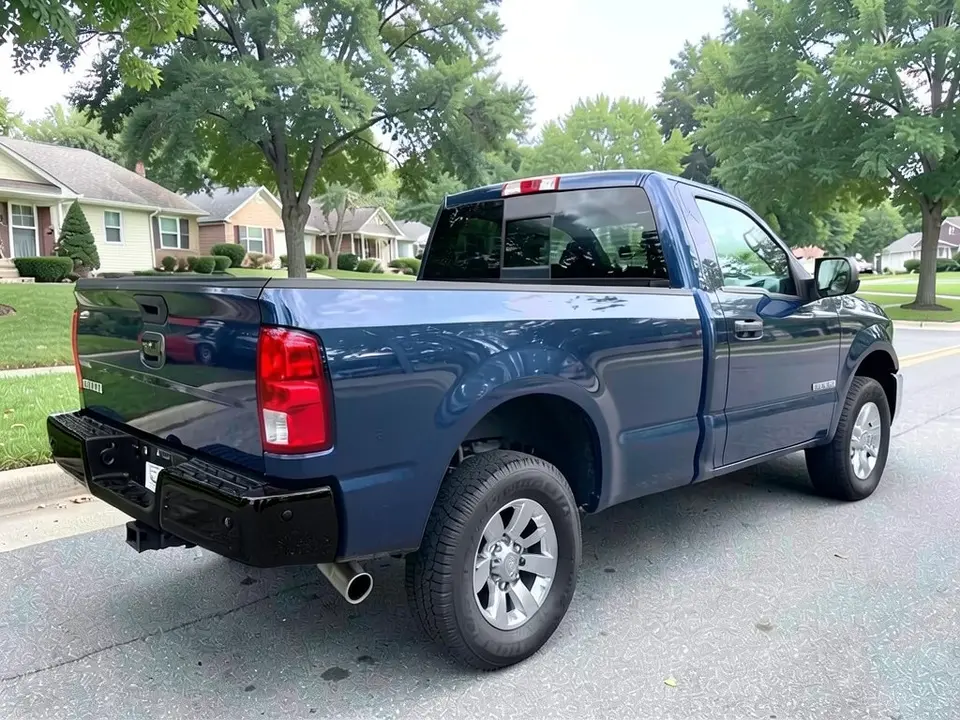
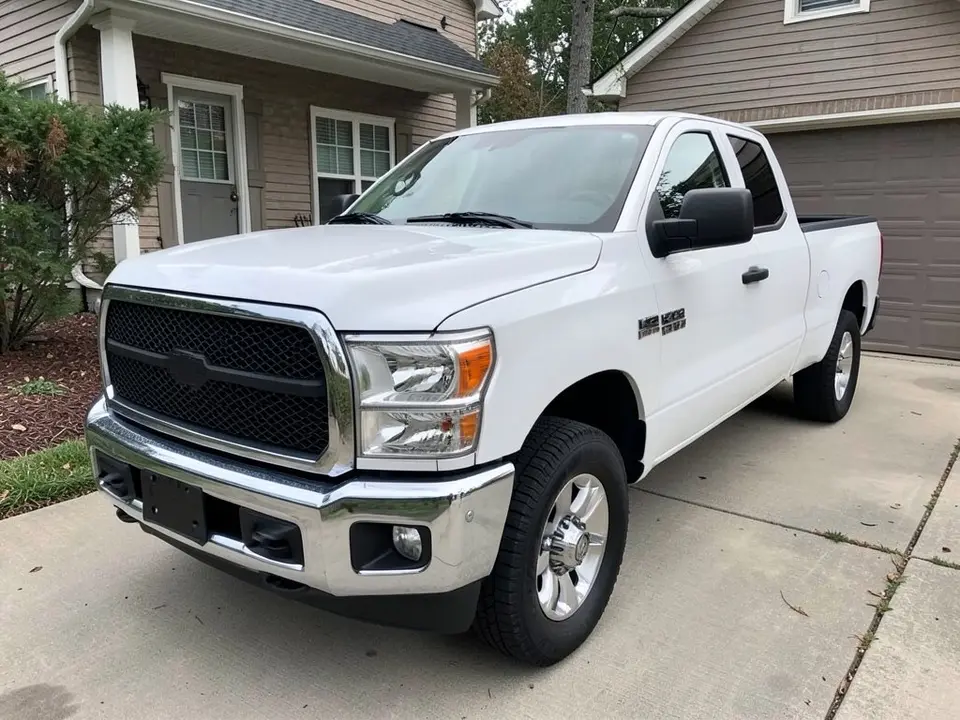
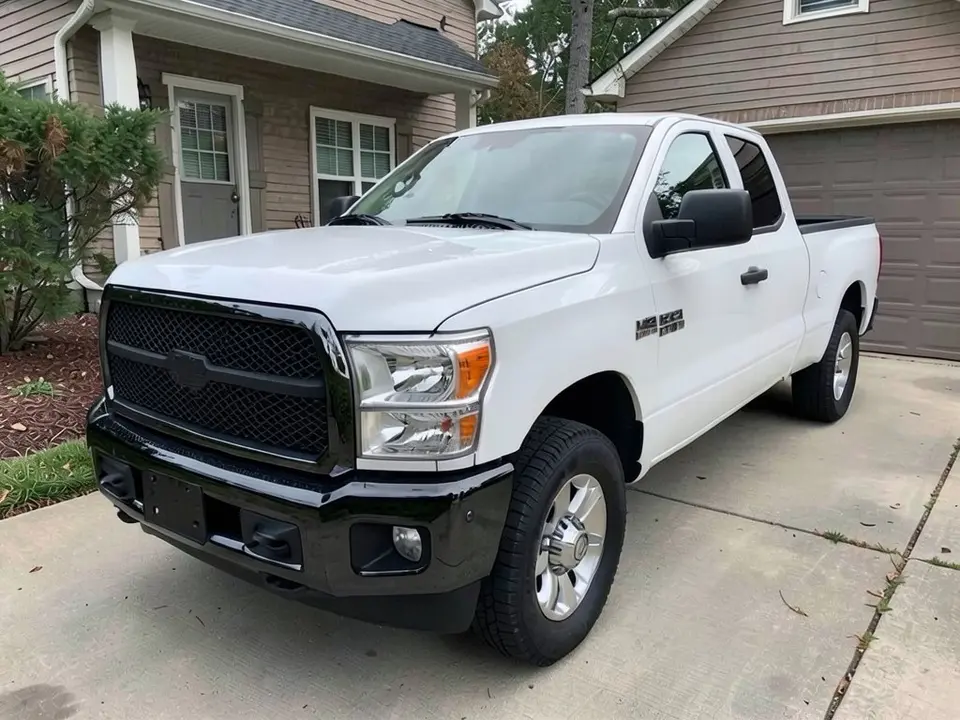
All before and after images are AI-drawn samples from our own image model, not photos of real customer vehicles. The trucks are generic. We asked for blank grilles and tailgates, though a tiny unreadable mark can appear on a fender as an AI artifact. Under each pair we list which parts of the request worked, which did not, and any change we never asked for.
See black trim on your own vehicle first
Chrome trim catches the eye on a bumper, a grille surround or a mirror cap, and many owners like the quieter look of black trim. Wrap shops and film makers show their finishes on sample cars or small swatches. Your vehicle has its own paint color and its own light, so WheelAI redraws your photo with the chrome part you name in the finish you describe.
The example trucks below are AI-drawn generic pickups, not photos of real customer vehicles, and no vehicle maker is affiliated with this page.
How to preview a chrome delete
There is no special chrome delete mode. The Modifications tool edits any vehicle photo, and its Custom Vision mode takes your own wording.
- 1
Take a photo that shows the chrome
Stand at a front or rear corner in daylight so the part you want to change is large in the frame.
- 2
Open the Modifications tool
Upload your photo and switch to Custom Vision.
- 3
Name one chrome part and the finish
In the Modification Goals box, write which part turns black (for example the rear bumper) and whether you want gloss or matte.
- 4
List what must stay
Name the paint color, the grille, the lights, the wheels and the background so the AI has less room to change them.
- 5
Compare with your original
Check every other chrome part and the surroundings. If something else changed, shorten the request and run it again.
Chrome parts people ask about
Bumpers
The biggest chrome part on many trucks. In our examples a bumper was the part that changed most cleanly.
Grille surround
It sits next to the bumper, so a bumper request can spill onto it. Name it in the request if you want it black, or say it must stay chrome and check the result.
Mirror caps and door handles
Small parts that the AI may skip, and we did not publish an example of them, so test them on your own photo and check every handle.
Window trim and roof rails
Common on sedans and SUVs. Our Tesla wrap page has a section on window trim; read it before you test your own car.
Wheels and exhaust tips
In our examples the silver wheels and the chrome exhaust tip stayed as they were. Say so if you want them changed.
What a picture cannot tell you
A render shows whether you like the look. It cannot show the film brand, the price, how the edges are finished, or how the film wears. The TeckWrap guide says vinyl can go over chrome when the surface is clean and smooth and not tarnished or scratched, and it says wrap can be removed later; it is a film seller, so confirm both points with the shop that will do your car.
- Ask a shop whether your chrome is in good enough shape to wrap.
- Ask which finishes they offer and to show a real film sample against your paint in daylight.
- Ask how edges and tight corners are finished and what the warranty covers.
- Get a quote for your own vehicle; a render does not give a price.
Photo tips
- Use daylight and avoid photos where chrome reflects bright sky or buildings.
- Stand at a corner so the part is large in the frame and keep the whole vehicle visible.
- Wash the vehicle first; dirt reads as texture and confuses the edit.
- Use the same photo for every idea so the comparisons are fair.
Two Modification Goals to paste
We used these requests for the examples. Copy one into Modification Goals, swap the colors and background words for your own, and delete anything that does not apply.
- Chrome delete: change ONLY the shiny chrome rear bumper, turning it gloss black. Keep the blue paint, tailgate, tail lights, wheels, tires, truck bed, street, houses, trees and the camera angle exactly the same
- Chrome delete: change ONLY the shiny chrome front bumper, turning it gloss black. Keep the white paint, grille, headlights, wheels, tires, windows, mirrors, driveway, house and the camera angle exactly the same
What the AI does well and where it slips
Large chrome parts such as a bumper came out black in both examples. Small parts and neighbors are the weak spot: the grille surround followed a bumper request in one example, thin chrome strips next to the bumper stayed silver, and the road or driveway looked slightly different after the edit. If a render misses, rerun it with shorter, plainer wording and name one part at a time.
Frequently asked questions
Is there a free chrome delete visualizer that uses a photo of my own car?
Yes. Sign in with email or Google, upload a photo of your car or truck, and describe the chrome parts to turn black in the Modification Goals box. Most new accounts get 5 free credits that last 30 days, and a standard render uses 1 credit. Free renders carry a WheelAI watermark. Wrap shops and film makers show their finishes on sample cars or swatches; this edits your own picture.
What is a chrome delete?
It means covering or recoloring the shiny chrome parts of a vehicle, usually trim, grille surrounds, bumpers, mirror caps and door handles, so they come out gloss, satin or matte black or another color. The vinyl maker TeckWrap describes vinyl over chrome trim, grilles and bumpers as a popular chrome delete option in a guide credited to E. Adnan and dated May 20, 2026. That page is written by a film seller, so treat it as one shop-side view.
Which chrome parts can I preview turning black?
Any part you can point to in words: a chrome bumper, a grille surround, mirror caps, window trim, door handles or roof rails. Our examples cover a rear bumper and a front bumper on two pickups. Name one part at a time and say what must stay the same.
Will the AI change only the chrome part I name?
Not always. In our front bumper example we asked to keep the grille, yet the chrome surround around the grille also turned black. Check every chrome part in your photo before you decide.
Does the render show how a real wrap will last or what it will cost?
No. A picture says nothing about film quality, install quality, edges, price or how long the film lasts. The TeckWrap guide says vinyl goes over chrome well when the surface is clean and smooth and not tarnished or scratched, so ask a shop to check your chrome first and to quote your car.
Can I get logos, badges or lettering blacked out too?
Do not rely on it. The image model does not draw logos and lettering reliably, and our examples show small unreadable marks on the tailgate and door badges both before and after. Use this page for trim, bumpers and mirror caps, and ask a shop about badges.
Are the example trucks real customer vehicles?
No. They are AI-drawn generic pickups, made with our own image model. We asked for blank grilles and tailgates, but a tiny unreadable mark can appear on a fender or wheel center as an AI artifact. No vehicle maker is affiliated with or endorses this page.
How is this different from the Tesla wrap or Silverado pages?
This page is only about chrome parts. The Tesla wrap page covers a full color change and includes a section on window trim, and the Silverado page is about wheels, tires and blackout trim on one truck. The tool is the same; only the Modification Goals wording differs.
Ready to try black trim?
Compare a black bumper with a black grille surround on one photo, then take your favorite to a wrap shop for a real film sample and a quote.
Preview a chrome delete on my vehicleAlso try: Pickup Truck Wrap Visualizer · Tesla Wrap Visualizer · Silverado Visualizer · Car Wrap Visualizer · Hood Wrap Visualizer