Tesla Wrap Visualizer: See Wrap Colors on Your Tesla Photo
Upload a photo of your Model 3, Model Y, Model S, Model X or Cybertruck, ask for a satin, matte or gloss wrap, a chrome delete or a contrasting roof, and see it on your own car before you book an installer.
Preview a wrap on my TeslaSign in with email or Google to render. Most new accounts get 5 free credits (valid 30 days); a standard render uses 1 credit. Free renders carry a WheelAI watermark.
Before and after examples
Each pair shows a car photo and the same photo after one Modification Goals request; the third pair is a second request made on the result of the second pair. We sent each goal to the same image model the Custom Vision mode uses, at a higher quality setting than the live tool, and kept the best of several renders, so your own render may come out rougher. The exact Modification Goals text is printed under each pair.
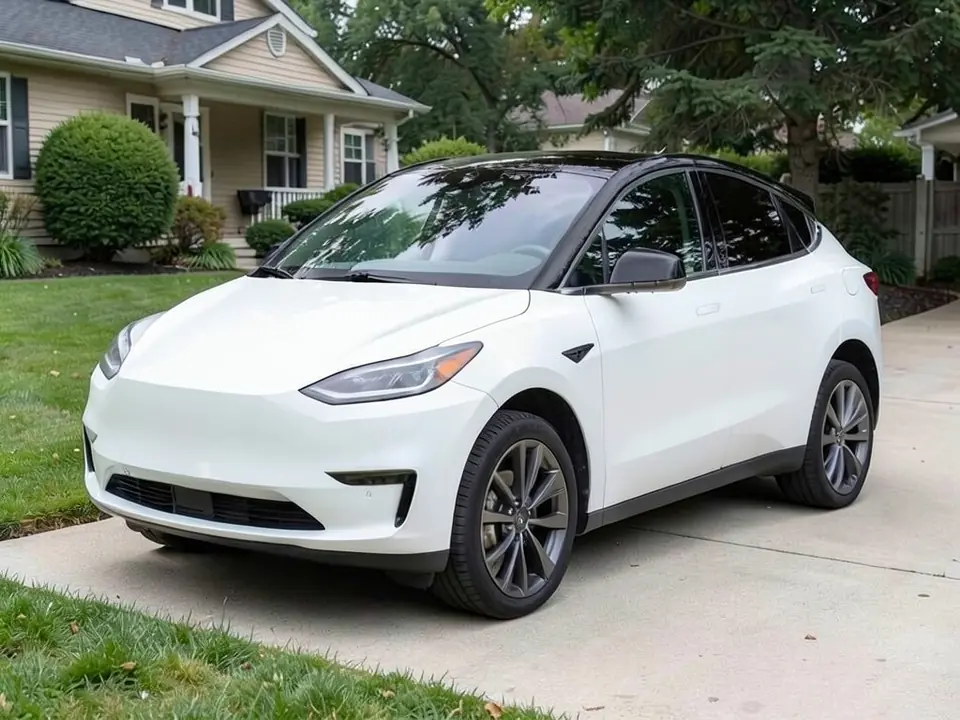
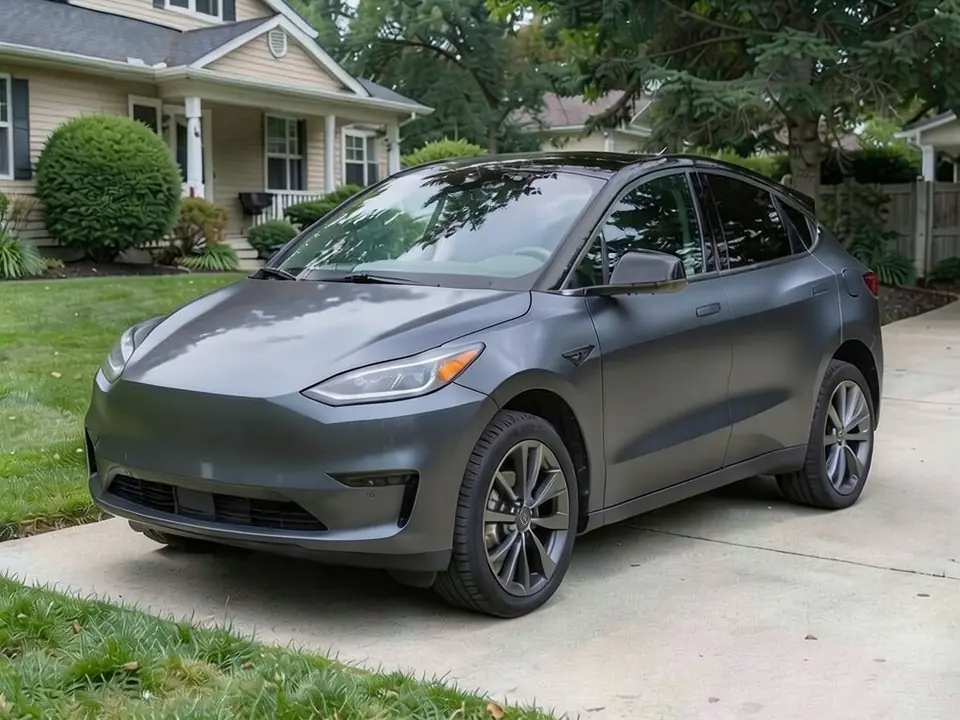
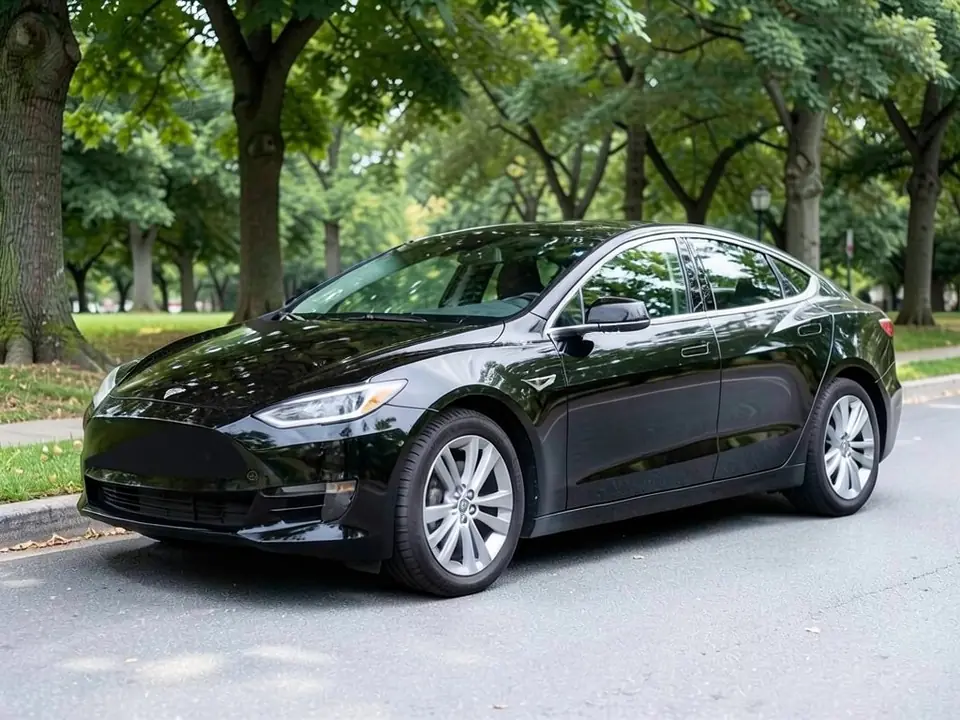
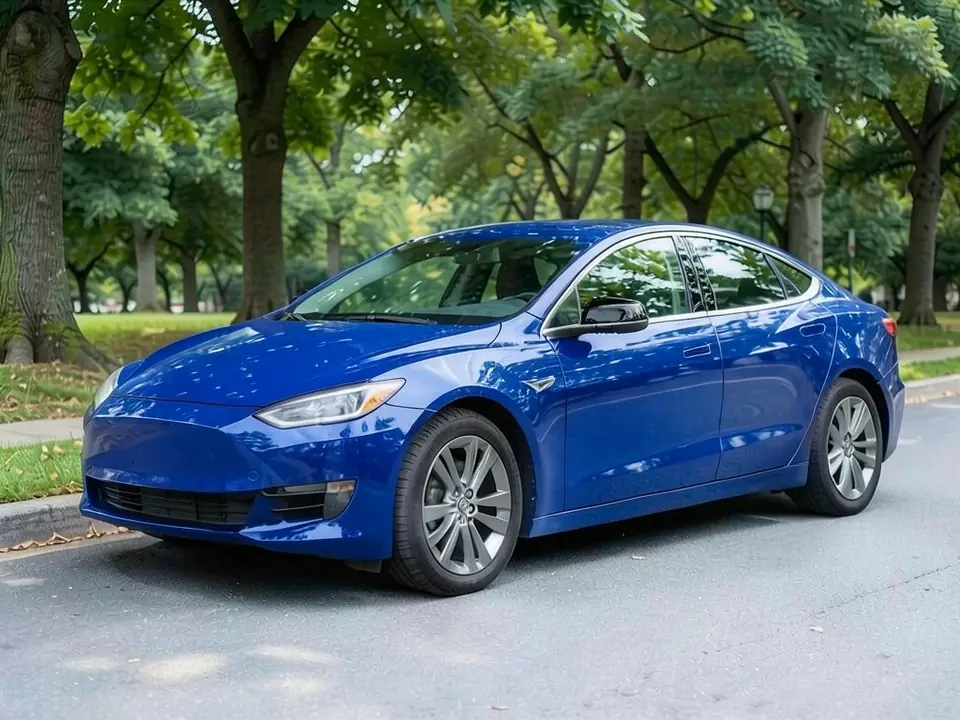
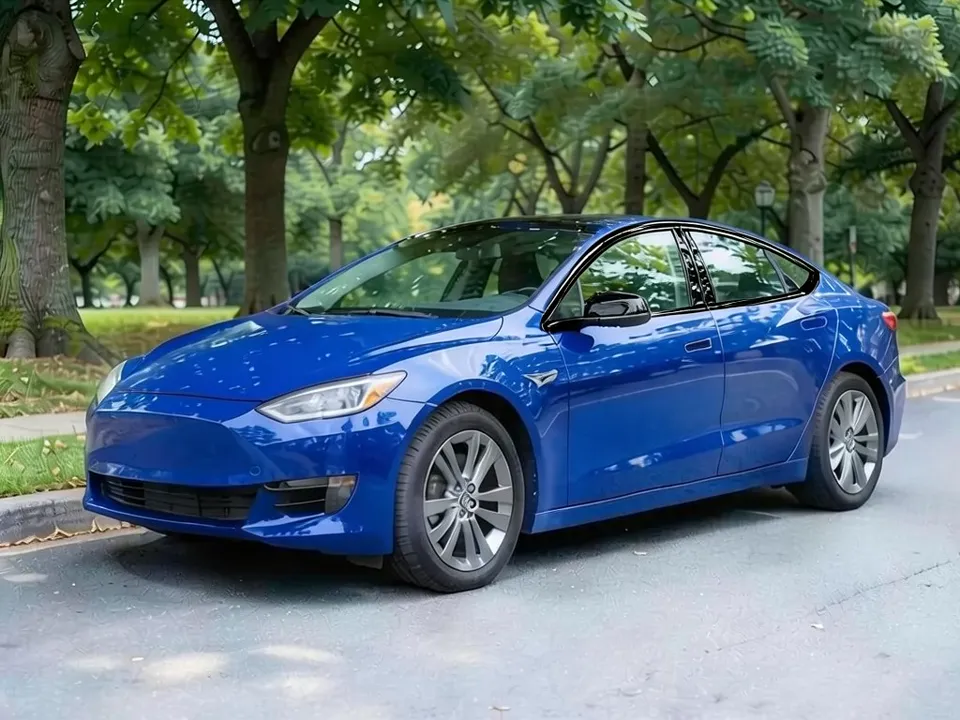
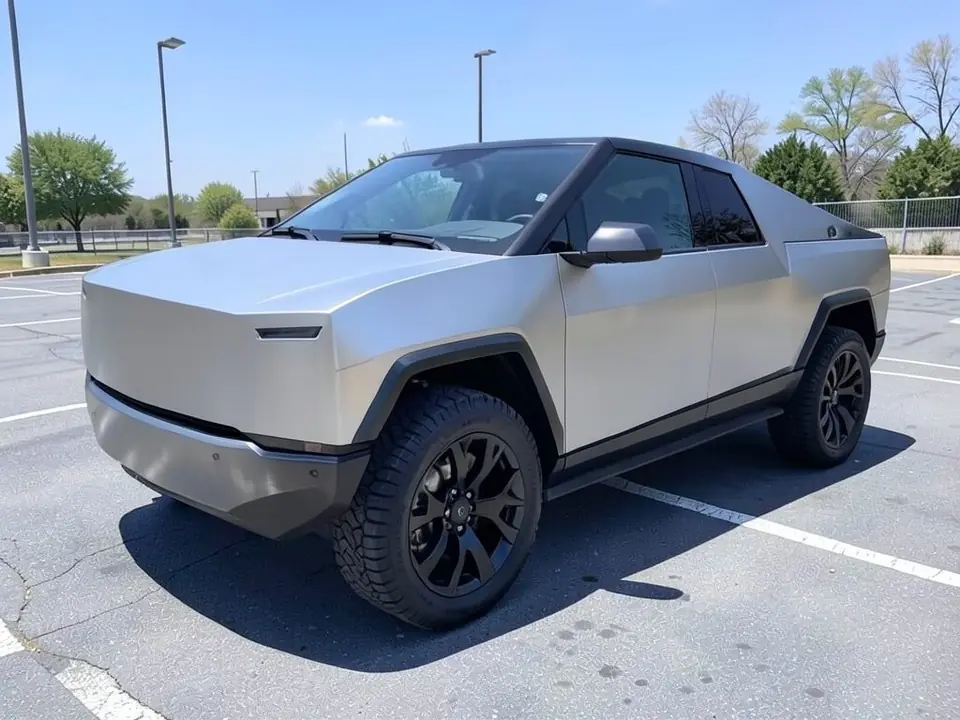
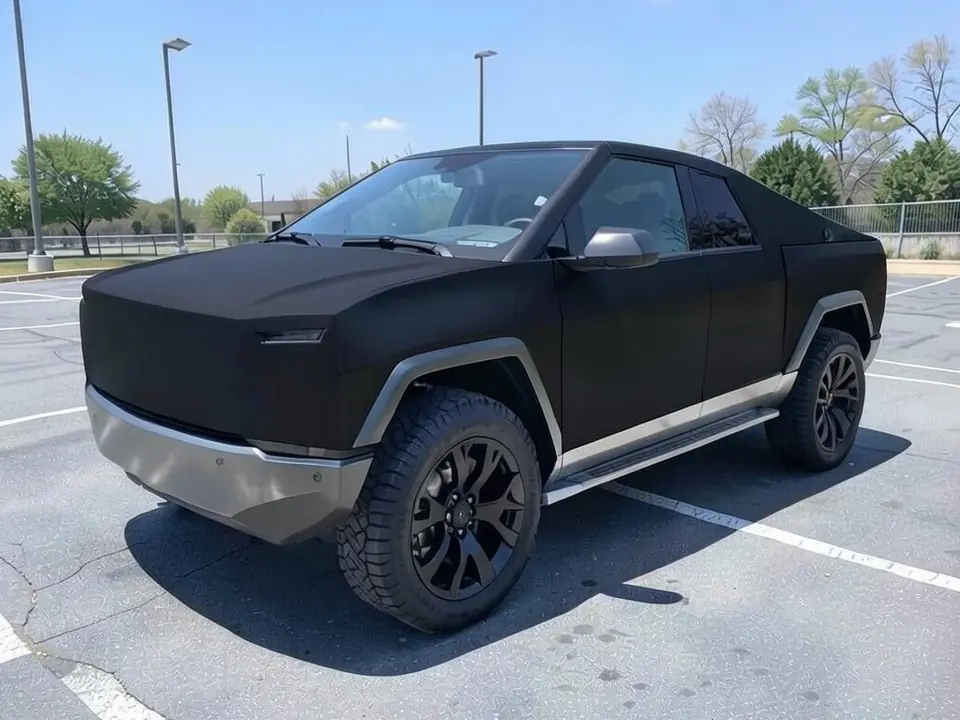
Both the before and the after images are AI-generated samples made with our own image model, not photos of real customer cars; the cars are Tesla-style models drawn by the AI. Each caption says what the AI changed besides the wrap or missed.
A photo preview, not a Paint Shop file
Some Tesla owners want a PNG design for Toybox or Paint Shop, so the car shows a custom wrap on its own touchscreen. WheelAI does not make those files. It shows what a real vinyl wrap would look like on a photo of your actual Model 3, Model Y, Model S, Model X or Cybertruck before you pay an installer.
WheelAI is not affiliated with Tesla, Inc. The model names are used only to describe the cars.
How to preview a wrap on your Tesla
There is no separate Tesla button. You use the Custom Vision mode of the Modifications tool and type the change in plain words.
- 1
Take a three-quarter photo of your car
Shoot the whole car in daylight from a front corner, so the nose, one side and the roof line are all in view.
- 2
Open the Modifications tool and pick Custom Vision
Upload your photo in the Modifications tool and switch to the "Custom Vision" mode.
- 3
Describe the wrap and what must stay the same
In the Modification Goals box, paste one of the four goals further down this page and edit it to match your photo. Name the color, the finish and the parts that must not change.
- 4
Render, compare and try another finish
Generate the image, compare it with your photo, then try the same color in another finish.
Gloss, satin, matte or color-shift: choosing a finish
Gloss
The closest look to factory paint and the easiest to keep clean, though swirl marks show more on dark gloss colors.
Satin
A soft sheen between gloss and matte. Satin dark grey and satin black suit the smooth Tesla body lines without the upkeep of full matte.
Matte
Flat and modern. Matte film cannot be polished or waxed, it can go shiny where it is rubbed hard, and it needs matte-safe soap.
Color-shift
A film that changes color with the viewing angle. A photo shows it from one angle only, so look at a real sample in daylight before you commit.
Always check a physical swatch on your car before you choose.
Wrap color ideas for each Tesla model
Model Y
Large, simple panels and a tall hatch make solid colors read well. The Hussle Customz Model Y wrap guide lists matte black, satin dark grey, military green and color-shift among owners' picks, plus gloss white over white paint for those who want the factory look under film.
Model 3
The low sedan suits deep gloss colors such as dark blue, dark red or dark green, or a sleek satin black. On older cars with chrome window trim, pair the wrap with a chrome delete.
Model S and Model X
The long Model S flanks show off satin and metallic finishes, and quieter dark colors suit its look. The tall sides and large doors of a Model X make a bold color cover a lot of area, so render it next to a more muted shade.
Cybertruck
The body is unpainted stainless steel with flat, angular panels, so the finish changes its look dramatically. Changing its color means covering the steel, and film is the reversible way to do it.
Wrap or repaint: what the choice means for a Tesla
Vinyl wrap
Reversible: the film sits on the factory paint and can be removed later, and it offers finishes the factory does not, such as matte, satin and color-shift. It is a cosmetic film, not chip protection.
Color PPF
Paint protection film in a color. It changes the color like a wrap but is thicker and designed to absorb stone chips. It usually costs more than a standard wrap.
Repaint
Permanent. Going back to the original color means painting again, so get the body shop's plan in writing.
Wrap guides warn that Tesla factory paint has a thin clear coat that can lift if a film with too strong an adhesive is used or removed carelessly. Ask the installer which film they use and how they remove it.
Partial wraps: roof, chrome delete and mirrors
You do not have to wrap the whole car. To preview a partial wrap, name only the parts that change.
- Chrome delete: cover the chrome window surrounds, handles and badges in gloss or satin black. The Hussle Customz guide recommends it with any dark or matte wrap. Tesla has moved away from chrome on newer cars, so yours may already have black trim.
- Roof: a contrasting gloss black roof is a popular partial wrap on white and silver cars. Much of the roof on many Teslas is tinted glass, so ask your installer which painted parts can take film.
- Mirrors: black or carbon-look mirror caps tie a dark wrap together.
- Cameras: the side repeater cameras on the front fenders must stay uncovered, so the film is cut around them. Never ask the AI or the installer to cover a camera.
Four Modification Goals you can paste
These are the exact texts behind the examples above. Paste one into the Modification Goals box, swap the car and background words for what is in your photo, and drop any part that does not fit. Avoid periods in the middle of a goal.
- Cover all painted body panels of the white crossover in a satin dark grey vinyl wrap; keep the black glass roof, windows, wheels, tires, lights, house, lawn and driveway exactly as they are
- Cover the painted body panels of the black sedan in a gloss deep blue vinyl wrap and cover all the chrome trim around the side windows in gloss black vinyl for a chrome delete; keep the black mirror caps black, keep the smooth nose with no emblem, and keep the wheels, tires, glass, lights, trees and street exactly as they are
- Chrome delete: change only the shiny chrome trim strips around the side windows to gloss black. Keep the deep blue paint, the wheels, mirrors, glass, headlights, the street, trees and the camera angle exactly the same.
- Cover the whole pickup body in a matte black vinyl wrap, including the stainless steel panels, the lower front bumper, the wheel arch flares and the side sills; keep the wheels, tires, glass, lights, sky and asphalt parking lot exactly as they are
What the AI can and cannot do
Our image model redraws the whole photo, not just the body panels, so side effects happen. In our tests it wrapped black mirror caps and trim in the body color, missed a chrome delete asked for in the same request as a full wrap (a second, chrome-delete-only request then got it), turned black wheel-arch flares silver, left a steel bumper uncovered and sometimes added a badge. If a render misses something, run it again and say more clearly what must change and what must stay, or ask for the missed part on its own as a second edit.
It will not give you a film product name, a color code, a quote or a guarantee that an installer can match the shade. Use the render to choose a direction, then check a real vinyl swatch on your car in daylight.
Frequently asked questions
Does this make a Toybox or Paint Shop wrap file for my Tesla screen?
No. WheelAI does not make the PNG files you load into Toybox, Paint Shop or the Tesla app to change how the car looks on its own touchscreen, and it does not make printing or cutting files for vinyl. It edits a real photo of your car so you can judge a physical wrap before you book an installer.
Is WheelAI affiliated with Tesla?
No. WheelAI is an independent tool and is not affiliated with, endorsed by or sponsored by Tesla, Inc. We use the model names only to say which cars this page is about.
Will a wrap affect my Tesla warranty?
We cannot give warranty or legal advice. Before you book, ask Tesla service and your wrap installer your exact questions in writing, and keep the installer's paperwork listing the film and the work done.
Is a wrap cheaper than repainting a Tesla?
It depends on the film, the finish, how many panels you cover, extras such as a chrome delete, and the shop. Color-shift and other specialty films usually cost more than standard gloss or satin. Get written quotes for both a wrap and a respray of your exact car.
How long does a Tesla wrap last?
It depends on the film, sun exposure and washing. Ask the installer what the film maker rates their film for and what their workmanship warranty covers. Hand washing and shade help.
How long does it take to wrap a Tesla?
A full wrap is a multi-day job, not a same-day visit. The Model Y wrap guide from the wrap shop Hussle Customz plans three to five working days for washing and prep, panel-by-panel application and a final inspection, and adds about half a day for a chrome delete. Ask your shop for their own schedule.
Can I wrap only the roof, the mirrors or the chrome trim?
Yes. A chrome delete, black or carbon-look mirror caps, a contrasting roof or racing stripes are all common partial wraps. Preview them in Custom Vision by naming only the parts that should change.
Is the Tesla wrap visualizer free?
You need to sign in with your email or a Google account. Most new accounts get 5 free credits that last 30 days, and a standard render uses 1 credit, so you can try up to 5 wrap colors or finishes before deciding whether to buy more. Free renders carry a WheelAI watermark; an active paid plan removes it.
Ready to pick your Tesla wrap?
Compare a gloss, a satin and a matte wrap on your own photo before you book a wrap shop.
Preview a wrap on my TeslaAlso try: Car Wrap Visualizer · Rim Visualizer · Color Changer · Roof Wrap Visualizer · Hood Wrap Visualizer · Chrome Delete Visualizer