Rivian Wrap Visualizer for a Photo of Your R1T, R1S or R2
Upload a photo of your Rivian, ask for a matte, satin, gloss or color-shift wrap, a contrast roof or a two-tone look, and see it on your own vehicle before you book a wrap shop.
Preview a wrap on my RivianSign in with email or Google to render. Most new accounts get 5 free credits (valid 30 days); a standard render uses 1 credit. Free renders carry a WheelAI watermark.
Before and after examples
Each pair shows a vehicle photo and the same photo after one Modification Goals request. We sent each goal to the same image model the Custom Vision mode uses, at a higher quality setting than the live tool, and kept the better of two renders, so your own render may come out rougher. The exact Modification Goals text is printed under each pair.
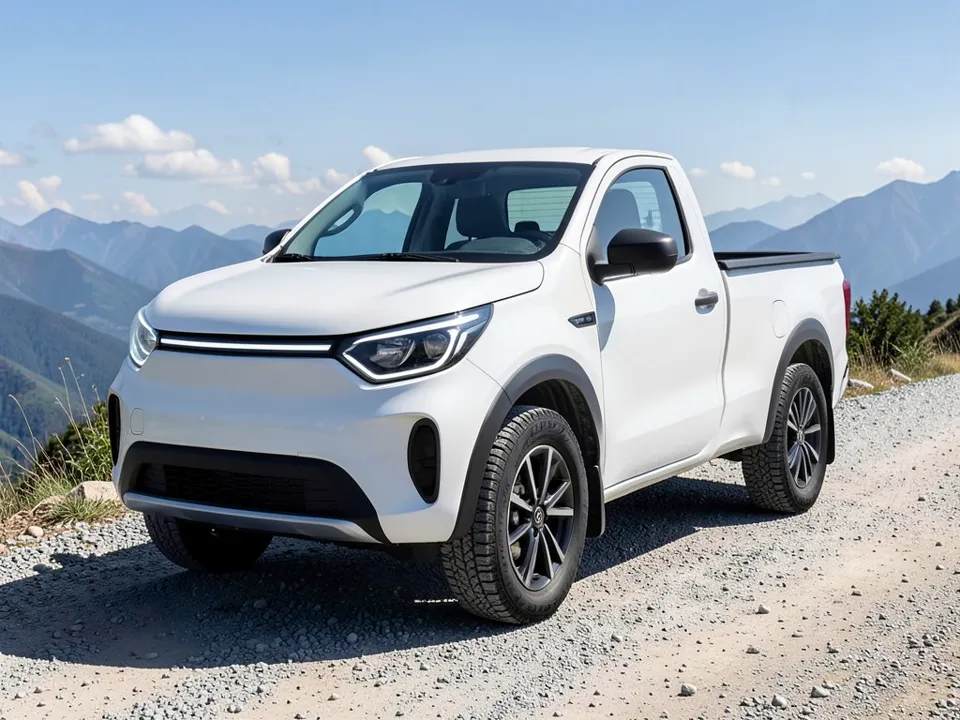
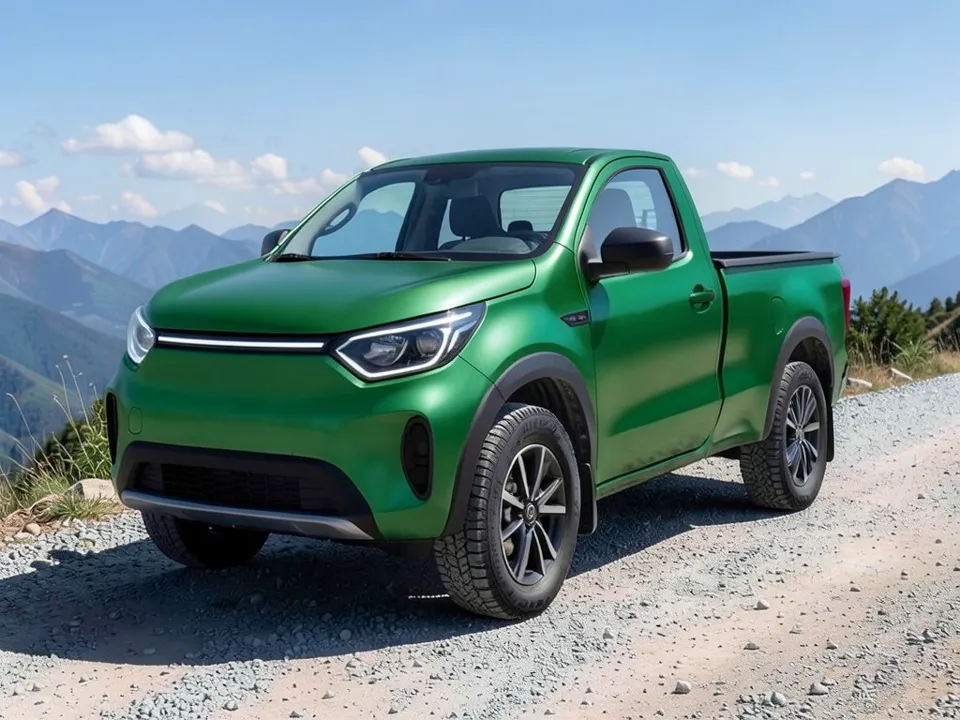
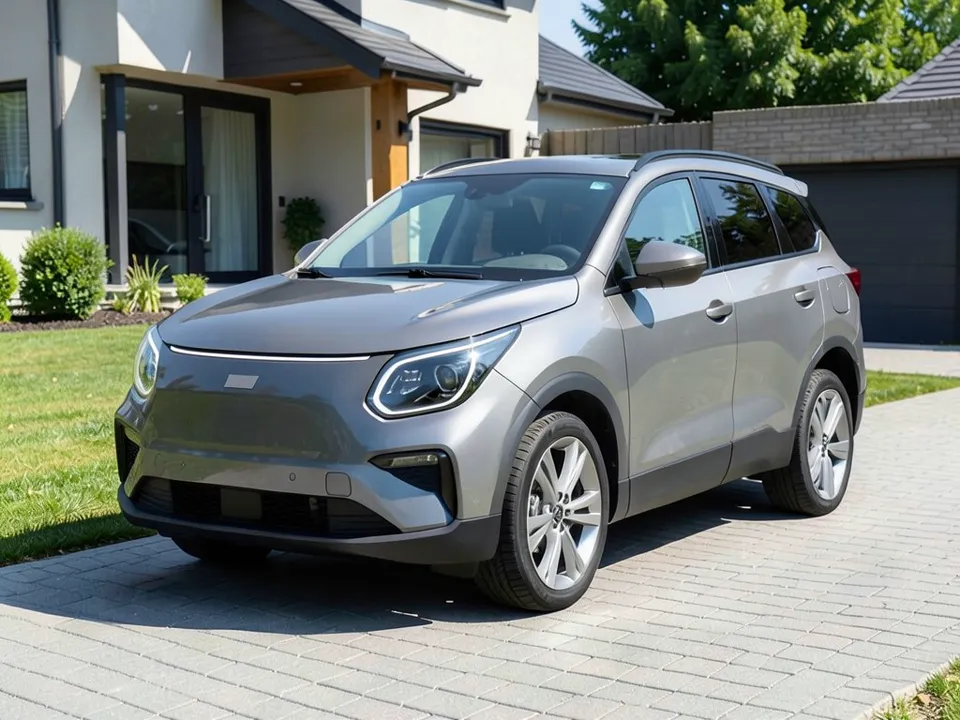
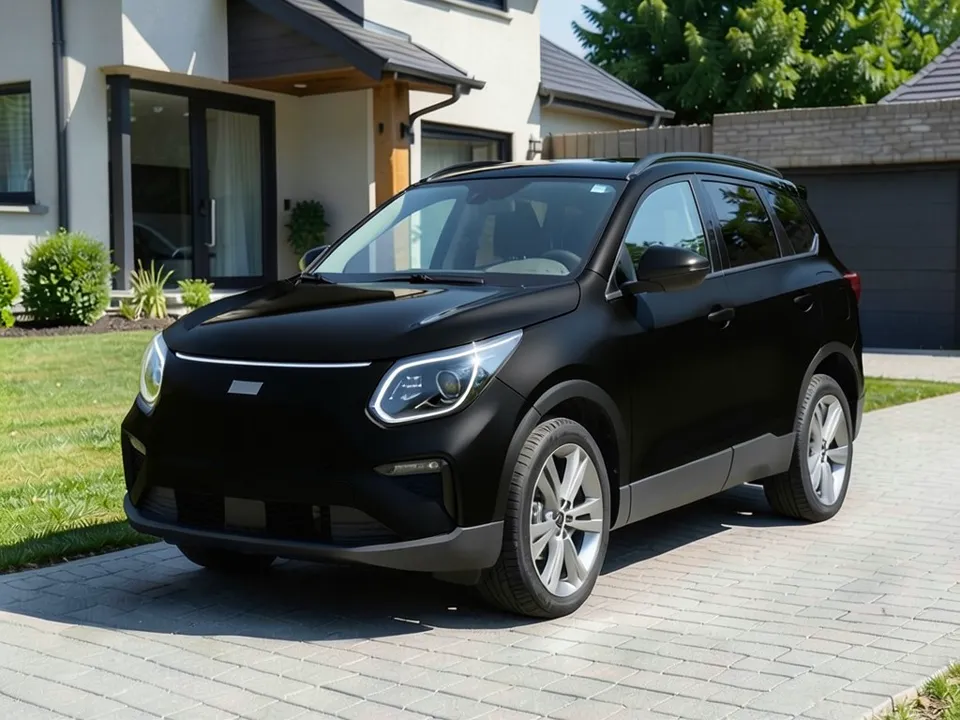
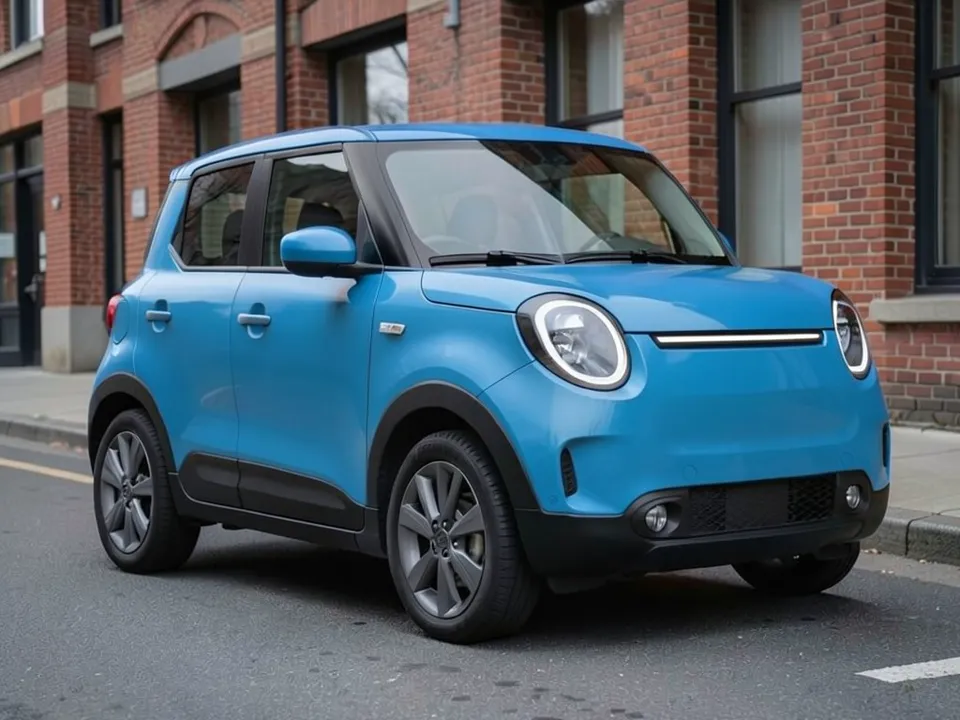
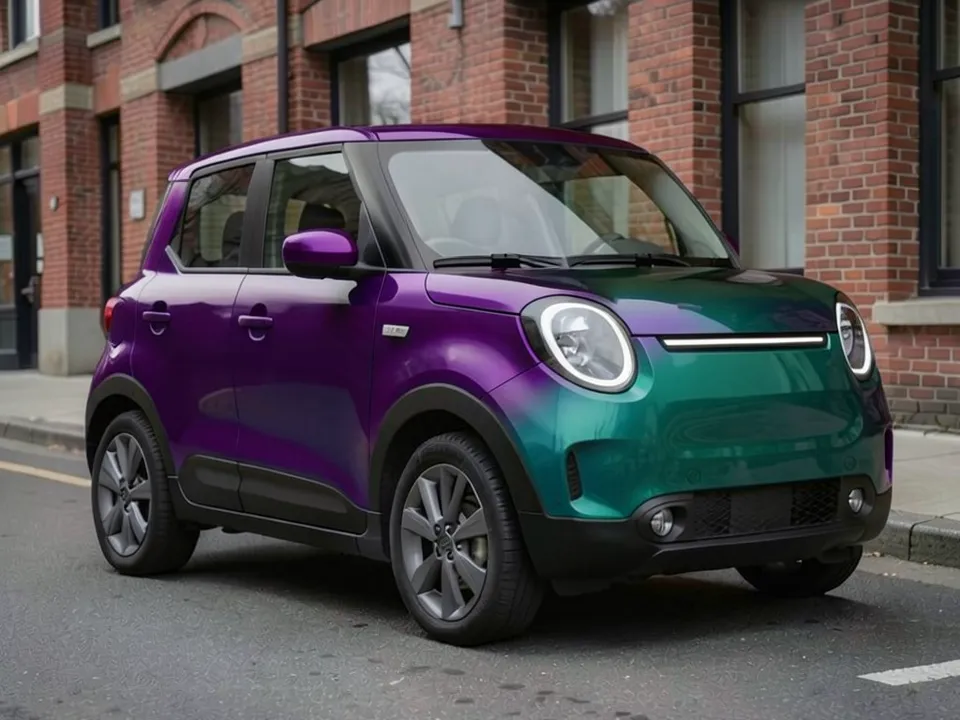
Both the before and the after images are AI-generated samples made with our own image model, not photos of real Rivians or customer vehicles. The vehicles are generic electric pickup and SUV stand-ins drawn by the AI, not Rivian lookalikes, with no Rivian badges; two of the before images were cleaned with a second AI edit to remove badge-like shapes the model had drawn. Each caption says what the AI changed besides the wrap, and which requests it did not clearly follow.
A wrap preview on your own Rivian photo
A wrap color can look very different across the large, smooth panels of an R1T, R1S or R2. WheelAI edits a photo you took of your own vehicle, so you can compare a matte, satin, gloss or color-shift wrap in the light and setting you know before you talk to an installer.
WheelAI is not affiliated with or endorsed by Rivian. No Rivian logos are used on this page, and the example vehicles below are AI-drawn stand-ins.
How to preview a wrap on your Rivian
There is no separate Rivian button. You use the Custom Vision mode of the Modifications tool and describe the wrap in plain words.
- 1
Take a three-quarter photo
Shoot the whole vehicle in daylight from a front corner, so the nose, one side and as much of the roof as possible are in view.
- 2
Open the Modifications tool and pick Custom Vision
Upload your photo in the Modifications tool and switch to the "Custom Vision" mode.
- 3
Describe the wrap and what must stay
In the Modification Goals box, paste one of the goals further down this page and edit it to match your photo. Name the color, the finish and every part that must not change.
- 4
Transform, compare, repeat
Press "Transform Vehicle", compare the result with your photo, then try the same color in another finish or a second color.
Matte, satin, gloss or color-shift
Gloss
Closest to factory paint and easy to wipe clean. Dark gloss colors show swirl marks more than light ones.
Satin
A low sheen between gloss and matte that softens reflections on big flat doors. Earthy satin greens, sands and grays suit an adventure truck or SUV.
Matte
Flat with almost no reflection. Matte film needs matte-safe soap and should not be polished or waxed.
Color-shift
A film that changes color as you walk around the vehicle. A still image shows it from one angle only, so see a real sample outdoors before you decide.
Ask for the finish in plain words in your goal and check the render closely: the AI can drift between satin and gloss.
Partial wraps and two-tone ideas
A full wrap is not the only option. To preview a partial wrap, name only the parts that change and list what stays.
- Contrast roof: a gloss black roof over a lighter body. If your roof is glass, ask your installer which painted parts can take film, and shoot from a higher angle so the roof shows in the photo.
- Lower panels: a darker color on the doors below the body line or along the sills gives a two-tone look without covering the whole side.
- Front panel: a contrasting color on the nose around the light strip. Keep the lamps, sensors and cameras clear of film, and tell the AI to keep them as they are.
- Mirror caps and accents: black or body-color mirror caps and thin stripes tie a wrap together.
Notes for the R1T, R1S and R2
R1T
Say whether the bed sides and tailgate get the wrap too. If your truck has a bed cover, a rack or other accessories, put them in the keep list.
R1S
The longer roof and rear quarter panels of the SUV give a contrast roof or a two-tone body a lot of area, so render the full and partial versions side by side.
R2
The smaller SUV has shorter panels, so a bold color or a color-shift film covers less area. Compare it with a quieter satin shade before you choose.
Three Modification Goals you can paste
These are the exact texts behind the examples above. Paste one into the Modification Goals box, swap the vehicle and background words for what is in your photo, and drop any part that does not fit. Avoid periods in the middle of a goal.
- Cover all white painted body panels of the pickup truck in a satin forest green vinyl wrap with a soft low sheen; keep the black wheel arch trim, black lower bumper, gray wheels, tires, glass, headlights, light strip, mountains and gravel exactly as they are
- Cover the gray doors, fenders, hood, nose and body sides of the SUV in a flat matte black vinyl wrap with no shine, and cover only the roof panel in shiny gloss black vinyl; keep the black window trim, roof rails, silver wheels, tires, glass, headlights, light strip, house, lawn and driveway exactly as they are
- Cover all blue painted body panels of the compact SUV, including the roof, mirrors and hood, in a color-shift vinyl wrap that flows from deep purple to teal blue across the panels; keep the black lower trim and bumper, gray wheels, tires, glass, round headlights, light strip, brick building and street exactly as they are
What the AI can and cannot do
Our image model redraws the whole photo, not only the painted panels. It usually keeps the wheels, glass, lights and body shape, but the captions above show what can slip: the shade came out brighter than asked, a satin request looked closer to semi-gloss, mirror caps turned black, roof rails came out darker, small sensor details disappeared and the vehicle moved slightly in the frame. If a render misses, run it again, name the part more clearly, or ask for the missed part on its own as a second edit.
It will not give you a film product name, a color code, a quote or a promise that an installer can match the shade. Use the render to choose a direction, then check a real vinyl sample on your Rivian in daylight.
Frequently asked questions
Is WheelAI affiliated with Rivian?
No. WheelAI is an independent tool and is not affiliated with or endorsed by Rivian. The model names R1T, R1S and R2 appear here only to say which vehicles this page is about.
Can I preview a wrap on a photo of my own Rivian?
Yes. Upload your own photo in the Modifications tool, pick the Custom Vision mode and describe the wrap in the Modification Goals box. The AI edits that photo, so you see the color on your truck or SUV in your own driveway or street.
Which Rivian models can I use?
Any clear photo of an R1T, R1S or R2 works, from any model year. The tool does not identify your model or trim; it edits what it sees, so a sharp three-quarter photo in daylight gives the best result.
What colors and finishes can I try?
Any color you can put into words, in gloss, satin, matte, metallic or color-shift. Name the finish plainly, for example "flat matte black with no shine". The AI does not know vinyl brand names or film codes, so describe the look rather than a product.
Can I preview a partial wrap or a two-tone look?
Yes. Name only the parts that should change, such as the roof, the lower panels or the mirror caps, and list everything that must stay. Pick a photo angle that shows those parts: in our second example the gloss roof could not be judged because the roof is barely in view.
Is the preview accurate?
Treat it as a guide, not a color match. In our examples the green came out brighter than forest green and the satin sheen looked closer to semi-gloss. Real film also looks different in sun and shade, so hold a physical swatch against your Rivian before you book.
Is the Rivian wrap visualizer free?
You need to sign in with your email or a Google account. Most new accounts get 5 free credits that last 30 days, and a standard render uses 1 credit, so you can try up to 5 wrap colors or finishes before deciding whether to buy more. Free renders carry a WheelAI watermark; an active paid plan removes it.
Ready to pick your Rivian wrap?
Compare a gloss, a satin and a matte wrap on your own photo before you book a wrap shop.
Preview a wrap on my RivianAlso try: Car Wrap Visualizer · Tesla Wrap Visualizer · Rim Visualizer · Racing Stripes Visualizer