Color Shift Wrap Visualizer: See Chameleon Film on Your Own Car
Upload a photo of your own car, describe the color-shift pair you are considering, and see it on your car. A still image can only show one angle of the shift, so treat it as a first look.
Preview a color-shift wrap on my carSign in with email or Google to render. Most new accounts get 5 free credits (valid 30 days); a standard render uses 1 credit. Free renders carry a WheelAI watermark.
Before and after examples
Each pair is one car photo and the same photo after one Modification Goals request, sent to the image model that Custom Vision uses but with more processing steps than the live tool default, so your own render may be rougher. Each after-image is a single run. We re-ran some of the before photos because they came out with stray badges, and show the ones we kept. The full request text sits under each pair.
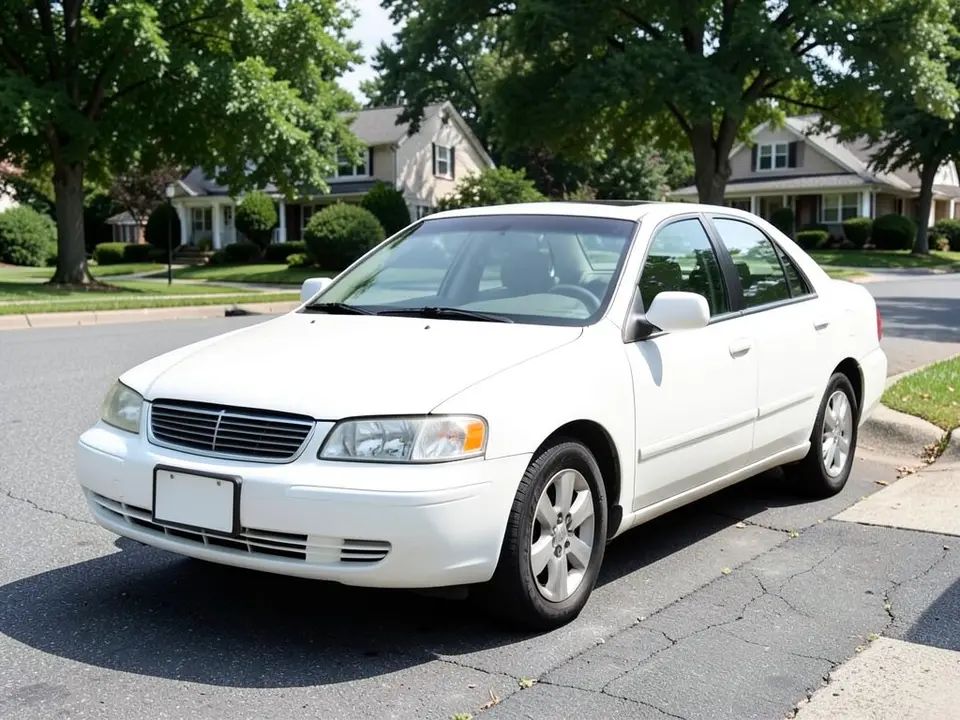
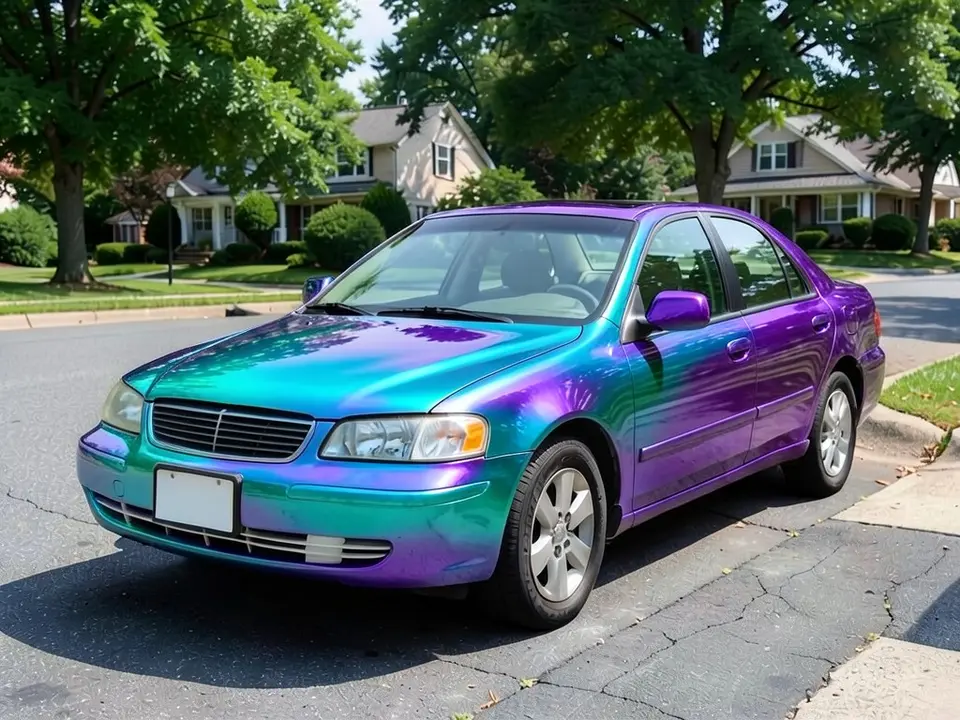
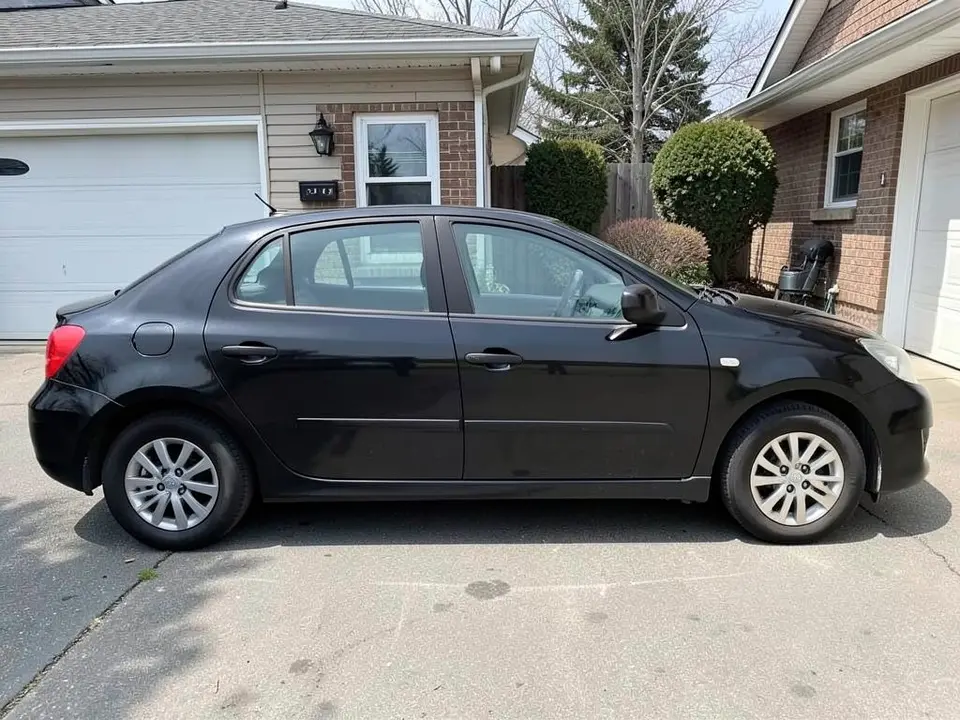
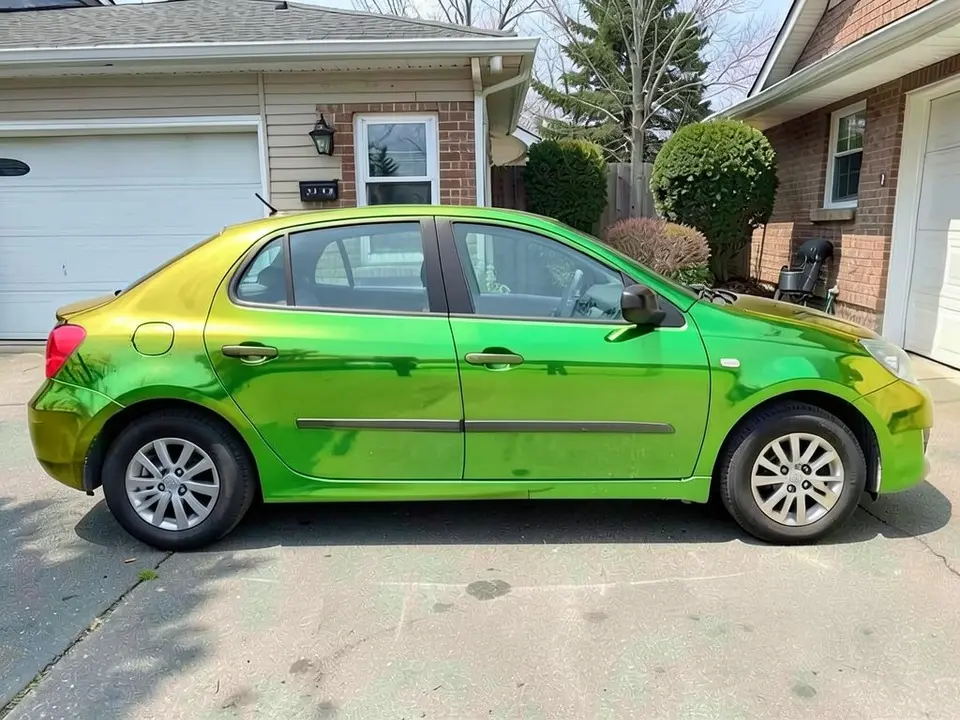
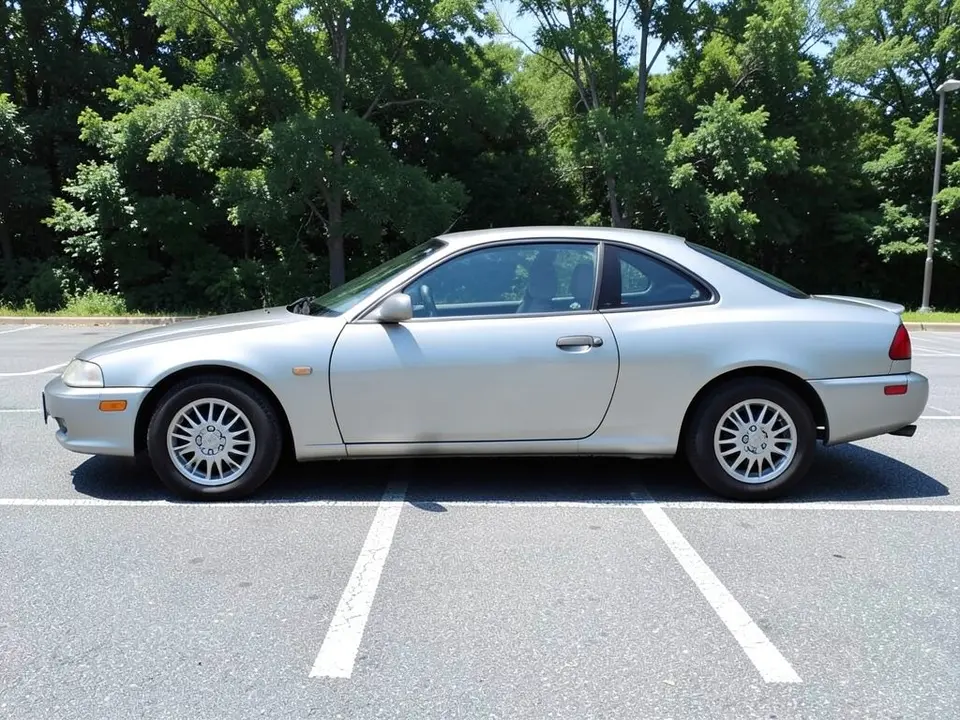
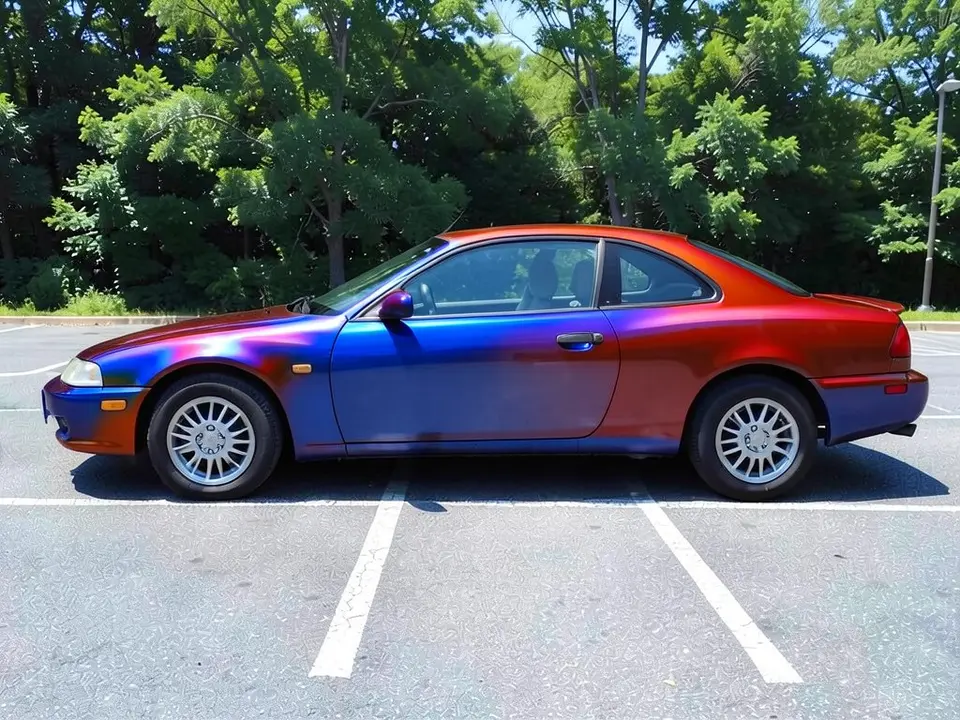
All before and after images are AI-drawn samples from our own image model, not photos of real customer cars. The cars are plain generic cars with blank plates. Under each pair we list which parts of the request worked, which did not, and any change we never asked for. None of these pictures can show the color changing with the angle.
See a color-shift wrap on your own car first
A color-shift wrap is a film that appears to change color as the light and your viewing angle change. Wrapmate describes it as one of the flashiest wrap options. It is also one of the harder ones to judge from a swatch, because a small sample shows only a patch of the effect.
WheelAI redraws your own photo with the color pair you describe, so you can see how teal and purple, or gold and green, sit on your car's shape before you talk to an installer. The example cars below are AI-drawn generic stand-ins, not photos of real customer cars or a specific make.
What a still image cannot show
The whole point of this film is that the color moves. A single picture cannot show that. When you ask for a flip, the AI paints one frozen version: in our examples one color sits on the hood and bumper and the other on the doors and rear, or a patch of each meets on a door. A real car in sunlight would show a different mix from each side and at each time of day.
So use the render for the questions it can answer: do these two colors look good together on my car, and does the car's shape suit a bold finish? Then go and look at the real film.
How to preview a color-shift wrap
There is no special color-shift mode. The Modifications tool edits any vehicle photo, and its Custom Vision mode takes your own wording.
- 1
Take the photo
Stand at a front corner or square to the side in daylight, with the whole car in the frame and some space around it.
- 2
Open the Modifications tool
Upload your photo and switch to Custom Vision.
- 3
Name the pair and what stays
In the Modification Goals box, write "color-shift chameleon vinyl that flips from [color] to [color]", say glossy or satin, and list what must stay the same: windows, wheels, tires, bumpers, mirrors, background and camera angle.
- 4
Compare and refine
Look at the result next to your original. Try one pair at a time on the same photo so the comparison is fair.
Color pairs to compare
Teal to purple
On our white car the front came out teal and the rear purple, with the two blending along the doors. A cool, high-contrast pair.
Gold to green
On our black car the doors came out green and the front and rear edges gold. It looked bright and glossy, and the shift read as two distinct zones.
Blue to red
On our silver car the front half came out blue and the rear and roof red, with a purple band between them. The shift was the most visible of the three.
Your own pair
Any two colors you can name. If a render does not show a pair clearly, try a shorter request, or name the pair in the other order.
Before you book an installer
- Ask for a physical sample or a test panel and look at it outdoors, in sun and in shade, from several angles.
- Ask which film pair and finish you are being quoted, and for a written quote for your own car.
- Ask the installer how doors, handles, mirrors and bumpers are handled, and whether panel seams will show the shift differently.
- Ask how the wrap is removed and what that does to the paint underneath.
- Check any local rules or insurer requirements on a color change, and tell your insurer if the color changes.
Three Modification Goals to paste
We used these requests for the examples. Copy one into Modification Goals, swap the colors and background words for your own, and delete anything that does not apply.
- Change ONLY the paint: wrap the car body in a color-shift chameleon vinyl that flips from teal to purple, glossy; keep the windows, wheels, tires, bumpers, grille, mirrors, street, houses, trees and the camera angle exactly the same
- Change ONLY the paint: wrap the car body in a color-shift chameleon vinyl that flips from gold to green, glossy; keep the windows, wheels, tires, bumpers, tail lights, driveway, house and the camera angle exactly the same
- Change ONLY the paint: wrap the car body in a color-shift chameleon vinyl that flips from blue to red, glossy; keep the windows, wheels, tires, bumpers, mirrors, parking lot, trees and the camera angle exactly the same
What the AI does well and where it slips
The new colors cover the doors, hood, fenders and roof, and the windows, wheels and tires mostly stay put. Three things slip: the flip itself is painted as a fixed blend, the bumpers and mirrors can take the color even when you asked to keep them, and the road or driveway looks different after an edit. If a render misses, rerun it with shorter, plainer wording.
Frequently asked questions
Can a picture show how a color-shift wrap really looks?
Only partly. Color-shift (chameleon) film changes color with the light and the angle you view it from, and a still image is one angle in one light. When you ask for a flip such as teal to purple, the AI cannot show the flip. It paints one fixed blend, usually one color on some panels and the other color on others. Use the render to judge whether you like the pair of colors on your car, then look at a real film sample outdoors and from several angles.
Is there a free color shift wrap visualizer that uses my own car photo?
Yes. Sign in with email or Google, upload a photo of your car, and describe the color pair in the Modification Goals box. Most new accounts get 5 free credits that last 30 days, and a standard render uses 1 credit. Free renders carry a WheelAI watermark. It edits your own picture rather than a stock car.
Which color-shift pairs can I try?
Any pair you can name, for example teal to purple, gold to green or blue to red, which are the three on this page. Say which color shows first, say glossy or satin, and list what must stay the same. Expect the AI to place the two colors on different panels rather than blending them smoothly, as in our examples.
Will the render match the film I would buy?
No. Different film makers sell different pairs and finishes, and a screen cannot show how a given film shifts. Treat the render as a rough idea of the colors and ask the installer for a physical sample or a test panel. We do not name or compare film brands here.
What does a wrap do that paint does not?
The Wrapmate article "The Best Car Wrap Colors: How to Choose the Best One" (byline: Marketing Team, no date shown) says a wrap can be removed, that it lets you try a bold color without a permanent commitment, and that the original paint stays underneath, which it says can help if you plan to sell. Wrapmate sells wraps, so read that as a seller's view. A render shows the look only, not how the film wears or comes off.
What if the AI changes something I did not ask for?
It can. The image model redraws the whole photo. In our three examples the windows, wheels and tires stayed as asked, but the bumpers and mirrors took the color in some of them, and the road looked different after every edit. Write what must stay the same, compare the result with your original, and rerun if a part changed.
Does the render show cost, install time or whether the film is legal on my car?
No. It shows a look only. It gives no price, no install time and no information on local rules for vehicle color changes or registration. Ask your installer and check your local rules before you commit.
How is this different from the car wrap visualizer?
The car wrap visualizer page is about plain color and finish changes such as matte, satin and gloss. This page is about the flip-color finish and the one thing a picture cannot do for it. The tool is the same; only the wording of the Modification Goals changes.
Ready to try a color-shift pair?
Compare a few color pairs on one photo, then take your favorite to an installer for a real film sample you can look at from every angle.
Preview a color-shift wrap on my carAlso try: Car Wrap Visualizer · Hood Wrap Visualizer · Roof Wrap Visualizer · Chrome Delete Visualizer · Wheel Color Visualizer