Food Truck Wrap Visualizer: See a New Wrap on Your Own Truck
Upload a photo of your own food truck or trailer, describe a color, stripe or pattern, and see it on your vehicle before you brief a printer. Logos, names and menu text are not reliable.
Preview a wrap on my truckSign in with email or Google to render. Most new accounts get 5 free credits (valid 30 days); a standard render uses 1 credit. Free renders carry a WheelAI watermark.
Before and after examples
Each pair is one vehicle photo and the same photo after one Modification Goals request, sent to the image model that Custom Vision uses but with more processing steps than the live tool default, so your own render may be rougher. Each after-image is a single run. We re-ran two before photos because an early version showed a pedestrian and another looked like a plain delivery van, and show the ones we kept. The full request text sits under each pair.
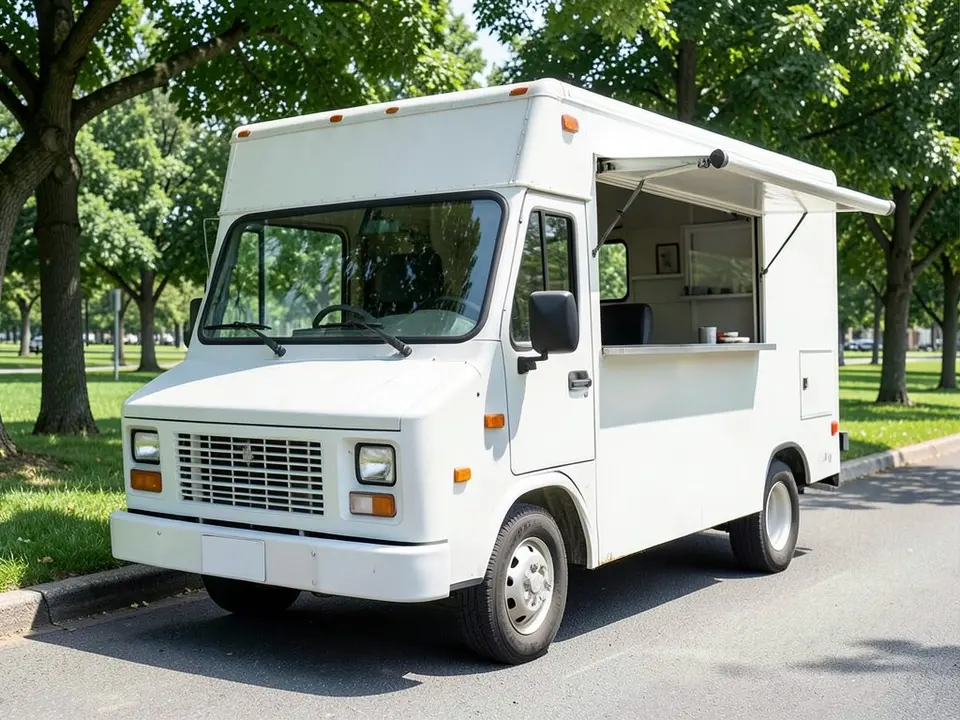
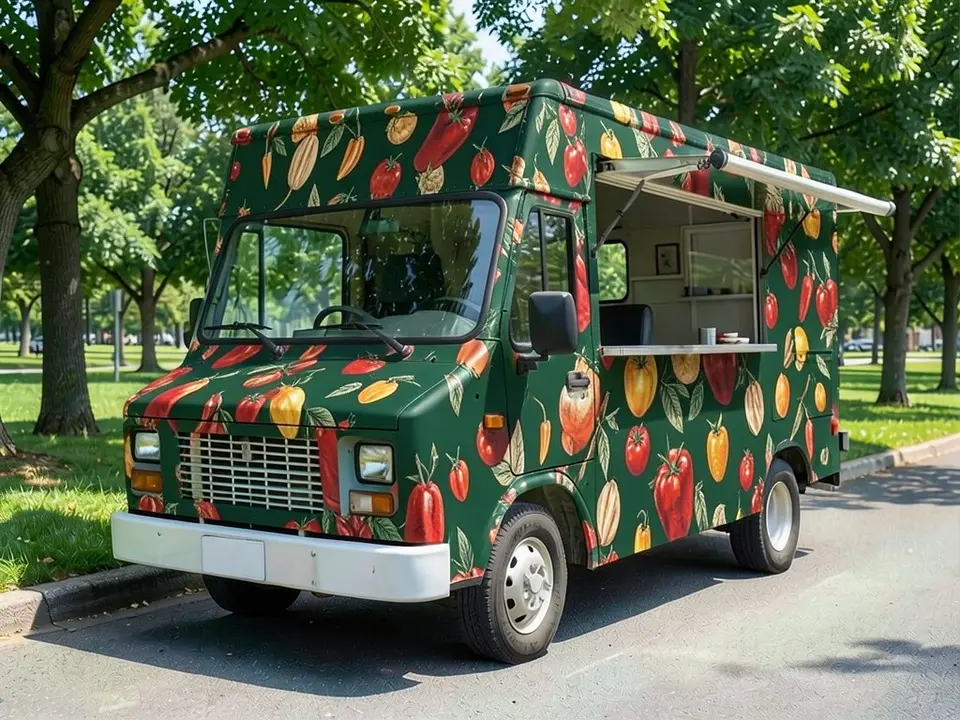
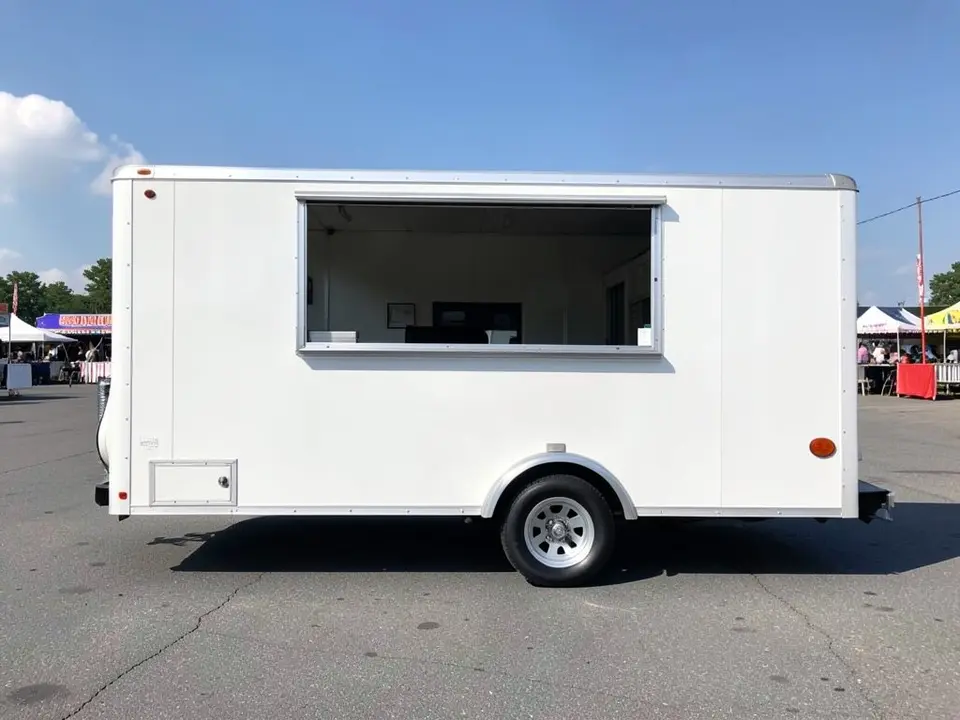
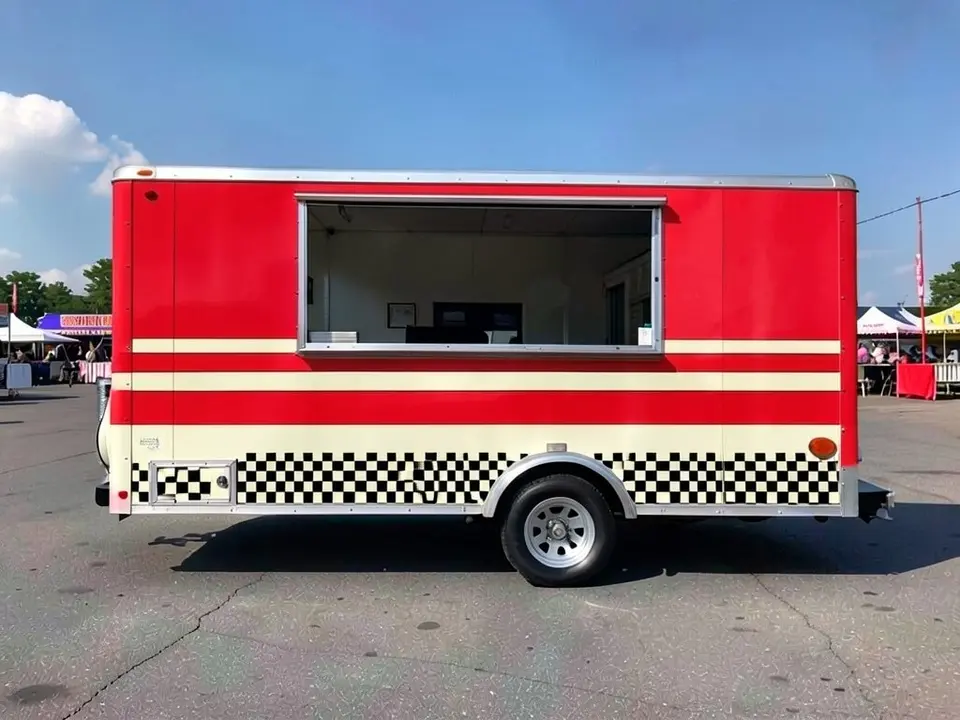
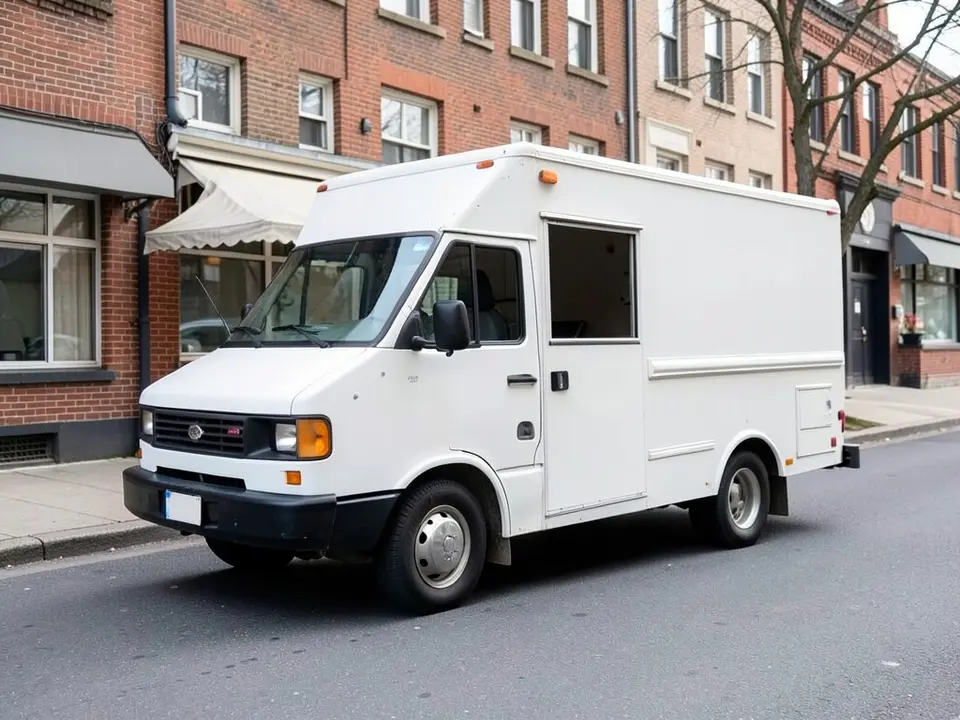
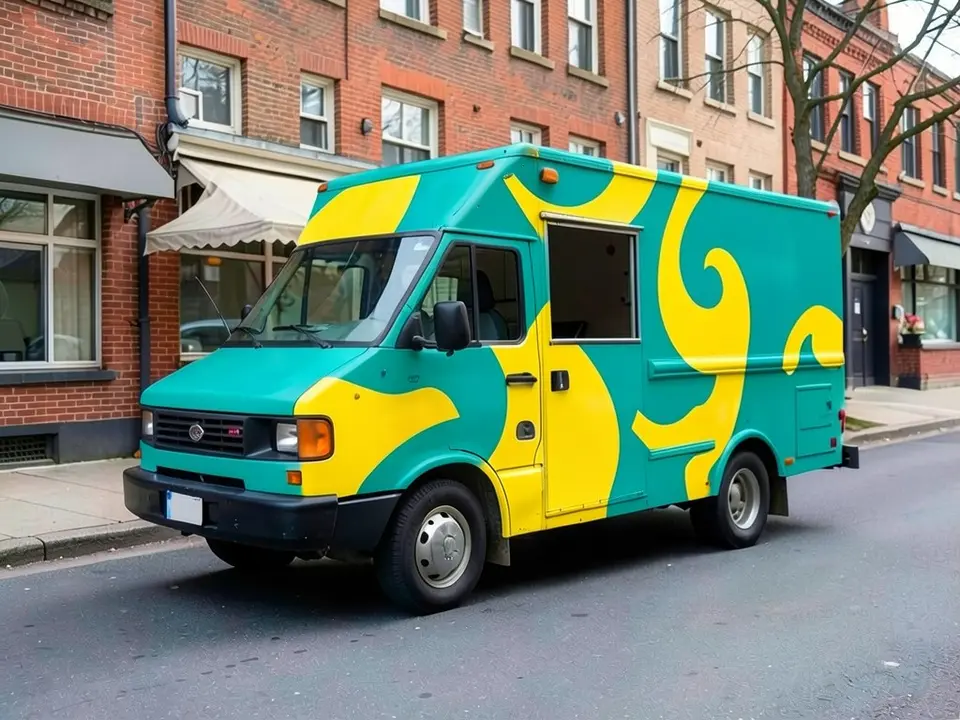
All before and after images are AI-drawn samples from our own image model, not photos of real customer trucks. The vehicles are plain generic stand-ins with no lettering or logos, and none of the wraps contain readable text. Under each pair we list which parts of the request worked, which did not, and any change we never asked for.
See a wrap on your own food truck first
A food truck is a moving sign, so the colors and pattern you pick matter before a single sheet of film is printed. WheelAI redraws your own photo with the look you describe, so you can compare a few directions on the same truck before you brief a designer or ask printers for quotes.
The example vehicles below are AI-drawn generic stand-ins, not photos of real customer trucks.
How to preview a food truck wrap
There is no special food truck mode. The Modifications tool edits any vehicle photo, and its Custom Vision mode takes your own wording.
- 1
Take the photo
Stand square to the serving side or at a front three-quarter angle in daylight, far enough back to fit the whole truck with space around it.
- 2
Open the Modifications tool
Upload your photo and switch to Custom Vision.
- 3
Name the look and what stays
In the Modification Goals box, describe one wrap look and say to use no text or logos. List what must stay the same: serving window, awning, wheels, tires, background and camera angle.
- 4
Compare and refine
Look at the result next to your original. Try one look at a time on the same photo.
Looks we compared
Color block with swirls
On a white box truck we asked for teal and yellow swirls. It drew a teal body with large yellow swirl shapes that run across the cab and the side. The swirls are loose and uneven, not a tidy repeating pattern.
Retro stripes and checkerboard
On a white trailer it made the upper body bright red, added two cream stripes under the window and a black and white checkerboard band along the bottom. The checkerboard also ran across the small hatch at the lower left.
All-over illustrated pattern
On a white step truck it covered the body in dark green with painted tomatoes, peppers and leaves. The pattern is dense and busy and also covers the front of the cab, with no readable text.
Before you brief a printer
- Ask the printer for a measured template of your exact truck or trailer, and have your designer lay your logo, name and menu out on it.
- Think about how the design reads from a distance and from the front and rear, not only from the serving side.
- Ask how the wrap is handled around the serving window, awning, vents, hatches and door seams.
- Ask for a physical sample of the exact film and look at it outdoors.
- Get several written quotes and look at examples of past work.
- Check local rules and any event or market requirements before you change the look.
Three Modification Goals to paste
We used these requests for the examples. Copy one into Modification Goals, swap the colors and background words for your own, and delete anything that does not apply.
- Change ONLY the exterior wrap: wrap the food truck body in a bold color-block design of teal and sunny yellow with large abstract swirl shapes, with no text, no letters and no logos; keep the serving window, awning, wheels, tires, street, buildings and the camera angle exactly the same
- Change ONLY the exterior wrap: wrap the food trailer body in a retro design of bright red with cream horizontal stripes and a black checkerboard band along the bottom, with no text, no letters and no logos; keep the serving window, wheels, tires, hitch, pavement, trees and the camera angle exactly the same
- Change ONLY the exterior wrap: wrap the truck body in deep forest green with a large pattern of illustrated tomatoes, peppers and leaves in red, orange and cream, with no text, no letters and no logos; keep the serving window, windshield, wheels, tires, grass, trees and the camera angle exactly the same
What the AI does well and where it slips
Whole-body color changes usually come out well, and the window, awning, wheels and surroundings mostly stay put. Patterns are drawn loosely and spill over the cab and small hatches, the exact shades are approximate, and nothing lines up with real panel seams. Logos, names and menus are not reliable, so treat this page as a color and layout test. If a render misses, rerun it with shorter, plainer wording.
Frequently asked questions
Is there a free food truck wrap visualizer that uses my own truck photo?
Yes. Sign in with email or Google, upload a photo of your food truck or trailer, and describe the wrap colors or pattern in the Modification Goals box. Most new accounts get 5 free credits that last 30 days, and a standard render uses 1 credit. Free renders carry a WheelAI watermark. It edits your own picture rather than a stock truck.
Can it put my logo, truck name or menu on the wrap?
No, not reliably. Image models draw text and logos unreliably, and letters usually come out wrong or garbled. This page is for colors, stripes and patterns, and our examples contain no readable lettering. Settle the look here, then give your real logo, name and menu to a designer or printer to lay out on a template for your exact truck.
Which wrap looks can I try?
A bold color block, a striped retro look or an all-over illustrated pattern. Our examples show teal and yellow swirls on a box truck, red with cream stripes and a checkerboard band on a trailer, and a green truck covered in illustrated produce. Cuisine-themed color palettes are an easy place to start, such as warm reds for a grill or fresh greens for salads.
Will it show how the wrap fits around the serving window, doors and vents?
Only roughly. The edit keeps the window and awning where they are, but it does not know where the panel seams, hinges, vents or hatches are. In our examples the pattern ran straight across a small side hatch and over the front of the cab. Your printer will work from a measured template of the real truck, so treat the render as a color and layout sketch.
Does it work on a trailer, a step van or a box truck?
It edits the vehicle in your photo and never asks for a make or model, so it should work on food trucks, trailers and vans. Our examples are AI-drawn generic stand-ins, so we have not tested a specific make. A sharp daylight photo of the whole vehicle from the side or front three-quarter matters more than the model.
What if the AI changes something I did not ask for?
It can. The image model redraws the whole photo. In our examples the windows, awnings, wheels and surroundings stayed as asked, but the patterns spilled over parts we did not mention, such as the cab and a small hatch. Write what must stay the same, compare the result with your original, and rerun if a part changed.
Does the render show cost, install time or whether the wrap is allowed where I sell?
No. It shows a look only. A wrap needs film, design work and labor, so ask for written quotes for your own vehicle. The render gives no price, no install time and no advice on permits or local rules. Check with your local authority and any event or market organizer if you change the look of your truck.
How is this different from the van wrap and pickup truck wrap pages?
Those pages are about work vans and pickups. This one is for food trucks and trailers, which have a serving window, an awning and a large flat side. The tool is the same; only the Modification Goals wording differs.
Ready to try a wrap on your truck?
Compare a color block, a stripe and a pattern on one photo, then give your favorite to a designer and printer for real artwork, a template and a quote.
Preview a wrap on my truckAlso try: Van Wrap Visualizer · Pickup Truck Wrap Visualizer · SUV Wrap Visualizer · Car Wrap Visualizer · Racing Stripes Visualizer