RV Wrap Visualizer: See a New Color or Stripe on Your Own RV
Upload a photo of your own RV, camper or travel trailer, describe a color, stripe or two-tone look, and see it on your rig before you book an installer. Large murals and any text or logos are not reliable.
Preview a wrap on my RVSign in with email or Google to render. Most new accounts get 5 free credits (valid 30 days); a standard render uses 1 credit. Free renders carry a WheelAI watermark.
Before and after examples
Each pair is one vehicle photo and the same photo after one Modification Goals request, sent to the image model that Custom Vision uses but with more processing steps than the live tool default, so your own render may be rougher. Each after-image is a single run. We re-ran one before photo twice because the first versions showed a brand-style logo on the front, and show the one we kept. The full request text sits under each pair.
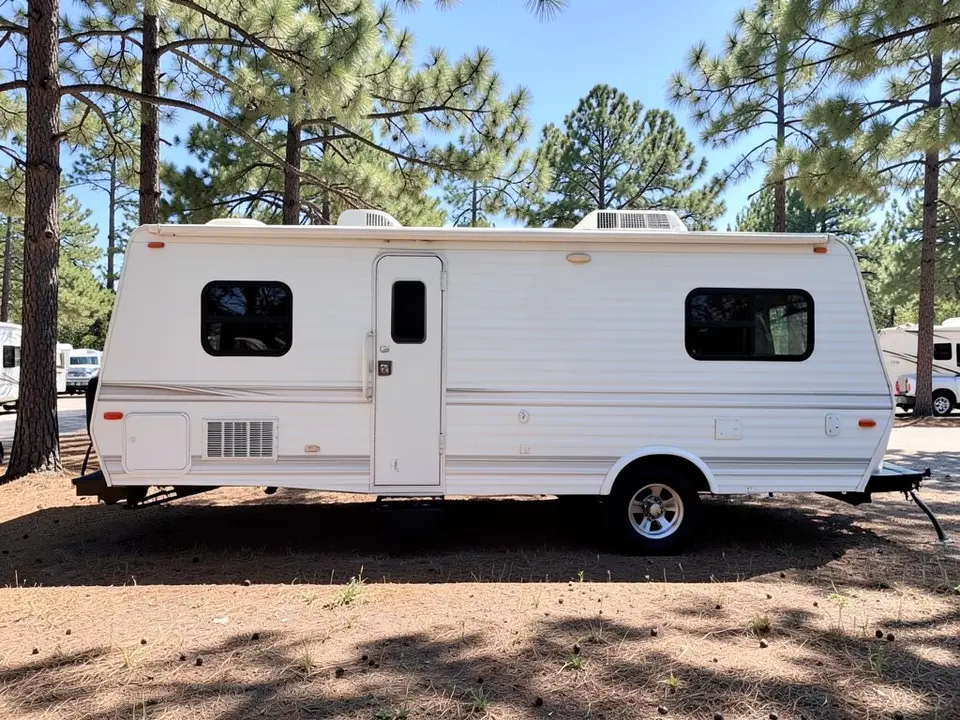
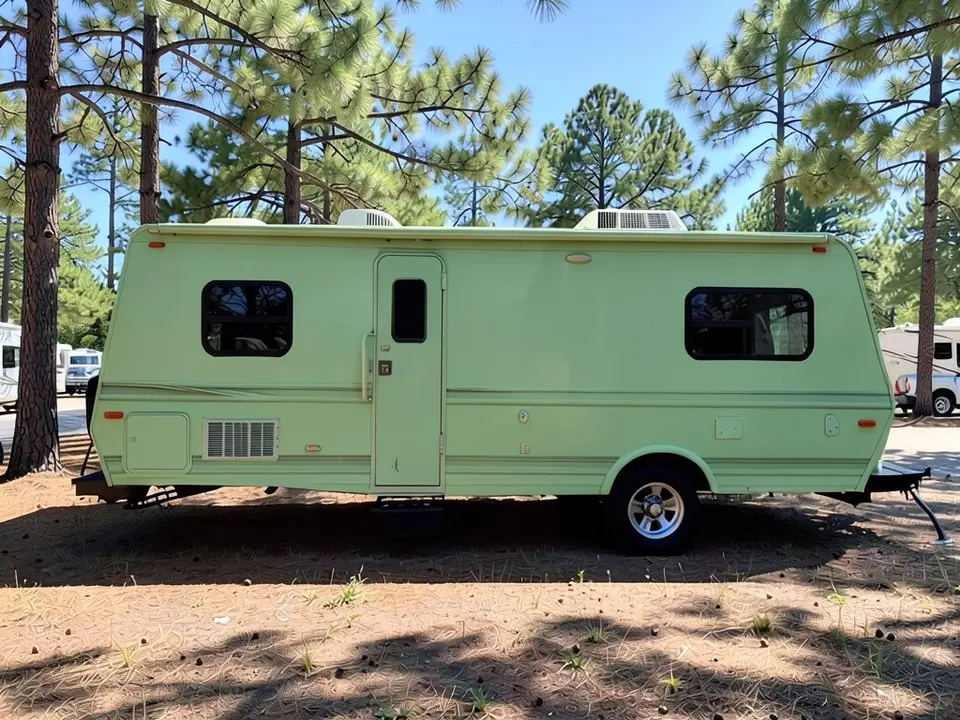
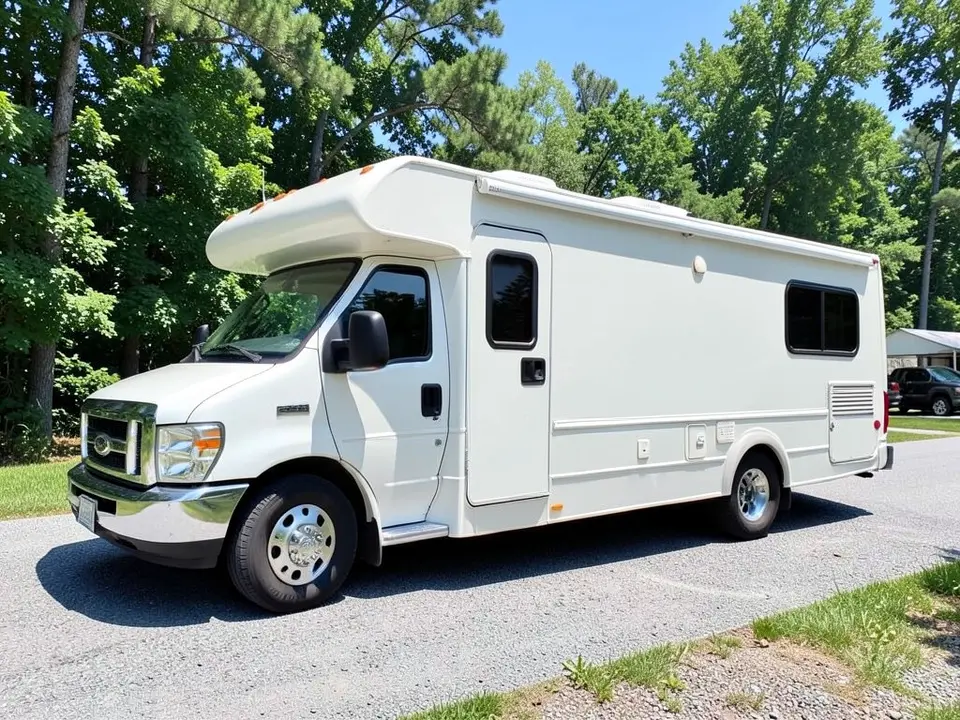
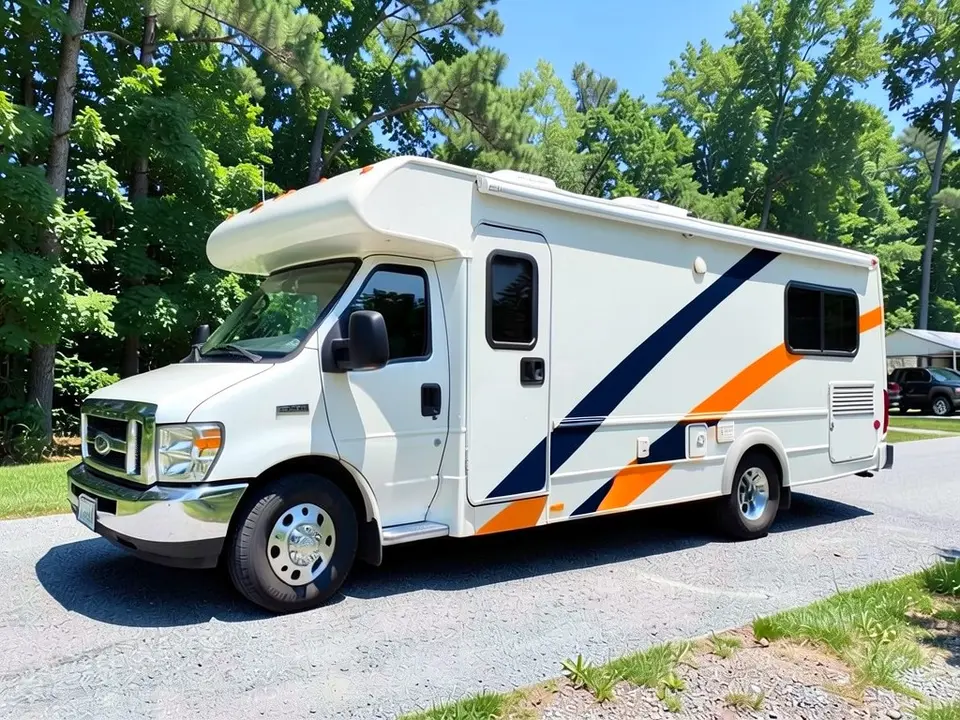
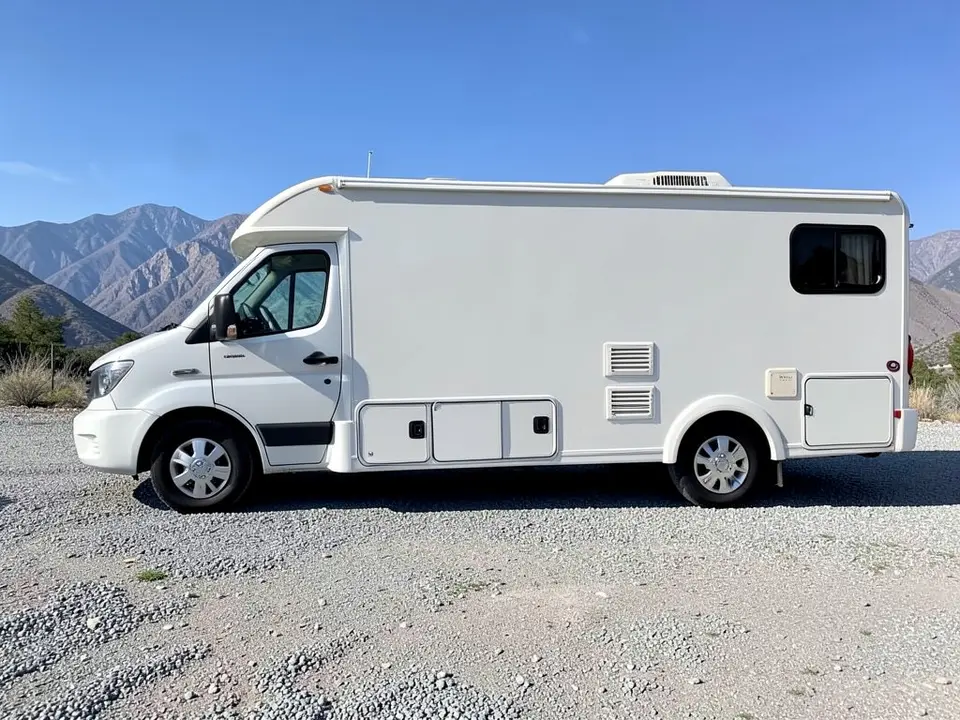
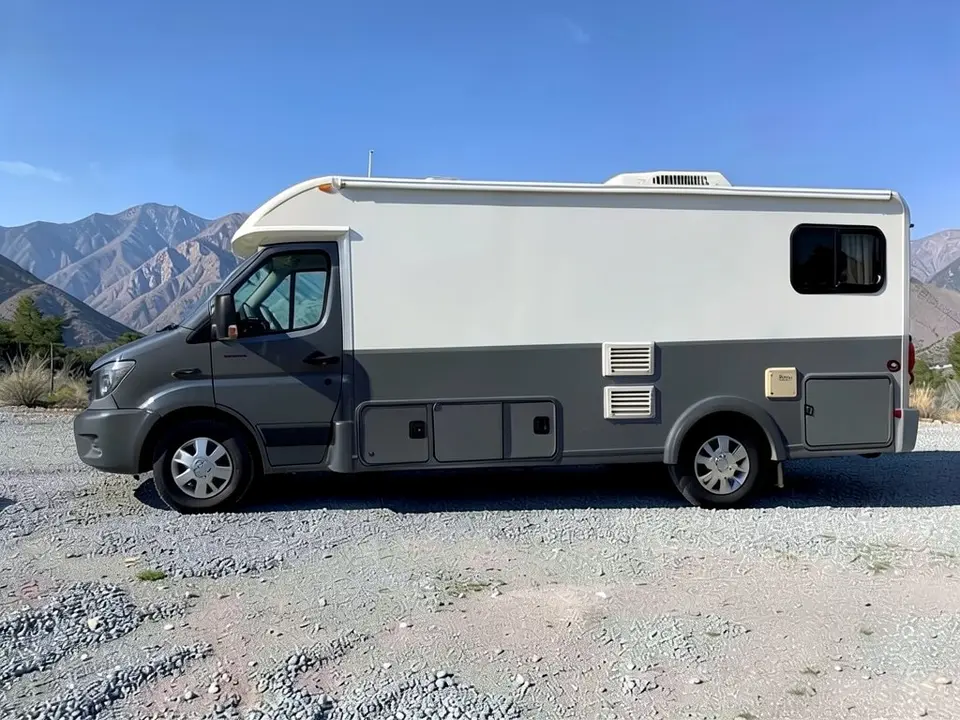
All before and after images are AI-drawn samples from our own image model, not photos of real customer RVs. The rigs are plain generic RVs with no lettering or logos. Under each pair we list which parts of the request worked, which did not, and any change we never asked for. None of them show a mural or text, because the AI cannot do those reliably.
See a wrap color on your own RV first
An RV has a lot of flat side to cover, so the color or stripe you pick shows from a long way off. WheelAI redraws your own photo with the look you describe, so you can compare a few options on the same RV before you ask installers for quotes.
The example rigs below are AI-drawn generic stand-ins, not photos of real customer RVs or a specific make.
Murals and text are not what this is for
Many RV wrap ideas are big murals: scenery on all four sides, a route map, a business logo. An image model is unreliable with these. Detailed artwork gets redrawn differently each time, and any text or logo usually comes out wrong.
So this page sticks to what the AI does well: a base color, a simple stripe or a two-tone split. Settle that first, then hand the real artwork to a designer.
How to preview an RV wrap
There is no special RV mode. The Modifications tool edits any vehicle photo, and its Custom Vision mode takes your own wording.
- 1
Take the photo
Stand square to the side of the RV in daylight, far enough back to fit the whole rig with space around it.
- 2
Open the Modifications tool
Upload your photo and switch to Custom Vision.
- 3
Name the look and what stays
In the Modification Goals box, describe one simple look, such as a solid color, a stripe or a two-tone split, and list what must stay the same: windows, door, wheels, tires, awning, background and camera angle.
- 4
Compare and refine
Look at the result next to your original. Try one look at a time on the same photo.
Looks we compared
Solid color
On a white travel trailer we asked for sage green. It came out a lighter, brighter mint green than sage, with the gray decal stripe still showing along the lower side. Name a darker or grayer shade if you want a muted color.
Diagonal stripe
On a Class C motorhome it drew two diagonal bands, dark blue and orange, across the entry door and the side panel. They are broken into segments and do not line up the way a designed swoosh would.
Two-tone color block
On a van-based motorhome it made the lower half charcoal and kept the upper half white, but it also darkened the cab and front end, and it did not draw the thin dividing line.
Before you book an installer
- Decide whether you want a full wrap, a partial wrap or only graphics, and ask installers to quote each. Get several quotes and look at examples of their past work.
- Ask for a physical sample of the exact film and look at it outdoors.
- Ask how awnings, vents, door seams, rivets and the roof are handled.
- Have a designer prepare any mural, logo or lettering as proper artwork; the render does not do this.
- Check any insurer, campground or local rules on changing the color or adding graphics.
Three Modification Goals to paste
We used these requests for the examples. Copy one into Modification Goals, swap the colors and background words for your own, and delete anything that does not apply.
- Change ONLY the exterior color: wrap the whole trailer body in a solid sage green vinyl instead of white; keep the windows, door, wheels, tires, hitch, trees, ground and the camera angle exactly the same
- Change ONLY the exterior: add a bold diagonal swoosh stripe in dark blue and orange along the side of the motorhome body, keep the rest white; keep the windows, door, wheels, tires, trees, ground and the camera angle exactly the same
- Change ONLY the exterior: wrap the lower half of the motorhome body in charcoal gray vinyl and keep the upper half white, with a thin color-block line between them; keep the windows, windshield, wheels, tires, gravel, mountains and the camera angle exactly the same
What the AI does well and where it slips
Whole-side color changes usually come out well, and the windows, wheels, tires and surroundings mostly stay put. Shades are approximate (our sage came out mint), stripes are drawn loosely, a two-tone request can spill onto the cab, and the ground looks different after an edit. Murals, logos and lettering are not reliable, so treat this page as a color and layout test. If a render misses, rerun it with shorter, plainer wording.
Frequently asked questions
Is there a free RV wrap visualizer that uses my own RV photo?
Yes. Sign in with email or Google, upload a side photo of your RV, camper or travel trailer, and describe the color or stripe you want in the Modification Goals box. Most new accounts get 5 free credits that last 30 days, and a standard render uses 1 credit. Free renders carry a WheelAI watermark. It edits your own picture rather than a stock RV.
Can it draw a mural, my logo or lettering on the RV?
No, not reliably. Image models draw large murals, text and logos unreliably, and the lettering is often wrong. This page is for body color, stripes and color blocks, and our examples have no lettering. Use the render to settle on a base look, then give a designer or print shop the real artwork to lay out.
Which RV looks can I try?
A solid color, a stripe or a two-tone color block. Our examples show a solid green trailer, a diagonal stripe on a Class C motorhome, and a charcoal lower half on a van-based motorhome. Mike Wendland's RVlifestyle article "Yay or Nay? Are Custom RV Wrap Designs Worth It?" (May 11, 2023) also lists photo wraps, themed designs and business advertising, which we do not recommend trying here because they need real artwork.
Should I wrap the whole RV or only part of it?
That is a question for your installer. The same RVlifestyle article describes full wraps, section wraps and small graphics, presents a partial wrap as a lower-cost option, and says that if the original paint is in excellent shape you might wrap only part of the vehicle. It also advises getting quotes from several installers and checking their past work. A render can help you compare a full look with a partial one on your own photo.
Does it work on any RV or trailer?
It edits the vehicle in your photo and never asks for a make or model, so it should work on motorhomes, camper vans, travel trailers and fifth wheels. Our examples are AI-drawn generic rigs, so we have not tested a specific make. A sharp daylight photo of the whole rig from the side matters more than the model.
What if the AI changes something I did not ask for?
It can. The image model redraws the whole photo. In our examples the windows, wheels and tires stayed as asked, but in the two-tone example the cab and front end turned gray too, and the ground looked different after edits. Write what must stay the same, compare the result with your original, and rerun if a part changed.
Does the render show cost, install time or how long a wrap lasts?
No. It shows a look only. A large rig needs a lot of film and labor, so ask for written quotes for your own RV. The render gives no price, no install time and no advice on how the film wears. Check local rules and any campground or insurer requirements if you change the color or add graphics.
How is this different from the van wrap and pickup truck wrap pages?
Those pages are about vans and pickups. This one is about RVs, campers and trailers, which have long flat sides, awnings, vents and a roof. The tool is the same; only the Modification Goals wording differs.
Ready to try a look on your RV?
Compare a solid color, a stripe and a two-tone split on one photo, then give your favorite to an installer or designer for real artwork and a quote.
Preview a wrap on my RVAlso try: Van Wrap Visualizer · Pickup Truck Wrap Visualizer · SUV Wrap Visualizer · Car Wrap Visualizer · Roof Wrap Visualizer