GMC Sierra Visualizer for a Photo of Your Own Truck
Upload a photo of your own Sierra, describe the wheels, tires, lift, blackout trim or bumper you have in mind, and see the idea drawn onto your truck before you order parts.
Sign in with email or Google to render. Most new accounts get 5 free credits (valid 30 days); a standard render uses 1 credit. Free renders carry a WheelAI watermark.
 BeforeAfter
Before and after examples
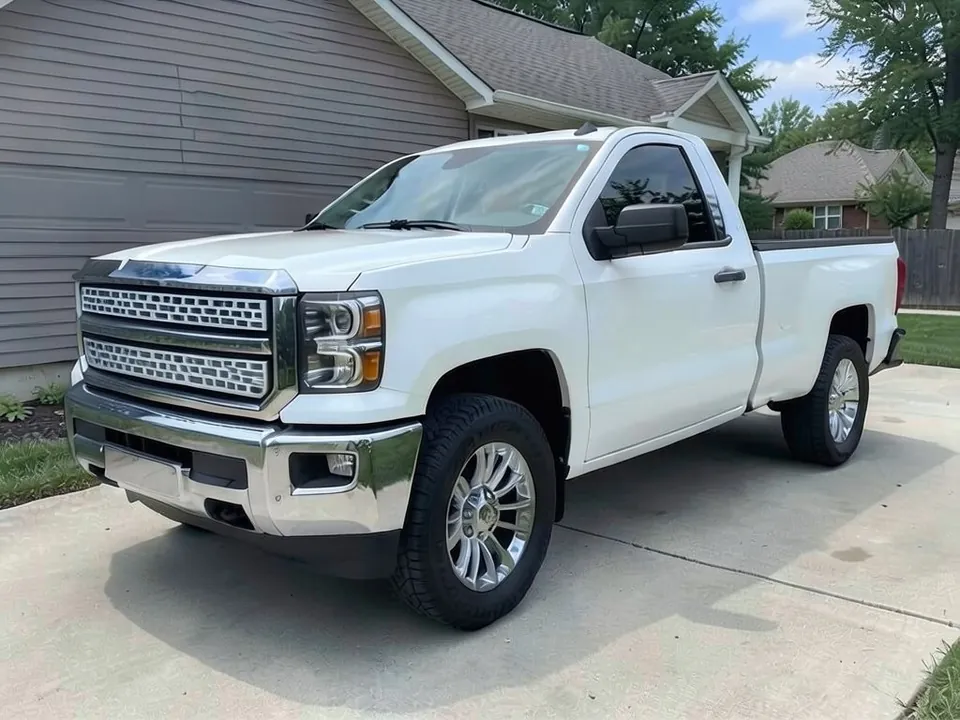
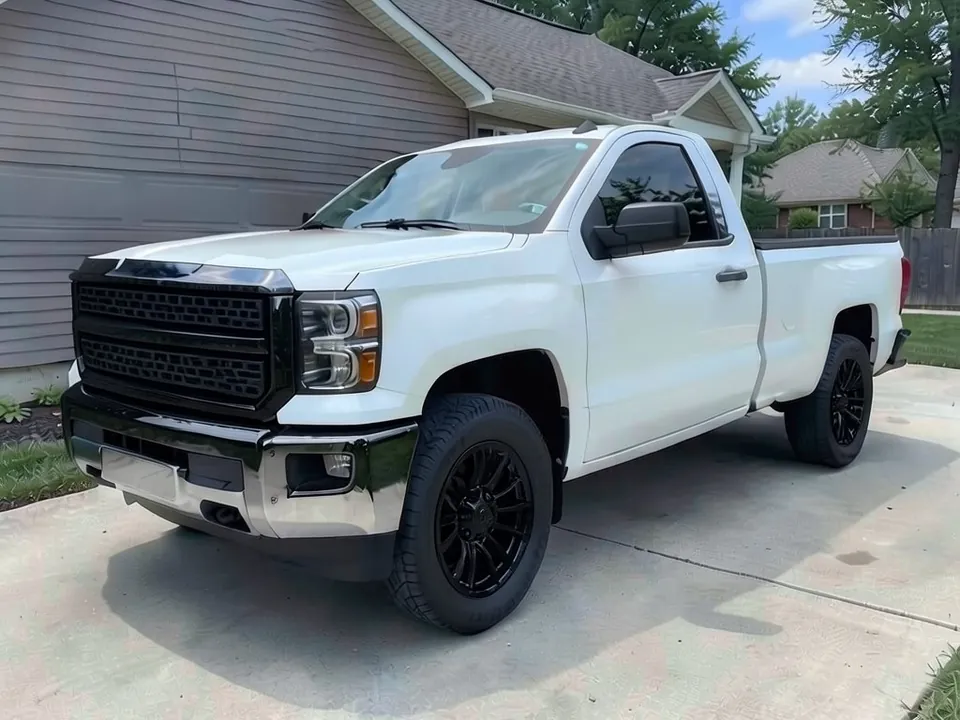
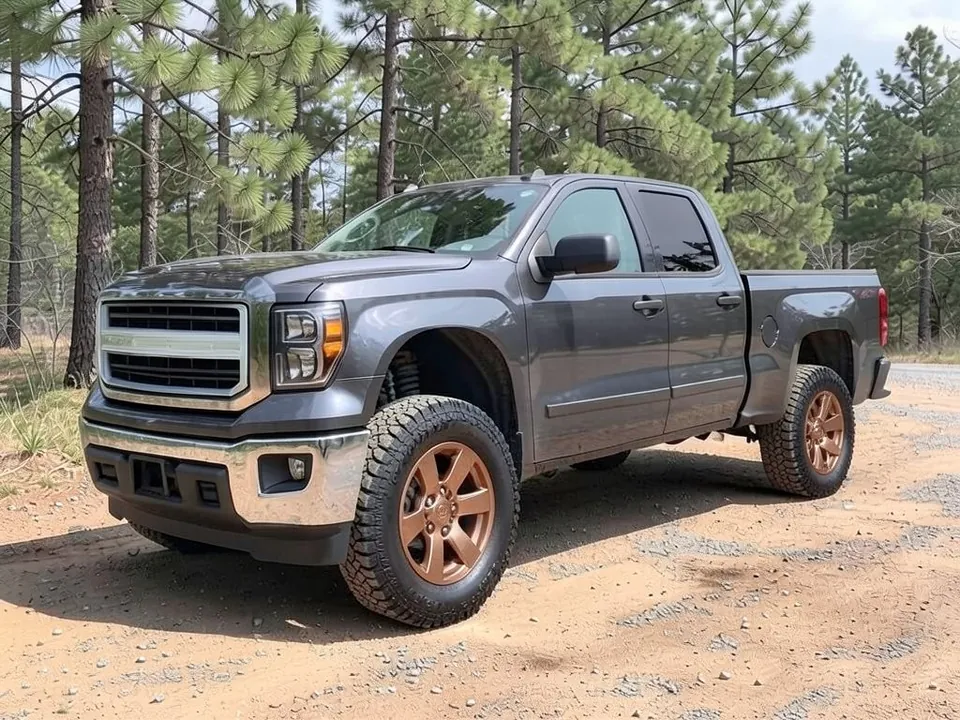
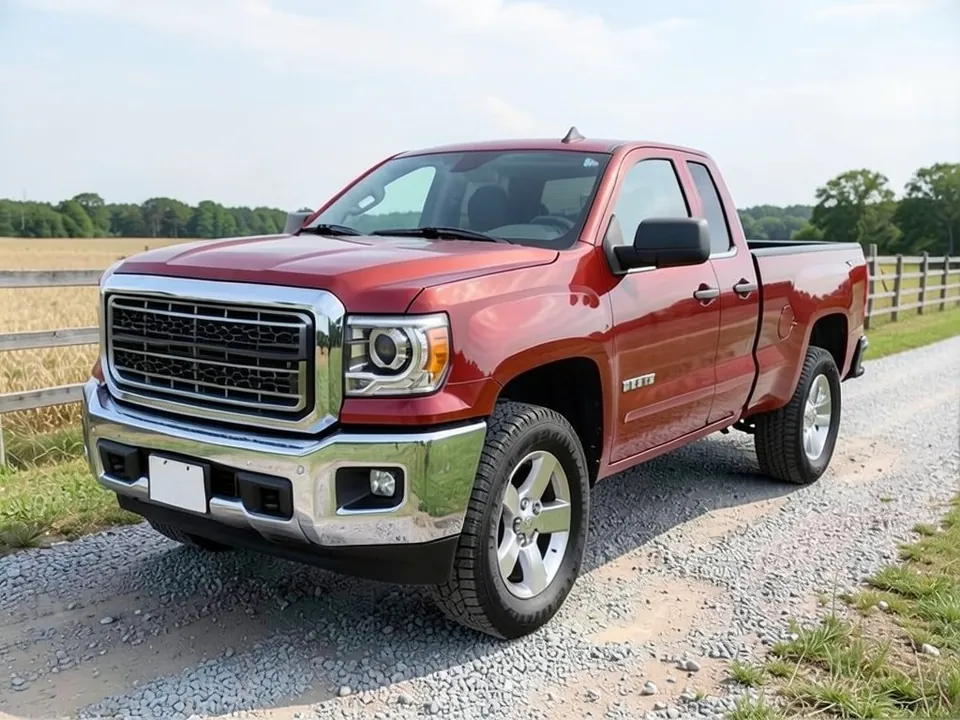
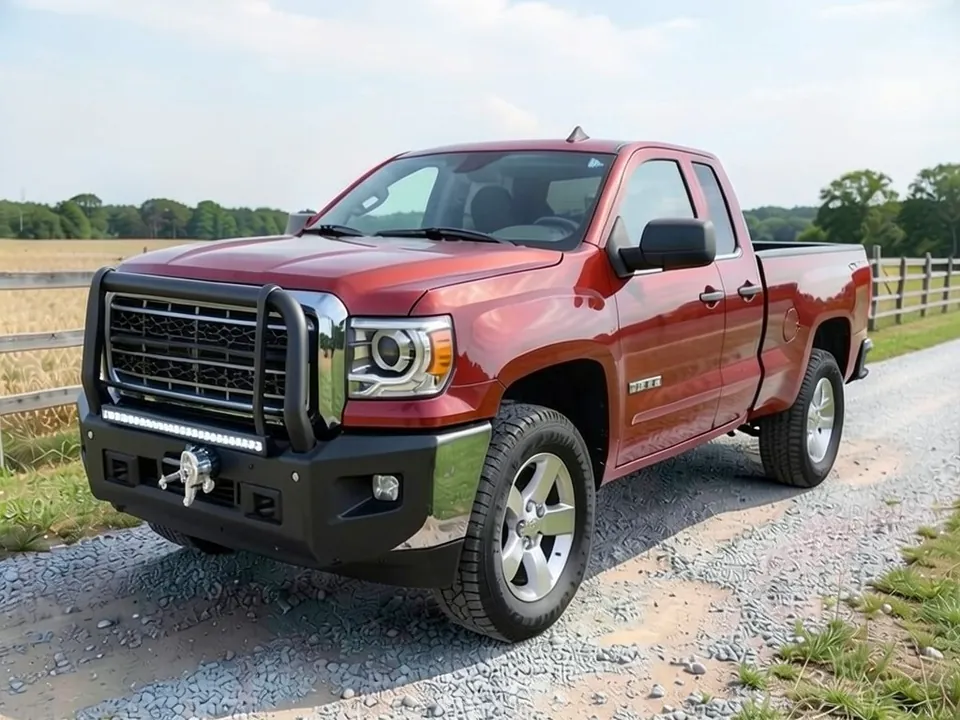
Each pair shows a truck photo and the same photo after one Modification Goals request. Pairs one and three are the first run. For pair two, the first run barely lifted the truck, so we reworded the lift request, ran it twice and kept the cleaner of the two. The exact request is printed under each pair.
BeforeAfter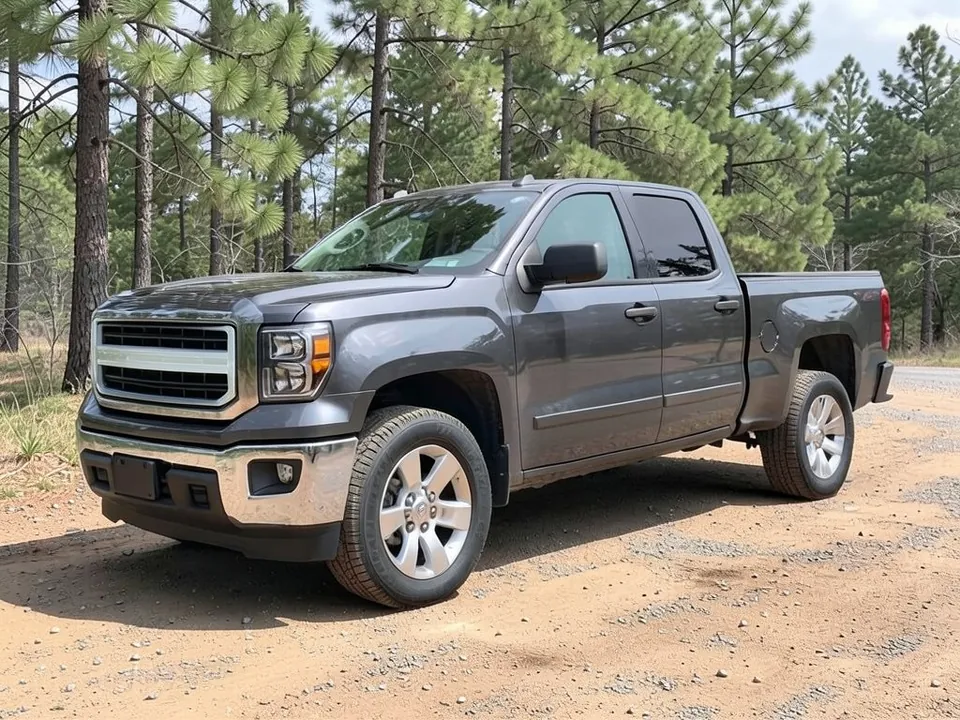
 BeforeAfter
 BeforeAfter
All example images on this page are AI-generated samples made with our own image model, not photos of real customer trucks. They were made with 4 processing steps, which is more than the live tool uses (2), so a render in the tool may come out rougher. The trucks are unbadged Sierra-style stand-ins, not real GMC trucks. The AI drew brand-like emblems on its first drafts of the before images, and we removed them with extra edit requests before making the afters. Small marks on the doors are unreadable AI artifacts, not model names.
Your own Sierra, not a catalog picture
Retailer wheel visualizers usually start from a stock picture of a truck in one color and one angle. WheelAI edits the photo you upload, so a new wheel, a lift or a blacked-out grille is drawn on your actual Sierra, with your paint, your trim and the parts you already have.
WheelAI is an independent tool and is not affiliated with or endorsed by GMC or General Motors. The Sierra name is used only to say which truck this page is about.
How to preview mods on your Sierra
There is no separate Sierra button. You use the Modifications tool and either pick options from its lists or type the change in plain words.
- 1
Take a front three-quarter photo
Shoot the whole truck in daylight from a front corner so the grille, one side and the wheels are all in the frame.
- 2
Open the Modifications tool and upload it
Go to the Modifications tool and upload your photo.
- 3
Pick a mode
Off-Road Modifications has lists for Off-Road Style, Lift Height, Tire & Wheel Setup and Off-Road Accessories. Exterior Modifications has a Wheel Upgrade list. For exact requests, switch to Custom Vision and type what should change, and what must stay, in the Modification Goals box.
- 4
Render, compare and adjust
Generate the image and compare it with your photo. If a part was missed or drawn differently, run it again with clearer words or ask for that part on its own.
Popular Sierra builds to try
Blackout
The Sierra wears a big grille, and chrome on the grille, bumper and wheels is a large part of its look. Ask for a gloss or satin black grille and black wheels, then compare it with the stock chrome. For more on dechroming, see the Chrome Delete Visualizer page.
Leveling kit or lift
Many Sierra 1500 owners first level the front so it matches the rear. Taller lifts change the look much more. The AI draws a look, not a measured height, and a lift written only in inches often barely changes the stance, so describe a visible gap between the tire and the wheel arch.
Wheels and tires
Large black or bronze wheels with all-terrain tires are a common look on trims like the AT4. Try two finishes on the same photo before you choose.
Steel bumper
A steel bumper with a winch changes the face of the truck more than any other part. In our test the AI added a grille guard we did not ask for, so say clearly whether you want a flat bumper or one with a hoop.
Sierra 1500, HD, Denali and AT4
The tool edits whatever truck is in the photo, so it does not need to know your year, cab, bed length or trim. It works the same on a Sierra 1500 or a 2500HD, a Denali with its chrome grille or an AT4 with off-road parts. Chevrolet sells the Silverado as a close sibling of the Sierra; if that is your truck, the Silverado Visualizer page shows tests on it.
A look preview, not a fitment check
The render answers one question: do I like how this looks on my Sierra? It cannot check offset, backspacing, bolt pattern, tire clearance or whether a part fits your model year, and it does not show real brand products or prices.
Check fitment with a shop before you buy. Rules about lift height, tire coverage and auxiliary lights differ from place to place, so ask a shop or your local authority about those too.
Three Modification Goals you can paste
These are the exact texts behind the examples above. Paste one into the Modification Goals box, swap the color and background words for what is in your photo, and drop any part you do not want.
- Replace the chrome wheels with large 22 inch gloss black multi-spoke wheels with low-profile tires, and make the chrome grille gloss black. Keep the white paint, headlights, bumper, ride height, driveway, house and camera angle exactly the same.
- Raise the whole truck body much higher on a tall suspension lift: the doors, bumpers and bed must sit clearly higher above the ground than in the photo, with a big empty gap of open space between the top of each tire and the wheel arch above it, and the suspension parts visible under the body. Fit much bigger 35 inch all-terrain tires on satin bronze six-spoke wheels. Keep the dark gray paint, grille, headlights, bumper, pine trees, dirt ground and camera angle exactly the same.
- Replace the chrome front bumper with a flat black steel off-road bumper with a winch in the middle and a slim LED light bar built into it. Keep the red paint, grille, headlights, hood, silver wheels, tires, ride height, fence, fields and camera angle exactly the same.
Frequently asked questions
How can I see new wheels on my GMC Sierra before I buy them?
Take a clear side or front three-quarter photo of your truck, upload it to the Modifications tool and describe the wheel you want, for example 22 inch gloss black multi-spoke or satin bronze six-spoke. The render draws that style on your own Sierra, so you see it against your paint and trim instead of a stock picture.
What would a lift or leveling kit look like on my Sierra?
Ask for a visible gap between the top of each tire and the wheel arch, plus taller tires if you want them. In our test that gave a moderately taller stance. The result is a look, not a measured lift height, so use it to choose a direction and then talk numbers with a shop.
Can I black out the chrome on my Sierra Denali?
Yes, as a preview. Ask for the grille, bumper, mirror caps or wheels in gloss or satin black, and name the parts that should stay chrome. In our test the grille and wheels turned black, and part of the bumper turned black too without being asked.
What wheel size fits my Sierra?
This tool cannot tell you. A photo edit does not check wheel offset, bolt pattern, tire clearance or whether a lift or trimming is needed. Ask a tire shop or the part maker before you buy.
Does it work on a Sierra HD, AT4 or an older Sierra?
Yes. The tool edits whatever truck is in the photo, so it does not need your generation, trim or cab size. A clear daylight photo with the whole truck in frame matters more than the model year.
Is WheelAI affiliated with GMC?
No. WheelAI is an independent tool and is not affiliated with, endorsed by or sponsored by GMC or General Motors. We use the Sierra name only to say which truck this page is about.
Is the Sierra visualizer free?
You need to sign in with your email or a Google account. Most new accounts get 5 free credits that last 30 days, and a standard render uses 1 credit, so you can try up to 5 builds before deciding whether to buy more. Free renders carry a WheelAI watermark; an active paid plan removes it.
Ready to plan your Sierra build?
Try two or three wheel, lift and trim ideas on your own photo, then take the one you like to a shop to check fitment.
Preview mods on my SierraAlso try: Silverado Visualizer · AI Truck Builder · Lift Kit Visualizer · Truck Wheel Visualizer · Chrome Delete Visualizer · Truck Bumper Visualizer · Bed Rack Visualizer