Wheel Offset Visualizer: See Flush and Poked Wheels on Your Car
Learn how to read and measure wheel offset, then upload a photo of your own car and preview a more flush or poked stance. It is a visual preview made by AI, not a fitment calculator, and it does not check clearance or rubbing.
Sign in with email or Google to render. Most new accounts get 5 free credits (valid 30 days); a standard render uses 1 credit. Free renders carry a WheelAI watermark.
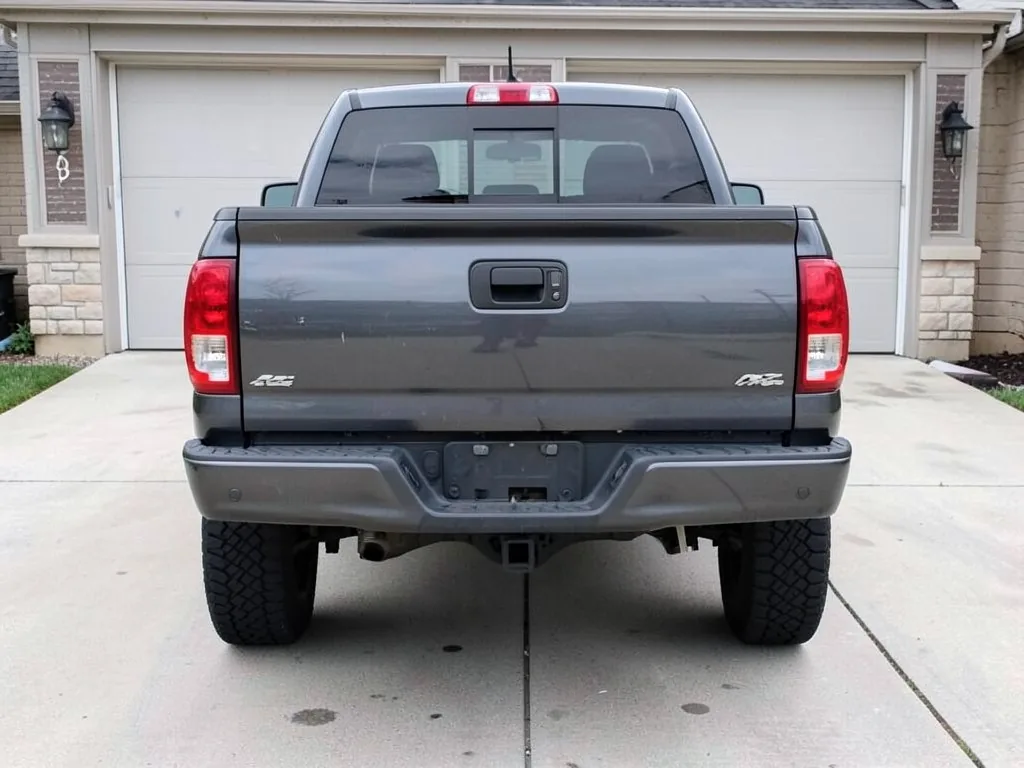
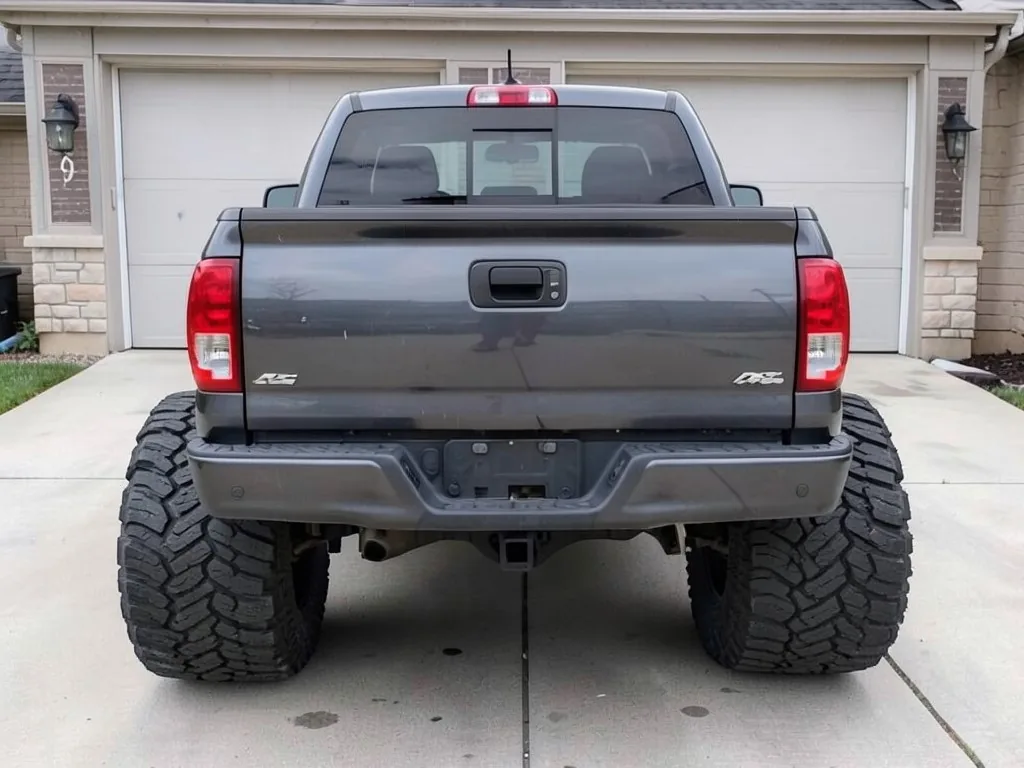 BeforeAfter
Before and after examples
Each pair shows an original photo of a stand-in vehicle seen from behind, and the same photo after asking for the wheels to move outward. Side photos showed almost no offset change, so we used rear photos. For every pair we ran up to three requests, changing the wording, and kept the one that showed the change; the other runs showed little or no change.
BeforeAfter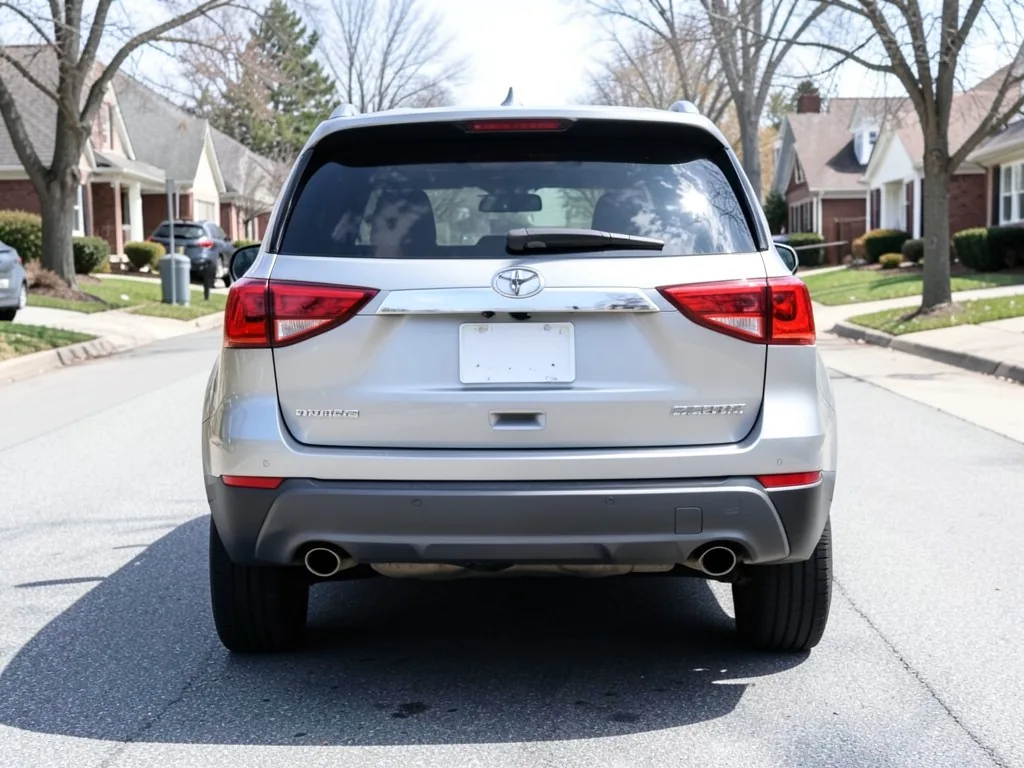
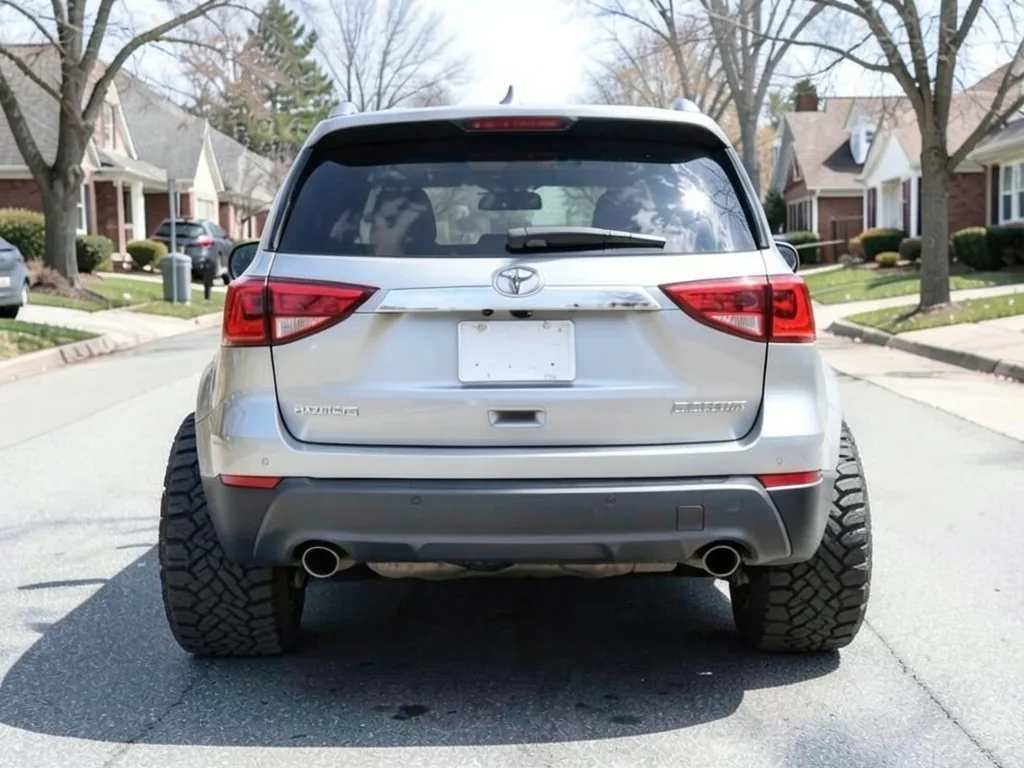 BeforeAfter
All example images on this page are AI-generated samples made with our own image model, not photos of real customer vehicles. They were made with 4 processing steps, which is more than the live tool uses (2), so a render in the tool may come out rougher. The offsets shown are not measured values and the examples do not show whether the setups would fit.
What wheel offset means
Every wheel has a mounting pad, the flat face that bolts against the hub. Offset is the distance in millimeters between that pad and the center line of the wheel, which is the line halfway between the inner lip and the outer lip. It decides how far the wheel sits in or out of the fender.
There are three cases. Positive offset means the pad is on the outer side of the center line, which pulls the wheel further into the arch. Most front-wheel-drive cars and many modern cars use positive offset. Zero offset means the pad is exactly on the center line. Negative offset means the pad sits on the inner side of the center line, which pushes the wheel outward. Many older rear-drive cars, trucks and "deep dish" aftermarket wheels use low or negative offsets.
How to determine wheel offset
The quickest way is to read it. Look at the back of the wheel, on a spoke or on the inner barrel, for a stamp such as "7.5J x 17 H2 ET35". The number after ET is the offset in millimeters. If the stamp is worn, painted over or missing, measure it.
- 1
Take the wheel off and lay it face down
Rest the wheel on the ground with the front face down, so the back of the wheel is facing up and the mounting pad is easy to see.
- 2
Measure the overall width
Lay a straight edge across the back of the wheel from lip to lip and measure the width from the inside faces of both lips. The measured width is usually about one inch more than the nominal size on the stamp, so a "8-inch" wheel measures roughly 9 inches.
- 3
Measure the backspacing
With the straight edge still across the inner lip, measure down to the mounting pad. That distance is the backspacing.
- 4
Apply the formula
Offset = backspacing minus half of the overall width. For example, a wheel that is 9.5 inches wide with 5.5 inches of backspacing has 5.5 minus 4.75, which is 0.75 inch. Times 25.4 gives about +19 mm. A positive answer is positive offset, zero is zero offset and a negative answer is negative offset.
To go the other way, backspacing equals half the width plus the offset. Keep the units the same, and remember that 1 inch is 25.4 mm. A tape measure gives a good estimate, but a wheel shop or the maker's spec sheet gives the exact number.
Flush, poke and tucked: what the words mean
Car and truck owners describe a stance by where the outer edge of the tire sits compared with the edge of the fender.
Tucked
The wheel and tire sit inside the fender, with a visible gap between the tire and the edge of the body. This is the factory look on most cars, and it comes from a higher positive offset or a narrower wheel.
Flush
The outer face of the tire lines up with the fender edge, so the body and the tire make one clean line. Many people aim for this look. It usually needs a wider wheel, a lower offset, a spacer or a mix of them.
Poke
The tire or wheel sticks out past the fender. A little poke is a common look on tuned cars and trucks, but a lot of it can rub, throw mud and be a problem with the law where you live.
How offset and width change the stance
Two numbers move the wheel: offset and width. Lowering the offset by 10 mm moves the whole wheel about 10 mm outward, so both the outside and the inner clearance change. Making a wheel one inch wider at the same offset adds about 12.7 mm on the outside and about 12.7 mm on the inside, because the extra width is split in half between the two sides.
That is why a wider wheel at the same offset can rub on the suspension on the inside and poke out on the outside at the same time. A lower offset to fix the inside moves the whole wheel outward and makes the poke worse. Tire width matters too, since a wider tire adds to both sides.
How to preview a stance on your car
- 1
Take a straight rear or front photo
Stand a few steps behind or in front of your car, centered, so both wheels on that axle and the fender edges are in the frame. A side photo does not show offset, because poke is easiest to see head on.
- 2
Open the Modifications tool and upload it
Modifications is our existing tool for visual upgrades. Upload your photo and switch to "Custom Vision".
- 3
Describe the stance
Type what you want, for example "push both rear wheels outward so the tires sit flush with the fenders, change nothing else". You can also ask for a bit of poke.
- 4
Render and compare
Generate the image and compare it with your original. Try a second request with more or less poke to see what you like, and then check the actual numbers with a calculator or a shop.
An honest note: a preview is not a fitment check
A picture cannot tell you whether a wheel fits. Fit depends on your exact car, the bolt pattern, the center bore, the brakes, the suspension, the tire size, the camber and the fender shape. This tool does not check clearance and it cannot tell you whether a setup will rub, so use it for the look only.
A simple order of work: first learn your current offset and width using the steps above, then use a wheel offset calculator to compare the setup you like with what you have now, then use this tool to see how the stance might look, and finally ask a wheel or tire shop to confirm.
Frequently asked questions
How do I determine my wheel offset?
Look for the number after "ET" stamped on the wheel, for example ET35 means a +35 mm offset. It is usually on the back of a spoke, on the inner barrel or near the hub. If it is worn off, measure it: take the overall width of the wheel (lip to lip) and the backspacing (mounting pad to the inner lip), then use offset = backspacing minus half the width.
What does ET mean on a wheel?
ET is short for the German word Einpresstiefe, which means "press-in depth". It is the offset in millimeters. ET35 is +35 mm, ET0 is zero offset and ET-12 is a negative offset of 12 mm.
Does a lower offset push the wheel out or in?
Out. A lower number (or a more negative one) moves the wheel and tire further toward the fender. A higher positive offset pulls them further in toward the suspension. Going from ET45 to ET30 moves the wheel about 15 mm outward.
Can this tool tell me whether a wheel offset will fit or rub?
No. This is an AI photo edit, so it only gives a visual preview of a stance. It does not check clearance to the fender, the brakes, the suspension or the inner liner, and it does not know your tire size, camber or suspension. Use an offset calculator and ask a wheel or tire shop before you buy.
Will the render show the exact offset I ask for?
No. The AI draws the look of a wider or more flush stance, not a measured number of millimeters. In our own tests the result depended a lot on the camera angle: a side photo showed almost no change in offset, and a straight rear photo showed it far better. Even then some requests changed nothing, so we ran several and kept the ones that showed the change.
Is it free to try?
You need to sign in with your email or a Google account. Most new accounts get 5 free credits that last 30 days, and a standard render uses 1 credit, so you can preview up to 5 stances before deciding whether to buy more. Free renders carry a WheelAI watermark; an active paid plan removes it.
What is the difference between offset and backspacing?
Both describe where the mounting pad sits in the wheel. Backspacing is the distance from the pad to the inner edge of the wheel, usually in inches. Offset is the distance from the pad to the center line of the wheel, in millimeters. If you know the width, you can convert one into the other.
Do wheel spacers change offset?
Yes. A wheel spacer pushes the wheel outward by its thickness, so a 10 mm spacer acts like lowering the offset by 10 mm. Spacers are covered on our wheel spacers visualizer page.
Ready to see a different stance?
Upload one straight rear or front photo and compare a flush look with a bit of poke before you buy wheels or spacers. Check the real numbers with a shop.
See a stance on my carAlso try: Wheel Spacers Visualizer · Rim Visualizer · Rim Size Visualizer · Lowered Truck Visualizer · Lift Kit Visualizer · Car Visualizers