Tire Visualizer: See New Tires on a Photo of Your Own Car
Upload a photo of your car, truck or SUV and preview all-terrain, mud-terrain or white letter tires, a taller sidewall, or a wheel and tire combination. Pick the look before you buy a set.
Sign in with email or Google to render. Most new accounts get 5 free credits (valid 30 days); a standard render uses 1 credit. Free renders carry a WheelAI watermark.
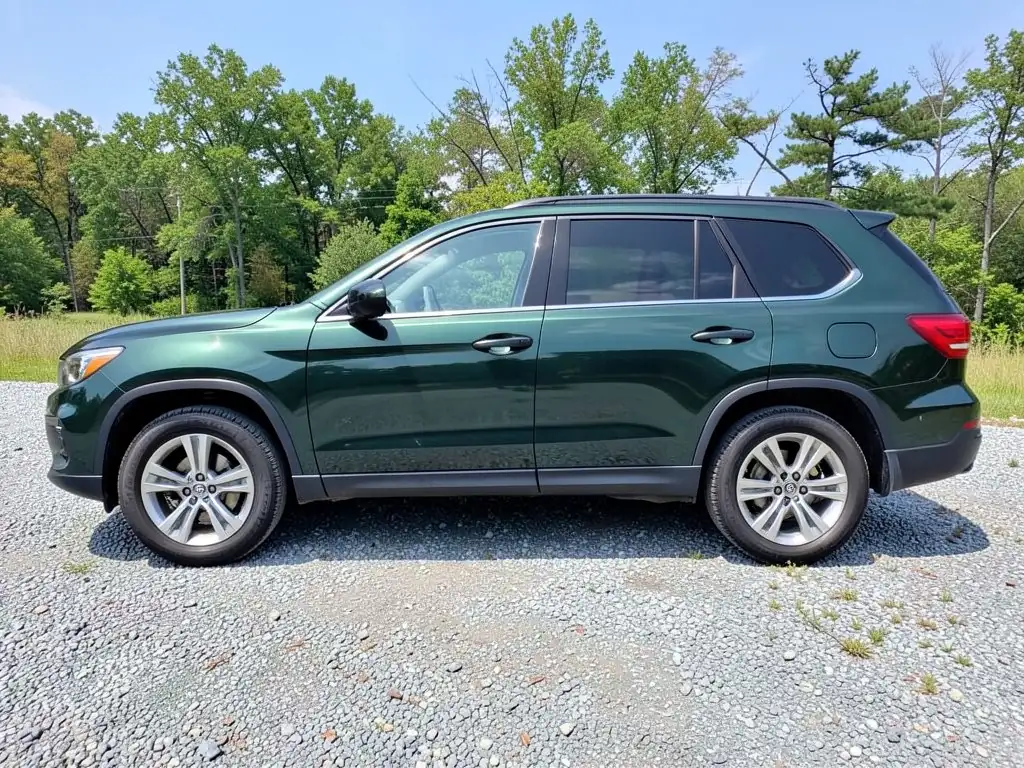
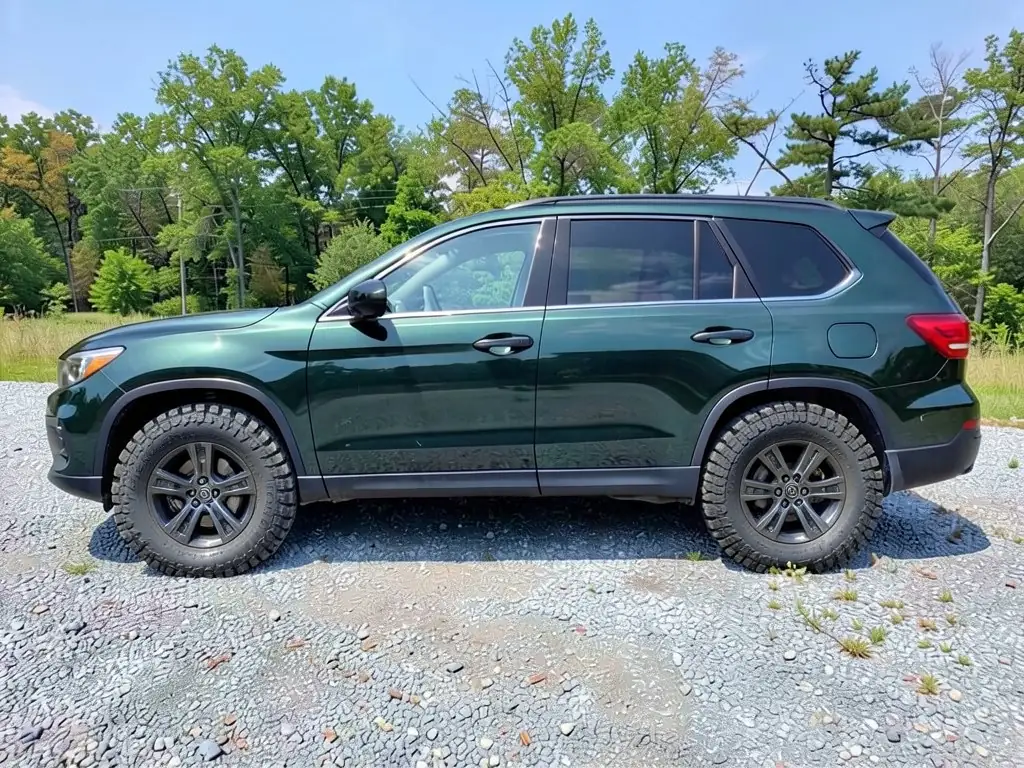 BeforeAfter
Before and after examples
Each pair shows an original side photo and the same photo after asking for different tires. Each request was run once, and we show that run.
BeforeAfter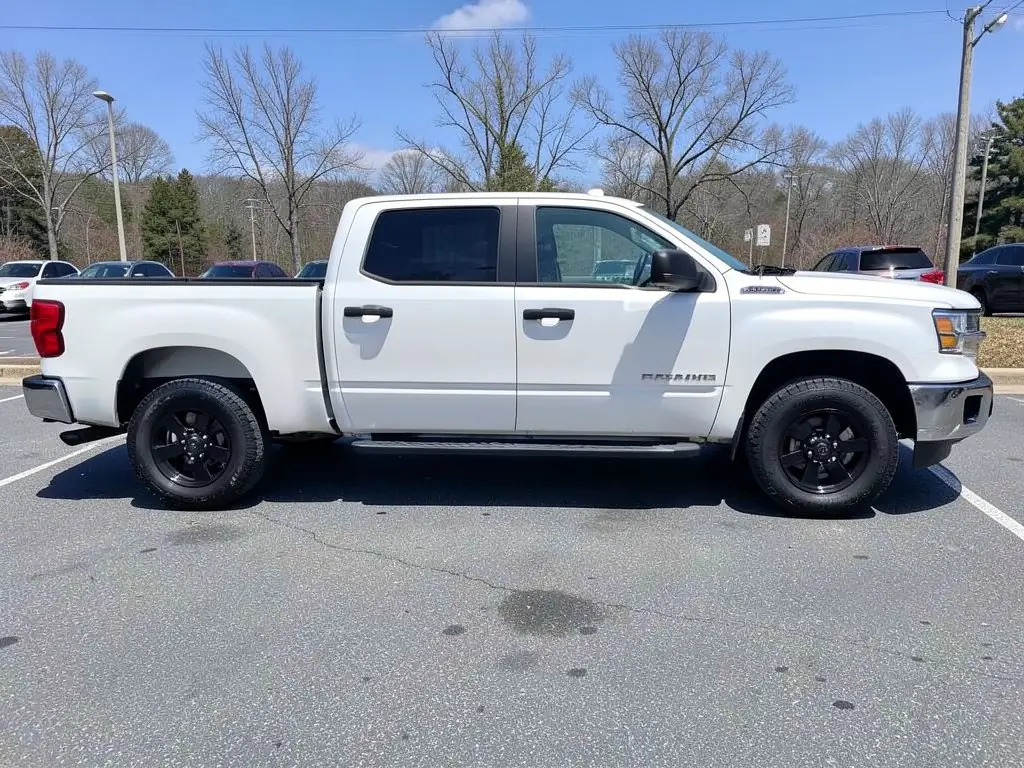
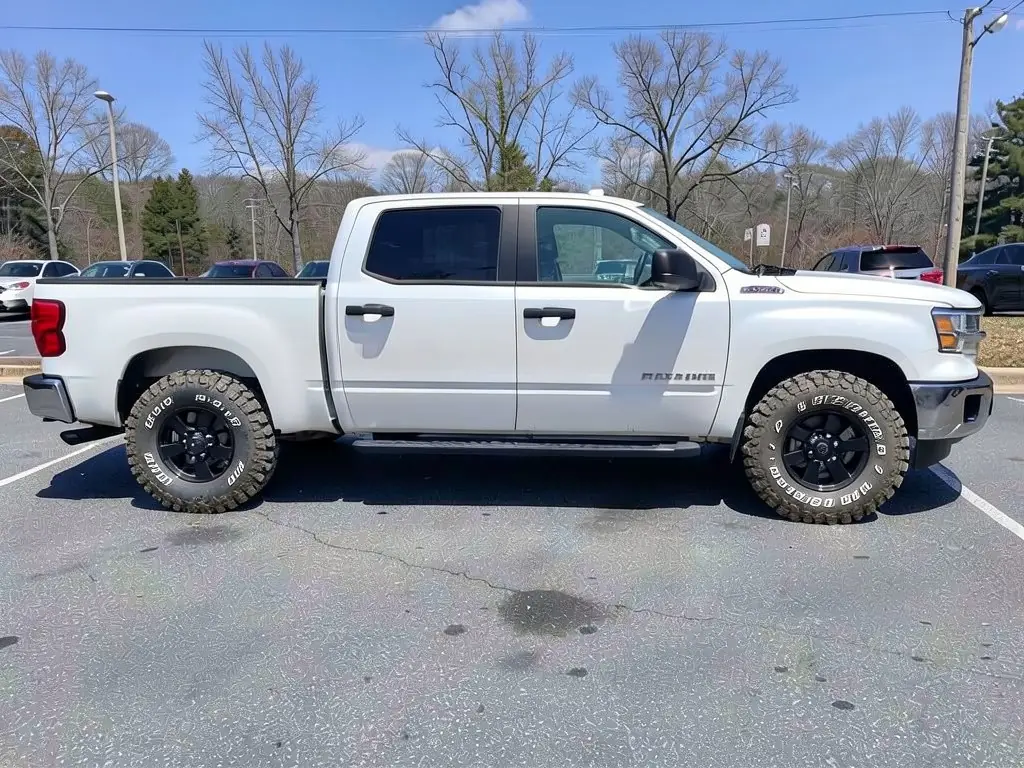 BeforeAfter
All example images on this page are AI-generated samples made with our own image model, not photos of real customer vehicles. They were made with 4 processing steps, which is more than the live tool uses (2), so a render in the tool may come out rougher. The tires shown are styles, not real tire models or sizes.
How to preview tires on your car
- 1
Take a side photo
Photograph your vehicle from the side in daylight so both tires and the gap between the tires and the fenders are clearly visible.
- 2
Open the Modifications tool and upload it
Modifications is our existing tool for visual upgrades. Upload your photo and switch to "Custom Vision" for a tire-only preview.
- 3
Describe the tires and what stays
Say the tire style and list what must not change, for example "replace the tires with chunky all-terrain tires with a thicker sidewall, keep the same wheels, paint, ride height and background".
- 4
Render and compare
Generate the image and compare it with your original. Then try a second style, such as a mud-terrain or a tire with white letters, and pick the one you like.
Tire styles you can preview
Most tire shopping starts with the look. These are the main styles, and what each is made for.
Highway and touring tires
Smooth, quiet tread with small grooves. They are the usual factory tire on cars and crossovers and work best on pavement.
All-terrain tires
A tread that mixes road comfort with grip on dirt, gravel and light snow, with chunkier blocks and a thicker sidewall than a street tire. A popular choice for SUVs and pickups.
Mud-terrain tires
The most aggressive tread, with big gaps between large blocks and lugs on the shoulders. They grip in mud and rocks, but they are louder on the road and wear faster.
White letter and outline letter tires
Raised white lettering on the sidewall for a retro or off-road look. It is a style, not a different type of tire.
Whitewall and redline tires
Classic looks from older cars: a white band or a thin red stripe on the sidewall.
Go deeper on one tire look
We have a page for each of the classic sidewall looks: white letter tires, redline tires and whitewall tires. To change the wheels as well, see the rim visualizer.
How to read a tire size and why it changes the look
A tire size such as 265/70R17 has three numbers. The first, 265, is the tire width in millimeters. The second, 70, is the aspect ratio: the sidewall height as a percent of the width. The last, 17, is the diameter of the wheel in inches that the tire fits.
The sidewall of a 265/70R17 is 70 percent of 265 mm, which is about 185 mm. Add the wheel diameter and two sidewalls and the whole tire is about 803 mm, or 31.6 inches, tall. A 245/65R17 comes to about 29.5 inches, so the taller tire is about 7 percent bigger. A taller sidewall makes a tire look chunkier, gives a softer ride and fills more of the wheel arch. A low sidewall on a bigger wheel looks sportier but rides harder.
Wheel and tire combinations
The tire and the wheel are judged together. Dark wheels with a tall all-terrain tire give a rugged look. A bigger wheel with a thin, low-profile tire gives a sporty look. A bright wheel with a white letter tire looks retro.
When you ask for a combination, name both, and say what must stay the same. If you want to change only the tires, say "keep the same wheels", or the AI may restyle the wheels too, as it did in one of our examples.
What a render cannot tell you
A render shows looks only. Before you buy tires, check these with a tire shop or the vehicle maker:
- Size and fit: the tire must match the wheel diameter and width and not rub on the fender, the liner or the suspension, especially when turning.
- Load and speed rating: the tire must carry the vehicle weight and match the speed rating the maker requires.
- Speedometer: a different overall diameter makes the speedometer read wrong, and a taller tire reads lower than the real speed.
- Fuel economy and noise: heavier, more aggressive tires usually cost mileage and add road noise.
- Season and weather: all-terrain and mud-terrain tires are not all rated for winter, so check for the three-peak mountain snowflake mark if you need that.
An honest note about AI renders
The images are concepts, not measurements. The AI may change the wheels, the tire size or the tread, and sidewall lettering often comes out garbled. If that happens, render again and be more specific. Then confirm the size and fitment with a tire shop.
Frequently asked questions
How does the tire visualizer work?
You upload a side photo of your car, truck or SUV and describe the tires you want, for example "chunky all-terrain tires with a thicker sidewall, keep the same wheels". Our AI image model redraws the tires on your photo and tries to keep the body, wheels and background the same, so you can compare it with your original.
Is it free to try?
You need to sign in with your email or a Google account. Most new accounts get 5 free credits that last 30 days, and a standard render uses 1 credit, so you can preview up to 5 tire or wheel and tire combinations before deciding whether to buy more. Free renders carry a WheelAI watermark; an active paid plan removes it.
Can I preview a wheel and tire combination together?
Yes. Name both in your request, for example "black 6-spoke wheels with all-terrain tires". The result is a style preview. It does not check whether that wheel and tire size fit your car.
Will the tire size I see fit my vehicle?
The tool cannot check fit. A bigger tire can rub on the fender or the suspension, and the right size depends on your wheel width, offset, suspension and any lift. Ask a tire shop before you buy, and check the load and speed rating too.
Does it show the exact tire size or brand I ask for?
No. The AI draws the style of a tire, such as the tread pattern and the sidewall height, but it does not know real tire models or measure sizes. Text on the sidewall is often garbled, as you can see in the white lettering on our mud-terrain example.
Can it show white letter, whitewall or redline tires?
Yes. We have separate pages for those looks, linked below on this page, and you can also ask for raised white letters in the same request as a new tire style.
What photo works best for tires?
A full side profile in daylight, taken from about wheel-center height, with both tires fully visible and the whole vehicle in the frame. Turn the front wheels straight and keep other cars and people out of the shot.
Can I see a bigger tire with a lift?
You can ask for it, but a much bigger tire often needs a lift or a different offset in real life, and the render may not show the height you ask for. Our lift kit visualizer is the better place to compare a lift with bigger tires.
Ready to see new tires on your car?
Upload one side photo and compare a street tire, an all-terrain and a mud-terrain on your own vehicle.
Preview tires on my carAlso try: White Letter Tires Visualizer · Redline Tires Visualizer · Whitewall Tire Visualizer · Rim Visualizer · Lift Kit Visualizer · Car Visualizers